Don't miss your chance to take the Fabric Data Engineer (DP-700) exam on us!
Learn moreNext up in the FabCon + SQLCon recap series: The roadmap for Microsoft SQL and Maximizing Developer experiences in Fabric. All sessions are available on-demand after the live show. Register now
Hello,
I want to display a particulart chart but I don't know if there is any visualization that can help me:
As you can see, I want to display the different categories of clientes according to the number of clients in each category. For example, category A may have 10 clients, whereas category E can have 50 clients. The sum of A, B, C, D and E does not represent the total number of clients, because one client can be in different categories at the same time.
Any idea if there is any visualization to represent this chart?
Many thanks!
Solved! Go to Solution.
Hi @afp141991,
In Power BI, there is no such a visualization can represent data like above chart. To work around this, please try to create a calculate table. Table1 is the original table containing two columns [Category] and [Client].
Table2 = UNION ( SUMMARIZE ( Table1, Table1[Category], "Client", DISTINCTCOUNT ( Table1[Client] ) ), SUMMARIZE ( SELECTCOLUMNS ( Table1, "Category", "Total Client", "Client", DISTINCTCOUNT ( Table1[Client] ) ), [Category], [Client] ) )
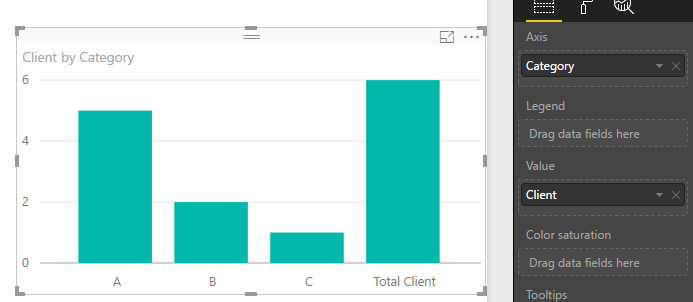
Then, create a column bar chart like below, add fields from Table2.
Best regards,
Yuliana Gu
Hi @afp141991,
In Power BI, there is no such a visualization can represent data like above chart. To work around this, please try to create a calculate table. Table1 is the original table containing two columns [Category] and [Client].
Table2 = UNION ( SUMMARIZE ( Table1, Table1[Category], "Client", DISTINCTCOUNT ( Table1[Client] ) ), SUMMARIZE ( SELECTCOLUMNS ( Table1, "Category", "Total Client", "Client", DISTINCTCOUNT ( Table1[Client] ) ), [Category], [Client] ) )
Then, create a column bar chart like below, add fields from Table2.
Best regards,
Yuliana Gu
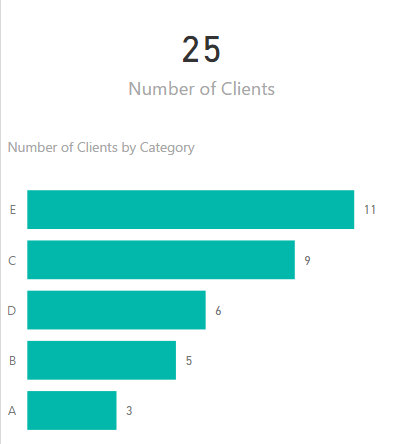
I would split the visual into two; have one visual (card) for the unique total of clients and then a stacked bar chart, sorted in descending order of number of clients with category on the axis.
The way you have it you can't easily compare the number of clients in each category....
If you have recently started exploring Fabric, we'd love to hear how it's going. Your feedback can help with product improvements.
A new Power BI DataViz World Championship is coming this June! Don't miss out on submitting your entry.
Share feedback directly with Fabric product managers, participate in targeted research studies and influence the Fabric roadmap.
| User | Count |
|---|---|
| 56 | |
| 47 | |
| 44 | |
| 20 | |
| 20 |
| User | Count |
|---|---|
| 73 | |
| 72 | |
| 34 | |
| 33 | |
| 31 |