cancel
Showing results for 
Search instead for 
Did you mean: 

The Power BI Data Visualization World Championships is back! Get ahead of the game and start preparing now! Learn more

Reply
afp141991
Frequent Visitor

Custom visual

Hello,


I want to display a particulart chart but I don't know if there is any visualization that can help me:

Chart example

As you can see, I want to display the different categories of clientes according to the number of clients in each category. For example, category A may have 10 clients, whereas category E can have 50 clients. The sum of A, B, C, D and E does not represent the total number of clients, because one client can be in different categories at the same time. 


Any idea if there is any visualization to represent this chart?


Many thanks!

1 ACCEPTED SOLUTION
v-yulgu-msft
Microsoft Employee
Microsoft Employee

Hi @afp141991,


In Power BI, there is no such a visualization can represent data like above chart. To work around this, please try to create a calculate table. Table1 is the original table containing two columns [Category] and [Client].


Table2 =
UNION (
    SUMMARIZE (
        Table1,
        Table1[Category],
        "Client", DISTINCTCOUNT ( Table1[Client] )
    ),
    SUMMARIZE (
        SELECTCOLUMNS (
            Table1,
            "Category", "Total Client",
            "Client", DISTINCTCOUNT ( Table1[Client] )
        ),
        [Category],
        [Client]
    )
)

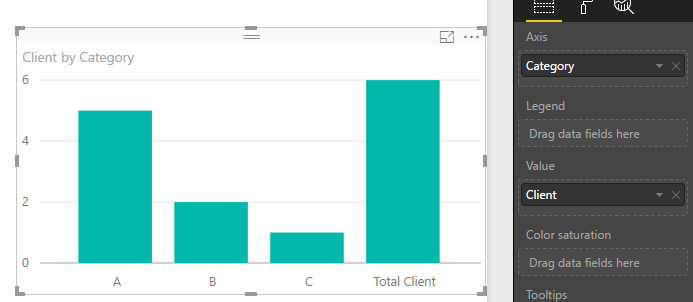
Then, create a column bar chart like below, add fields from Table2.

1.PNG


Best regards,
Yuliana Gu

Community Support Team _ Yuliana Gu
If this post helps, then please consider Accept it as the solution to help the other members find it more quickly.

View solution in original post

2 REPLIES 2
v-yulgu-msft
Microsoft Employee
Microsoft Employee

Hi @afp141991,


In Power BI, there is no such a visualization can represent data like above chart. To work around this, please try to create a calculate table. Table1 is the original table containing two columns [Category] and [Client].


Table2 =
UNION (
    SUMMARIZE (
        Table1,
        Table1[Category],
        "Client", DISTINCTCOUNT ( Table1[Client] )
    ),
    SUMMARIZE (
        SELECTCOLUMNS (
            Table1,
            "Category", "Total Client",
            "Client", DISTINCTCOUNT ( Table1[Client] )
        ),
        [Category],
        [Client]
    )
)

Then, create a column bar chart like below, add fields from Table2.

1.PNG


Best regards,
Yuliana Gu

Community Support Team _ Yuliana Gu
If this post helps, then please consider Accept it as the solution to help the other members find it more quickly.
Anonymous
Not applicable

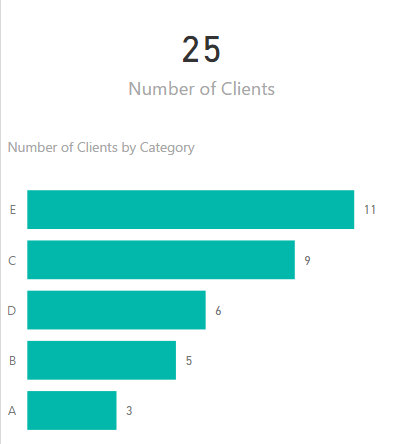
I would split the visual into two; have one visual (card) for the unique total of clients and then a stacked bar chart, sorted in descending order of number of clients with category on the axis.


The way you have it you can't easily compare the number of clients in each category....


bar chart.png

Helpful resources

Announcements
Power BI DataViz World Championships

Power BI Dataviz World Championships

The Power BI Data Visualization World Championships is back! Get ahead of the game and start preparing now!

December 2025 Power BI Update Carousel

Power BI Monthly Update - December 2025

Check out the December 2025 Power BI Holiday Recap!

FabCon Atlanta 2026 carousel

FabCon Atlanta 2026

Join us at FabCon Atlanta, March 16-20, for the ultimate Fabric, Power BI, AI and SQL community-led event. Save $200 with code FABCOMM.