Join us at FabCon Atlanta from March 16 - 20, 2026, for the ultimate Fabric, Power BI, AI and SQL community-led event. Save $200 with code FABCOMM.
Register now!Vote for your favorite vizzies from the Power BI Dataviz World Championship submissions. Vote now!
Hello
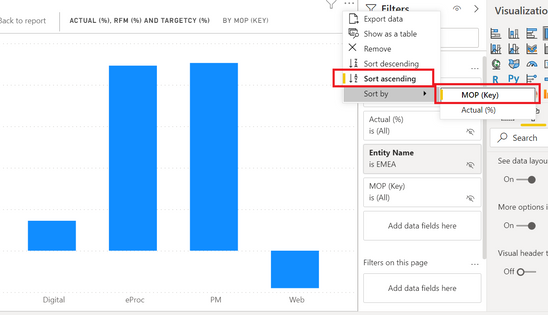
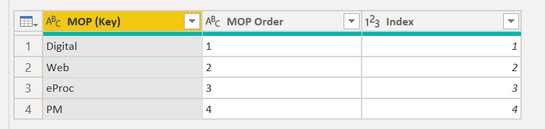
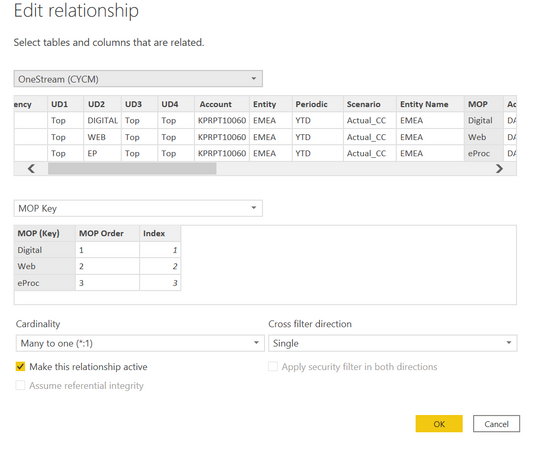
I have already set up a separate index table for custom sorting but it's not working. I suspect it's being overridden by the automatic sorting in PowerBI. How can I fix this?
The correct order should be "Digital -> Web -> eProc -> PM" as per my index table, but it's only allowing me to sort alphabetically (e.g. for ascending, "Digital -> eProc -> PM -> Web").
Solved! Go to Solution.
Hi,
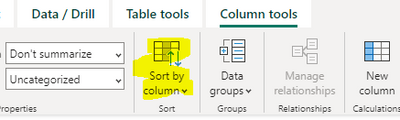
Not sure if you've tried this but try clicking on the field you're wanting to sort in the data pane, then on the column tools ribbon select sort by column, then select your ordering field.
If I answered your question, please mark my post as solution, Appreciate your Kudos 👍
This doesn't work if you calculate the index. "A circular dependency was detected..."
Awesome, it was driving me nuts, thanks for the quick help
No worries, happy to help 🙂
Hi,
Not sure if you've tried this but try clicking on the field you're wanting to sort in the data pane, then on the column tools ribbon select sort by column, then select your ordering field.
If I answered your question, please mark my post as solution, Appreciate your Kudos 👍
Vote for your favorite vizzies from the Power BI World Championship submissions!
If you love stickers, then you will definitely want to check out our Community Sticker Challenge!
Check out the January 2026 Power BI update to learn about new features.
| User | Count |
|---|---|
| 56 | |
| 52 | |
| 45 | |
| 17 | |
| 16 |
| User | Count |
|---|---|
| 108 | |
| 108 | |
| 39 | |
| 33 | |
| 26 |