cancel
Showing results for 
Search instead for 
Did you mean: 

The Power BI Data Visualization World Championships is back! Get ahead of the game and start preparing now! Learn more

Reply
JDeMaro22
Frequent Visitor

Custom sort X axis Values on Line Chart

Hello,


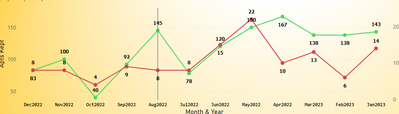
My CEO would like the Date X-Axis values to read Dec-April 2022 then Jan-March 2023. How can I custom sort these values? 


Thanks for your time,


JDeMaro22_0-1684352042835.png


4 REPLIES 4
JDeMaro22
Frequent Visitor

@Syk 


I tried writing it but I'm not good with DAX yet. So its an IF formula = year, month = 1


JDeMaro22_0-1684419979306.png


Syk
Resident Rockstar
Resident Rockstar

You SHOULD tell the CEO "No". It makes no sense and will confuse anyone looking at the graph.

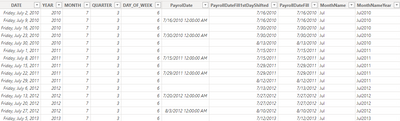
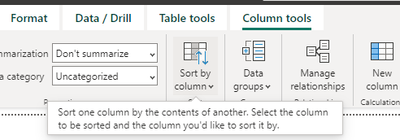
But, you can create a calculated column to and sort your date based on the new column.

Syk_0-1684352864728.png


JDeMaro22
Frequent Visitor

What would the calcuated column consist of to sort this accordingly?

Syk
Resident Rockstar
Resident Rockstar

For such a specific sorting it would have to be something like 
if year = 2022 and month = December -> 1
if year = 2022 and month = November -> 2
and so on until you get the desired result

Helpful resources

Announcements
Power BI DataViz World Championships

Power BI Dataviz World Championships

The Power BI Data Visualization World Championships is back! Get ahead of the game and start preparing now!

December 2025 Power BI Update Carousel

Power BI Monthly Update - December 2025

Check out the December 2025 Power BI Holiday Recap!

FabCon Atlanta 2026 carousel

FabCon Atlanta 2026

Join us at FabCon Atlanta, March 16-20, for the ultimate Fabric, Power BI, AI and SQL community-led event. Save $200 with code FABCOMM.