cancel
Showing results for 
Search instead for 
Did you mean: 

Next up in the FabCon + SQLCon recap series: The roadmap for Microsoft SQL and Maximizing Developer experiences in Fabric. All sessions are available on-demand after the live show. Register now

Reply
EllO
New Member

Custom index colum with multiple conditions

Hi,


I'm new here, but I have read many posts and have gotten a lot of help from them 🙂 So I wonder if anyone can help med with my problem. Hope it's alright that I post a couple of pictures insted of files. 

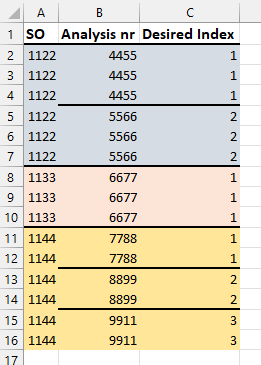
This is my data: (The dataset has many more colums and about 50000 rows, but the problem I have is with the data below.)

EllO_0-1695388300012.png

I want an index colum that looks like this:

EllO_1-1695388402107.png

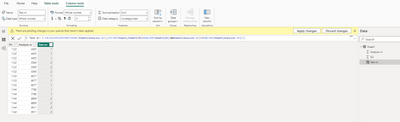
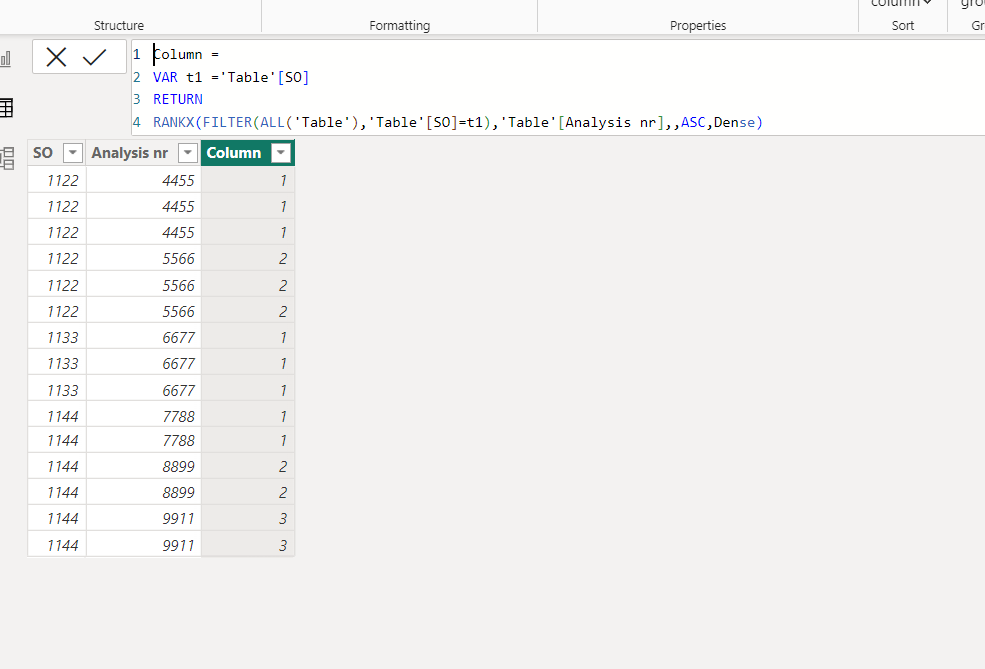
I can do this in the table view in power BI, but I need to do it in power query. In the table view in power BI, this is what I get: (And this is what I want in power query.)

EllO_2-1695388520709.png

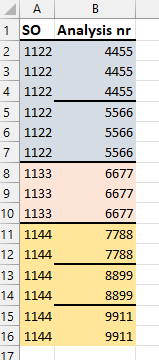
I've tried to use "group by" in power query, but this is what I get:

EllO_3-1695388578039.png

I will really appreciate if anybody has the time to help me 🙂 Thanks 🙂

1 ACCEPTED SOLUTION
Ahmedx
Super User
Super User

and to know how you can do this in power query, watch my video

let
    Source = Table.FromRows(Json.Document(Binary.Decompress(Binary.FromText("jce5DQAgCADAXahp+GEWwv5raG9iuO66gYgZEFTNYHB9M/flRe7dI5ZXvY/I/D2z6vcqovdzAA==", BinaryEncoding.Base64), Compression.Deflate)), let _t = ((type nullable text) meta [Serialized.Text = true]) in type table [SO = _t, #"Analysis nr" = _t]),
    #"Changed Type" = Table.TransformColumnTypes(Source,{{"SO", Int64.Type}, {"Analysis nr", Int64.Type}}),
    #"Grouped Rows" = Table.Group(#"Changed Type", {"SO", "Analysis nr"}, {{"Count", each _, type table [SO=nullable number, Analysis nr=nullable number]}}),
    #"Grouped Rows1" = Table.Group(#"Grouped Rows", {"SO"}, {{"Count", (x)=> Table.AddIndexColumn(x,"Indx",1,1)
}}),
    #"Removed Columns" = Table.RemoveColumns(#"Grouped Rows1",{"SO"}),
    #"Expanded Count" = Table.ExpandTableColumn(#"Removed Columns", "Count", {"Count", "Indx"}, {"Count.1", "Indx"}),
    #"Expanded Count.1" = Table.ExpandTableColumn(#"Expanded Count", "Count.1", {"SO", "Analysis nr"}, {"SO", "Analysis nr"})
in
    #"Expanded Count.1"

Custom index colum.mp4

View solution in original post

3 REPLIES 3
Ahmedx
Super User
Super User

and to know how you can do this in power query, watch my video

let
    Source = Table.FromRows(Json.Document(Binary.Decompress(Binary.FromText("jce5DQAgCADAXahp+GEWwv5raG9iuO66gYgZEFTNYHB9M/flRe7dI5ZXvY/I/D2z6vcqovdzAA==", BinaryEncoding.Base64), Compression.Deflate)), let _t = ((type nullable text) meta [Serialized.Text = true]) in type table [SO = _t, #"Analysis nr" = _t]),
    #"Changed Type" = Table.TransformColumnTypes(Source,{{"SO", Int64.Type}, {"Analysis nr", Int64.Type}}),
    #"Grouped Rows" = Table.Group(#"Changed Type", {"SO", "Analysis nr"}, {{"Count", each _, type table [SO=nullable number, Analysis nr=nullable number]}}),
    #"Grouped Rows1" = Table.Group(#"Grouped Rows", {"SO"}, {{"Count", (x)=> Table.AddIndexColumn(x,"Indx",1,1)
}}),
    #"Removed Columns" = Table.RemoveColumns(#"Grouped Rows1",{"SO"}),
    #"Expanded Count" = Table.ExpandTableColumn(#"Removed Columns", "Count", {"Count", "Indx"}, {"Count.1", "Indx"}),
    #"Expanded Count.1" = Table.ExpandTableColumn(#"Expanded Count", "Count.1", {"SO", "Analysis nr"}, {"SO", "Analysis nr"})
in
    #"Expanded Count.1"

Custom index colum.mp4
Thank you so much, especially for the video! Really impressed that you took the time to make a video! This worked out really well 🙂 Thanks again 🙂

Ahmedx
Super User
Super User

pls try this

Column = 
VAR t1 ='Table'[SO]
RETURN
RANKX(FILTER(ALL('Table'),'Table'[SO]=t1),'Table'[Analysis nr],,ASC,Dense)

Screenshot_1.png

Helpful resources

Announcements
New to Fabric survey Carousel

New to Fabric Survey

If you have recently started exploring Fabric, we'd love to hear how it's going. Your feedback can help with product improvements.

Power BI DataViz World Championships carousel

Power BI DataViz World Championships - June 2026

A new Power BI DataViz World Championship is coming this June! Don't miss out on submitting your entry.

FabCon and SQLCon Highlights Carousel

FabCon &SQLCon Highlights

Experience the highlights from FabCon & SQLCon, available live and on-demand starting April 14th.

March Power BI Update Carousel

Power BI Community Update - March 2026

Check out the March 2026 Power BI update to learn about new features.