Join us at FabCon Atlanta from March 16 - 20, 2026, for the ultimate Fabric, Power BI, AI and SQL community-led event. Save $200 with code FABCOMM.
Register now!The Power BI Data Visualization World Championships is back! Get ahead of the game and start preparing now! Learn more
Hi team, I'm hoping someone might be able to help.
I have a table showing various files ("URL" column), some with labels ("Label" column), and some without. Some files have multiple labels, and there are sometimes multiple rows for each file.
I need to create a custom column in Power Query that looks through each grouping of URLs and tells me whether the grouping contains a label or not. Here's an example of the output I need:
| URL | Label | Contains Label |
| File1 | Lable.Archived | Yes |
| File2 | Label.Customers | Yes |
| File2 | Label.Active | Yes |
| File3 | Yes | |
| File3 | Label.Staff | Yes |
| File3 | Yes | |
| File4 | No | |
| File4 | No | |
| File4 | No | |
| File5 | No |
Any help would really be appreciated 🙂
Solved! Go to Solution.
Hi @MichaelHutchens ,
You can also use the dax function to.
Here are the steps you can follow:
1. Create calculated column.
Contains Label =
var _count=
COUNTX(FILTER(ALL('Table'),'Table'[URL]=EARLIER('Table'[URL])&&'Table'[Label]<>BLANK()),[Label])
return
IF(
_count>=1,"Yes","No")
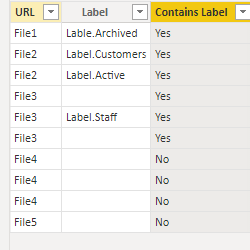
2. Result:
Best Regards,
Liu Yang
If this post helps, then please consider Accept it as the solution to help the other members find it more quickly
Thanks so much @Anonymous , that solutions works just fine 🙂 Appreciate your time!
Hi @MichaelHutchens ,
You can also use the dax function to.
Here are the steps you can follow:
1. Create calculated column.
Contains Label =
var _count=
COUNTX(FILTER(ALL('Table'),'Table'[URL]=EARLIER('Table'[URL])&&'Table'[Label]<>BLANK()),[Label])
return
IF(
_count>=1,"Yes","No")
2. Result:
Best Regards,
Liu Yang
If this post helps, then please consider Accept it as the solution to help the other members find it more quickly
Thanks so much @Anonymous , that solutions works just fine 🙂 Appreciate your time!
@MichaelHutchens , Try a new column in power query
let
_col = [URL],
_table = Table.SelectRows(Ranges, each [URL] = _col and [Label] <> null ),
_count = if Table.RowCount(_table[Label]) >=1 then "Yes" else "No"
in
_count
The Power BI Data Visualization World Championships is back! Get ahead of the game and start preparing now!
Check out the November 2025 Power BI update to learn about new features.
| User | Count |
|---|---|
| 68 | |
| 46 | |
| 44 | |
| 29 | |
| 20 |
| User | Count |
|---|---|
| 202 | |
| 130 | |
| 102 | |
| 71 | |
| 55 |