Learn from the best! Meet the four finalists headed to the FINALS of the Power BI Dataviz World Championships! Register now
I have one colum with some values like
scot/english
english/scot
english
scot
so i want to filter my data by putting all this values in one cluster "english"
if it some easy way to do this?) i can make some more column and fill it with custom values like if ... then...
but mb its more easy way?
replace data not good variant, couse i want to update info every month.
Solved! Go to Solution.
Hi @maybevlad,
In this scenario, could you go to check if the custom visual Attribute Slicer on Power BI Visual Gallery helps?![]()
Regards
Hi @maybevlad,
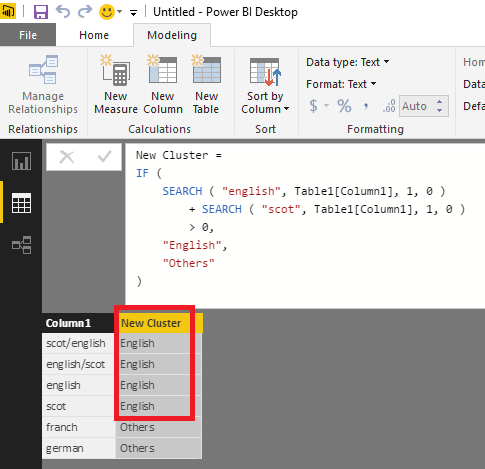
Have you tried using SEARCH function in this scenario? The formula below to create a new calculate column for cluster is for your reference.![]()
New Cluster =
IF (
SEARCH ( "english", Table1[Column1], 1, 0 )
+ SEARCH ( "scot", Table1[Column1], 1, 0 )
> 0,
"English",
"Others"
)
Regards
Not so good) Couse i want to filter all info via 20+ claster and want to use for this "filter" vvisualisation, as i understand its impossible to do this using "search"
Hi @maybevlad,
In this scenario, could you go to check if the custom visual Attribute Slicer on Power BI Visual Gallery helps?![]()
Regards
A new Power BI DataViz World Championship is coming this June! Don't miss out on submitting your entry.
Share feedback directly with Fabric product managers, participate in targeted research studies and influence the Fabric roadmap.
| User | Count |
|---|---|
| 47 | |
| 35 | |
| 28 | |
| 17 | |
| 16 |
| User | Count |
|---|---|
| 59 | |
| 58 | |
| 40 | |
| 22 | |
| 20 |