Join us at FabCon Atlanta from March 16 - 20, 2026, for the ultimate Fabric, Power BI, AI and SQL community-led event. Save $200 with code FABCOMM.
Register now!The Power BI Data Visualization World Championships is back! It's time to submit your entry. Live now!
I have one colum with some values like
scot/english
english/scot
english
scot
so i want to filter my data by putting all this values in one cluster "english"
if it some easy way to do this?) i can make some more column and fill it with custom values like if ... then...
but mb its more easy way?
replace data not good variant, couse i want to update info every month.
Solved! Go to Solution.
Hi @maybevlad,
In this scenario, could you go to check if the custom visual Attribute Slicer on Power BI Visual Gallery helps?![]()
Regards
Hi @maybevlad,
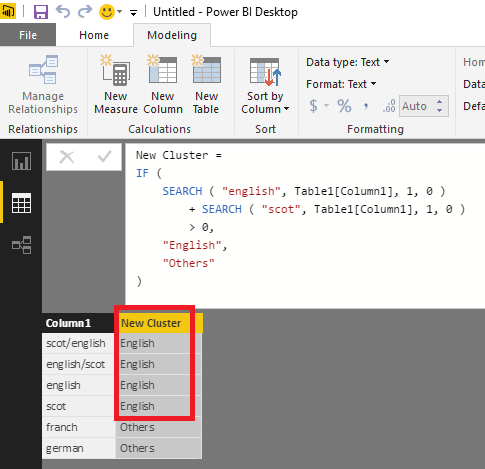
Have you tried using SEARCH function in this scenario? The formula below to create a new calculate column for cluster is for your reference.![]()
New Cluster =
IF (
SEARCH ( "english", Table1[Column1], 1, 0 )
+ SEARCH ( "scot", Table1[Column1], 1, 0 )
> 0,
"English",
"Others"
)
Regards
Not so good) Couse i want to filter all info via 20+ claster and want to use for this "filter" vvisualisation, as i understand its impossible to do this using "search"
Hi @maybevlad,
In this scenario, could you go to check if the custom visual Attribute Slicer on Power BI Visual Gallery helps?![]()
Regards
The Power BI Data Visualization World Championships is back! It's time to submit your entry.
Check out the January 2026 Power BI update to learn about new features.
| User | Count |
|---|---|
| 60 | |
| 47 | |
| 39 | |
| 24 | |
| 23 |
| User | Count |
|---|---|
| 144 | |
| 106 | |
| 63 | |
| 38 | |
| 31 |