Join us in Barcelona for FabCon and SQLCon, September 28 - October 1, 2026.
This is best Fabric, Power BI, SQL and AI community event. How do we know? The last event sold out! Save €200 with code FABCMTY200.
Register now- Power BI forums
- Get Help with Power BI
- Desktop
- Service
- Report Server
- Power Query
- Mobile Apps
- Developer
- DAX Commands and Tips
- Custom Visuals Development Discussion
- Health and Life Sciences
- Power BI Spanish forums
- Translated Spanish Desktop
- Training and Consulting
- Instructor Led Training
- Dashboard in a Day for Women, by Women
- Galleries
- Data Stories Gallery
- Themes Gallery
- Contests Gallery
- QuickViz Gallery
- Quick Measures Gallery
- Visual Calculations Gallery
- Fabric Apps Gallery
- Notebook Gallery
- Translytical Task Flow Gallery
- TMDL Gallery
- R Script Showcase
- Webinars and Video Gallery
- Ideas
- Custom Visuals Ideas (read-only)
- Issues
- Issues
- Events
- Upcoming Events
The Fabric community is now in read-only for platform upgrade. Learn more
- Power BI forums
- Forums
- Get Help with Power BI
- Desktop
- Re: Custom Week Number for specific Date Range
- Subscribe to RSS Feed
- Mark Topic as New
- Mark Topic as Read
- Float this Topic for Current User
- Bookmark
- Subscribe
- Printer Friendly Page


- Mark as New
- Bookmark
- Subscribe
- Mute
- Subscribe to RSS Feed
- Permalink
Custom Week Number for specific Date Range
Dear Community,
I would like to create a weeknumber for specific date range in 2 years :
Example :
Start Date : 01/06/2019 to End Date : 05/11/2020
01/06/2019 to 07/06/2019 is Week1
08/06/2019 to 15/06/2019 is Week 2
......
XX/XX/2020 to XX/XX/2020 Week 145
My purpose is to create a weekly LINE chart on these specific dates for CY and LY (for same dates but 01/06/2018 to 05/011/2019).
Thanks in advance.
Solved! Go to Solution.


- Mark as New
- Bookmark
- Subscribe
- Mute
- Subscribe to RSS Feed
- Permalink
Like
Week = format([Week Start date],"dd/mm/YYYY") & " to "& format([Week End date],"dd/mm/YYYY")
If you need set that as date format : https://community.powerbi.com/t5/Desktop/How-to-apply-UK-date-format-dd-mm-yyyy-in-Date-slicer/td-p/...


- Mark as New
- Bookmark
- Subscribe
- Mute
- Subscribe to RSS Feed
- Permalink
Check out Sequential - https://community.powerbi.com/t5/Quick-Measures-Gallery/Sequential/m-p/380231#M116
Follow on LinkedIn
@ me in replies or I'll lose your thread!!!
Instead of a Kudo, please vote for this idea
Become an expert!: Enterprise DNA
External Tools: MSHGQM
YouTube Channel!: Microsoft Hates Greg
Latest book!: DAX For Humans
DAX is easy, CALCULATE makes DAX hard...
- Mark as New
- Bookmark
- Subscribe
- Mute
- Subscribe to RSS Feed
- Permalink
@Greg_Deckler Looks like that i need sequential solution.
With this calendar table is possible to create sequential measure / column ?
- Mark as New
- Bookmark
- Subscribe
- Mute
- Subscribe to RSS Feed
- Permalink
Follow on LinkedIn
@ me in replies or I'll lose your thread!!!
Instead of a Kudo, please vote for this idea
Become an expert!: Enterprise DNA
External Tools: MSHGQM
YouTube Channel!: Microsoft Hates Greg
Latest book!: DAX For Humans
DAX is easy, CALCULATE makes DAX hard...
- Mark as New
- Bookmark
- Subscribe
- Mute
- Subscribe to RSS Feed
- Permalink
Create in your date table like
Week Start date = 'Date'[Date]+-1*WEEKDAY('Date'[Date])+1
Week End date = DATEADD('Date'[Date],7-1*WEEKDAY('Date'[Date]),DAY)

Week = [Week Start date] & " to "& [Week End date]
Also refer : https://www.dropbox.com/s/d9898a48e76wmvl/sales_analytics_weekWise.pbix?dl=0
use format on dates if needed
To get the best of the time intelligence function. Make sure you have a date calendar and it has been marked as the date in model view. Also, join it with the date column of your fact/s. Refer :
https://radacad.com/creating-calendar-table-in-power-bi-using-dax-functions
https://www.archerpoint.com/blog/Posts/creating-date-table-power-bi
https://www.sqlbi.com/articles/creating-a-simple-date-table-in-dax/
- Mark as New
- Bookmark
- Subscribe
- Mute
- Subscribe to RSS Feed
- Permalink
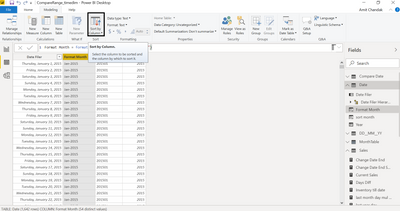
@amitchandak Thank you for your effort.
There is a small progress but still not completed. These weeks are not sorted on my graph.
So is there any week to sort it with correct dates ?
Thanks in advance!!!
- Mark as New
- Bookmark
- Subscribe
- Mute
- Subscribe to RSS Feed
- Permalink

- Mark as New
- Bookmark
- Subscribe
- Mute
- Subscribe to RSS Feed
- Permalink
@amitchandak Thanks very much!!
Almost complete my solution but still 2 remaining things...
1st : Is it possible to show dates as "DD/MM/YYYY" instead of "MM/DD/YYYY"?
2nd : Is it possible to visualize on same weekly graph metrics for this week year and metrics for Last week year ?
for example : Week for this year : 10/02/2019 to 17/02/2019 with Sum metric = 1000 and last year metric : 10/02/2018 to 17/02/2019 with sum metric : 500
Thanks again!!
- Mark as New
- Bookmark
- Subscribe
- Mute
- Subscribe to RSS Feed
- Permalink
Like
Week = format([Week Start date],"dd/mm/YYYY") & " to "& format([Week End date],"dd/mm/YYYY")
If you need set that as date format : https://community.powerbi.com/t5/Desktop/How-to-apply-UK-date-format-dd-mm-yyyy-in-Date-slicer/td-p/...

Helpful resources

FabCon & SQLCon – Barcelona 2026
Join us in Barcelona for FabCon and SQLCon, the Fabric, Power BI, SQL, and AI community event. Save €200 with code FABCMTY200.

Power BI DataViz World Championships - June 2026
A new Power BI DataViz World Championship is coming this June! Don't miss out on submitting your entry.

| User | Count |
|---|---|
| 23 | |
| 22 | |
| 14 | |
| 14 | |
| 13 |


| User | Count |
|---|---|
| 47 | |
| 39 | |
| 24 | |
| 20 | |
| 20 |


