cancel
Showing results for 
Search instead for 
Did you mean: 

We've captured the moments from FabCon & SQLCon that everyone is talking about, and we are bringing them to the community, live and on-demand. Starts on April 14th. Register now

Reply
Anonymous
Not applicable

Custom Visualization Power KPI Matrix: Prepping data!

Hi!


I'm trying to use the KPI Matrix (imported from marketplace) and looked through this tutorial . Example of visualization:
example3.png


My data looks like this (ish). Type A and Type B are from different databases and different types of projects that our company does.
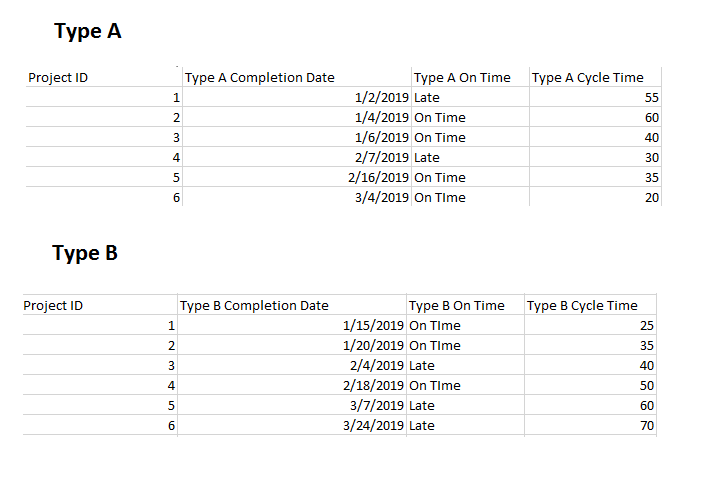
example2.png

The metrics I want to display:

1. Number of completions for current month (and yearly trendline)

2. On Time percentage of projects for current month (and yearly trendline)

3.  Average Cycle Time for that month (and yearly trendline)


Questions:

1.  How do I have the current value reflect an average for the month, while the trendline shows for the year?

2. What the best way to create targets? For example, our cycle time target is 50 days. What's the best way to set arbitrary targets and implement into the KPI Matrix?

3. I'm not quite sure I understand the KPI Indicator Index and Value. It looks like you have to create a sort of variance? How should I do this?
4. The trendlines are currently connected to the completion dates, how do I change it where the trendlines show a monthly or weekly trend (not singular date data points)?


All of the tutorials I've seen seem to already have data in the right format -- can't seem to figure out how to get the data into that format -- any help is so appreciated!!!

1 REPLY 1
v-lili6-msft
Community Support
Community Support

hi, @Anonymous 

For it is a custom visual, I would suggest you post it here, there will be many experts help you.


Best Regards,
Lin


Community Support Team _ Lin
If this post helps, then please consider Accept it as the solution to help the other members find it more quickly.

Helpful resources

Announcements
New to Fabric survey Carousel

New to Fabric Survey

If you have recently started exploring Fabric, we'd love to hear how it's going. Your feedback can help with product improvements.

Power BI DataViz World Championships carousel

Power BI DataViz World Championships - June 2026

A new Power BI DataViz World Championship is coming this June! Don't miss out on submitting your entry.

Join our Fabric User Panel

Join our Fabric User Panel

Share feedback directly with Fabric product managers, participate in targeted research studies and influence the Fabric roadmap.

March Power BI Update Carousel

Power BI Community Update - March 2026

Check out the March 2026 Power BI update to learn about new features.