Hi!
I'm trying to use the KPI Matrix (imported from marketplace) and looked through this tutorial . Example of visualization:

My data looks like this (ish). Type A and Type B are from different databases and different types of projects that our company does.
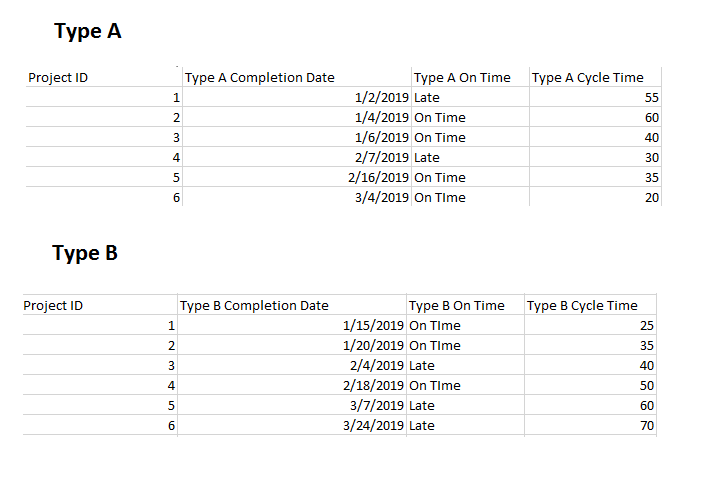
The metrics I want to display:
1. Number of completions for current month (and yearly trendline)
2. On Time percentage of projects for current month (and yearly trendline)
3. Average Cycle Time for that month (and yearly trendline)
Questions:
1. How do I have the current value reflect an average for the month, while the trendline shows for the year?
2. What the best way to create targets? For example, our cycle time target is 50 days. What's the best way to set arbitrary targets and implement into the KPI Matrix?
3. I'm not quite sure I understand the KPI Indicator Index and Value. It looks like you have to create a sort of variance? How should I do this?
4. The trendlines are currently connected to the completion dates, how do I change it where the trendlines show a monthly or weekly trend (not singular date data points)?
All of the tutorials I've seen seem to already have data in the right format -- can't seem to figure out how to get the data into that format -- any help is so appreciated!!!


