cancel
Showing results for 
Search instead for 
Did you mean: 

Get Fabric certified for FREE! Don't miss your chance! Learn more

Reply
KFP
Helper I
Helper I

Custom Theme

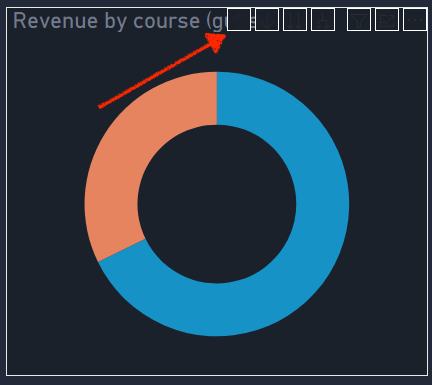
How do I change the color of the icons in the drill buttons? 


Screen Shot 2021-08-10 at 3.09.26 PM.png


Thanks! 


1 ACCEPTED SOLUTION
VahidDM
Super User
Super User

Hi @KFP 


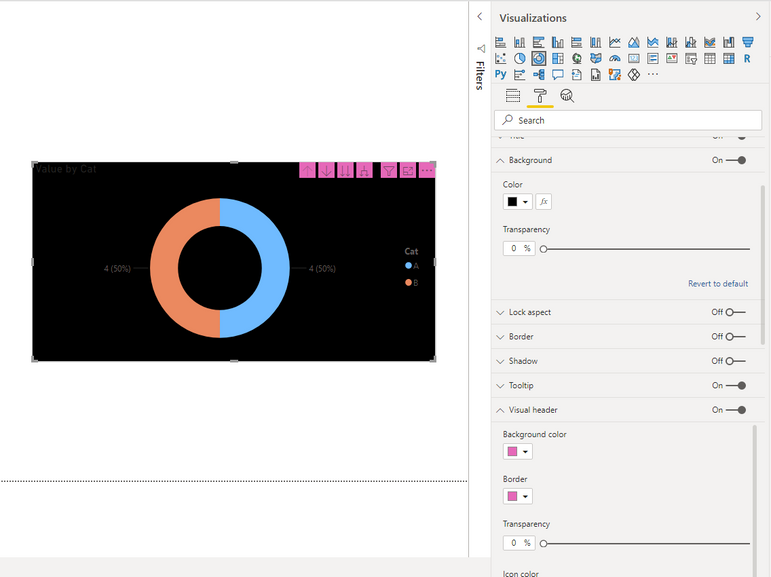
Please check the Visual Header, and try to change the Background Color, Border, and Transparency :


VahidDM_0-1628643362159.png


Did I answer your question? Mark my post as a solution!

Appreciate your Kudos VahidDM_1-1628643417004.png !!

View solution in original post

2 REPLIES 2
VahidDM
Super User
Super User

Hi @KFP 


Please check the Visual Header, and try to change the Background Color, Border, and Transparency :


VahidDM_0-1628643362159.png


Did I answer your question? Mark my post as a solution!

Appreciate your Kudos VahidDM_1-1628643417004.png !!

That works! Thank you! 

Helpful resources

Announcements
Sticker Challenge 2026 Carousel

Join our Community Sticker Challenge 2026

If you love stickers, then you will definitely want to check out our Community Sticker Challenge!

January Power BI Update Carousel

Power BI Monthly Update - January 2026

Check out the January 2026 Power BI update to learn about new features.

FabCon Atlanta 2026 carousel

FabCon Atlanta 2026

Join us at FabCon Atlanta, March 16-20, for the ultimate Fabric, Power BI, AI and SQL community-led event. Save $200 with code FABCOMM.