cancel
Showing results for 
Search instead for 
Did you mean: 

Next up in the FabCon + SQLCon recap series: The roadmap for Microsoft SQL and Maximizing Developer experiences in Fabric. All sessions are available on-demand after the live show. Register now

Reply
Anonymous
Not applicable

Custom Sorting

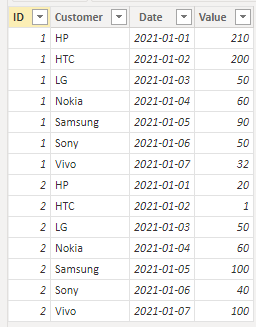
Hi Thank in advance to solve this issue. this is the scenario I have table having values like customer and respective values here I need custom sort function. below is the table for reference.


ljuturi1_0-1669977165249.png

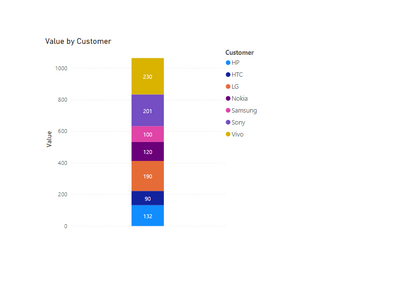
Here I need Samsung is the bottom of the stacked bar ireespective of any value remaining customers arrange their based on the value sort by higher to lower. is there any way to get through DAX, I tried multliple ways here but not getting the expected results. Can some one please help here That really appreciated.


Thank you so much in advance.


1 ACCEPTED SOLUTION
Anonymous
Not applicable

Hi  @Anonymous ,

I created some data:

vyangliumsft_0-1670213614627.png

Here are the steps you can follow:

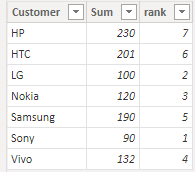
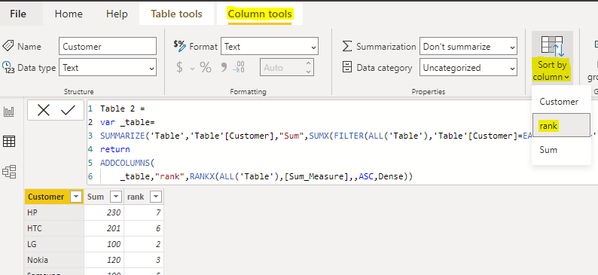
1. Create calculated table.

Table 2 =
var _table=
SUMMARIZE('Table','Table'[Customer],"Sum",SUMX(FILTER(ALL('Table'),'Table'[Customer]=EARLIER('Table'[Customer])),[Value]))
return
ADDCOLUMNS(
    _table,"rank",RANKX(ALL('Table'),[Sum_Measure],,ASC,Dense))

vyangliumsft_1-1670213614628.png

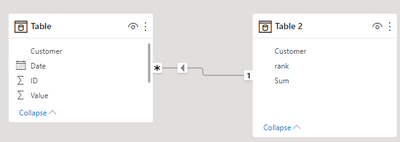
2. Relationship to join two tables.

vyangliumsft_2-1670213614629.png

3. Select [Customer] – Column tools – Sort by column – [rank] for the new table.

vyangliumsft_3-1670213614633.png

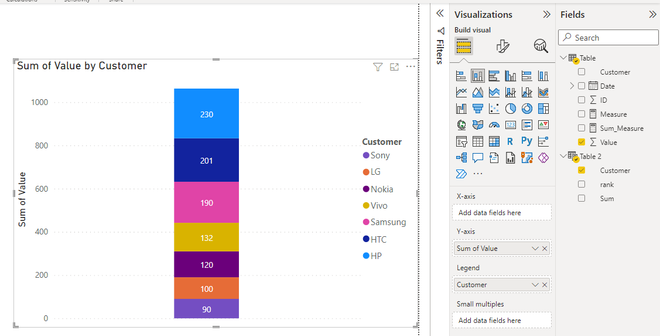
4. Result:

vyangliumsft_4-1670213614637.png


Best Regards,

Liu Yang

If this post helps, then please consider Accept it as the solution to help the other members find it more quickly

View solution in original post

4 REPLIES 4
atuljha07
Regular Visitor

Hi Peps,


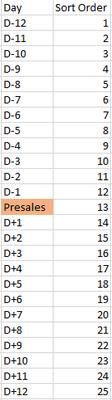
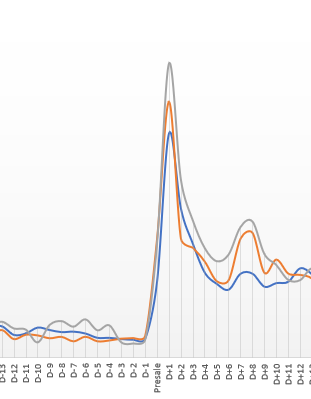
I'm trying to create a customer sort with the help of dimension table, it worked for number and text perfectly. What turns it down is when using a special charter as a parameter to sort, for instance when I'm trying to create a column "Day" which ranges from the -12 and +12 days from Presales (Day) it's not sorting as I expect it to be, though I've defined relationship with the base table and sort this table with "Sort Order"


atuljha07_0-1691999543807.png


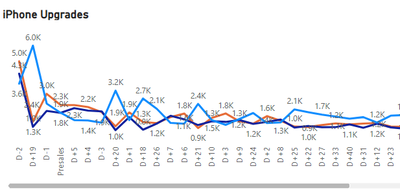
I'm getting something like below: 


atuljha07_1-1691999897604.png


The outcome should be something like:

atuljha07_2-1692000386008.png


Any help in this regards will be much appreciated!


Thanks,

Atul

Anonymous
Not applicable

Hi  @Anonymous ,

I created some data:

vyangliumsft_0-1670213614627.png

Here are the steps you can follow:

1. Create calculated table.

Table 2 =
var _table=
SUMMARIZE('Table','Table'[Customer],"Sum",SUMX(FILTER(ALL('Table'),'Table'[Customer]=EARLIER('Table'[Customer])),[Value]))
return
ADDCOLUMNS(
    _table,"rank",RANKX(ALL('Table'),[Sum_Measure],,ASC,Dense))

vyangliumsft_1-1670213614628.png

2. Relationship to join two tables.

vyangliumsft_2-1670213614629.png

3. Select [Customer] – Column tools – Sort by column – [rank] for the new table.

vyangliumsft_3-1670213614633.png

4. Result:

vyangliumsft_4-1670213614637.png


Best Regards,

Liu Yang

If this post helps, then please consider Accept it as the solution to help the other members find it more quickly

amitchandak
Super User
Super User

@Anonymous , You need to create sort column


Example

customer1 =[customer]


customer Sort = Switch( [customer],

"Samsung",1,

"Hp",2,

//Add other


10)


Mark customer sort as sort column of customer1 and use customer1 in visual


PowerBI Abstract Thesis Episode 6: How to Create Sort Column and Solve Related Errors:
https://www.youtube.com/watch?v=KK1zu4MBb-c

Share with Power BI Enthusiasts: Full Power BI Video (20 Hours) YouTube
Microsoft Fabric Series 60+ Videos YouTube
Microsoft Fabric Hindi End to End YouTube
Anonymous
Not applicable

Thanks for your response limited customers then it will lwork but I have N number of customers thats why I am requesting is there any option to change dynamically.

Helpful resources

Announcements
New to Fabric survey Carousel

New to Fabric Survey

If you have recently started exploring Fabric, we'd love to hear how it's going. Your feedback can help with product improvements.

Power BI DataViz World Championships carousel

Power BI DataViz World Championships - June 2026

A new Power BI DataViz World Championship is coming this June! Don't miss out on submitting your entry.

Join our Fabric User Panel

Join our Fabric User Panel

Share feedback directly with Fabric product managers, participate in targeted research studies and influence the Fabric roadmap.

March Power BI Update Carousel

Power BI Community Update - March 2026

Check out the March 2026 Power BI update to learn about new features.

Users online (12,777)