cancel
Showing results for 
Search instead for 
Did you mean: 

Learn from the best! Meet the four finalists headed to the FINALS of the Power BI Dataviz World Championships! Register now

Reply
YavuzDuran
Helper III
Helper III

Custom Sorting for a Calculated Column

Hi all,

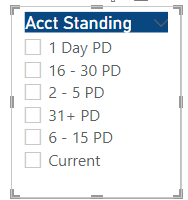
I have a slicer in which there is a calculated column value. 

I want to make a custom sort like:

Current

1 Dat PD

2 - 5 PD

6 - 15 PD

16 - 30 PD

31+ PD


but since this is a calculated column I could not do it on Power BI query editor since it is not there.

I tied adding a table and putting index and bringing that index near to this calculated column by LOOKUPVALUE, there occurs a circular dependency 


Any other way that can help me? 


Acct Standing = if(AllAccounts[Actual # Days Past Due]=0,"Current",
if(AllAccounts[Actual # Days Past Due]=1,"1 Day PD",
if(and(AllAccounts[Actual # Days Past Due]>1,AllAccounts[Actual # Days Past Due]<6),"2 - 5 PD",
if(and(AllAccounts[Actual # Days Past Due]>5,AllAccounts[Actual # Days Past Due]<16),"6 - 15 PD",
if(and(AllAccounts[Actual # Days Past Due]>15,AllAccounts[Actual # Days Past Due]<31),"16 - 30 PD",
if(AllAccounts[Actual # Days Past Due]>30,"31+ PD",""))))))


YavuzDuran_0-1634909447327.png


1 ACCEPTED SOLUTION
mwegener
Most Valuable Professional

Hi @YavuzDuran,


for this you should use the function: "Sort one column by another column"

https://docs.microsoft.com/en-us/power-bi/create-reports/desktop-sort-by-column?WT.mc_id=DP-MVP-5004...


Acct Standing Index =
IF (
    AllAccounts[Actual # Days Past Due] = 0,
    0,
    IF (
        AllAccounts[Actual # Days Past Due] = 1,
        1,
        IF (
            AND (
                AllAccounts[Actual # Days Past Due] > 1,
                AllAccounts[Actual # Days Past Due] < 6
            ),
            2,
            IF (
                AND (
                    AllAccounts[Actual # Days Past Due] > 5,
                    AllAccounts[Actual # Days Past Due] < 16
                ),
                3,
                IF (
                    AND (
                        AllAccounts[Actual # Days Past Due] > 15,
                        AllAccounts[Actual # Days Past Due] < 31
                    ),
                    4,
                    IF ( AllAccounts[Actual # Days Past Due] > 30, 5, 99 )
                )
            )
        )
    )
)
Did I answer your question?
Please mark my post as solution, this will also help others.
Please give Kudos for support.

Marcus Wegener works as Full Stack Power BI Engineer at BI or DIE.
His mission is clear: "Get the most out of data, with Power BI."
twitter - LinkedIn - YouTube - website - podcast - Power BI Tutorials


View solution in original post

2 REPLIES 2
mwegener
Most Valuable Professional

Hi @YavuzDuran,


for this you should use the function: "Sort one column by another column"

https://docs.microsoft.com/en-us/power-bi/create-reports/desktop-sort-by-column?WT.mc_id=DP-MVP-5004...


Acct Standing Index =
IF (
    AllAccounts[Actual # Days Past Due] = 0,
    0,
    IF (
        AllAccounts[Actual # Days Past Due] = 1,
        1,
        IF (
            AND (
                AllAccounts[Actual # Days Past Due] > 1,
                AllAccounts[Actual # Days Past Due] < 6
            ),
            2,
            IF (
                AND (
                    AllAccounts[Actual # Days Past Due] > 5,
                    AllAccounts[Actual # Days Past Due] < 16
                ),
                3,
                IF (
                    AND (
                        AllAccounts[Actual # Days Past Due] > 15,
                        AllAccounts[Actual # Days Past Due] < 31
                    ),
                    4,
                    IF ( AllAccounts[Actual # Days Past Due] > 30, 5, 99 )
                )
            )
        )
    )
)
Did I answer your question?
Please mark my post as solution, this will also help others.
Please give Kudos for support.

Marcus Wegener works as Full Stack Power BI Engineer at BI or DIE.
His mission is clear: "Get the most out of data, with Power BI."
twitter - LinkedIn - YouTube - website - podcast - Power BI Tutorials


Perfect. Worked. Thank you. 

Helpful resources

Announcements
New to Fabric survey Carousel

New to Fabric Survey

If you have recently started exploring Fabric, we'd love to hear how it's going. Your feedback can help with product improvements.

Power BI DataViz World Championships carousel

Power BI DataViz World Championships - June 2026

A new Power BI DataViz World Championship is coming this June! Don't miss out on submitting your entry.

Join our Fabric User Panel

Join our Fabric User Panel

Share feedback directly with Fabric product managers, participate in targeted research studies and influence the Fabric roadmap.

March Power BI Update Carousel

Power BI Community Update - March 2026

Check out the March 2026 Power BI update to learn about new features.