We've captured the moments from FabCon & SQLCon that everyone is talking about, and we are bringing them to the community, live and on-demand. Starts on April 14th. Register now
Hi There,
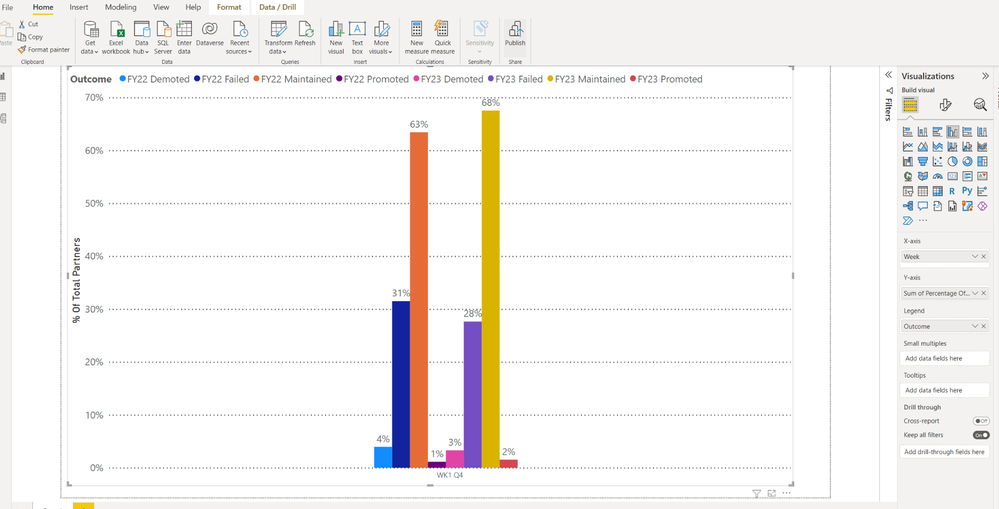
I have a chart (see attached) that displays totals for one year vs the other i.e FY23/FY22.
I want to have the data sorted so that the outcomes i.e promoted/demoted etc are side by side for comparitive purposes. Is this possible to move them side by side ?
Appreciate any help here 🙂
Solved! Go to Solution.
@Anonymous You need to set your original Outcomes column to have a Sort By column of Outcome Sort. You do this in the Column tools tab of the ribbon. Then, you use your original Outcome column in your visualization and it will be sorted in the order of Outcome Sort column.
ohh apologies think im mistaken -- i still use original outcome column but sort it by outcome sort ?
@Anonymous In Power Query, duplicate your Outcome column. Then, create a calculated column in DAX like this:
Outcome Sort =
SWITCH('Table'[Outcome Dup],
"FY22 Demoted",1,
"FY22 Promoted",2,
"FY22 Failed",3,
"FY22 Maintained,4,
"FY23 Demoted",5,
"FY23 Promoted",6,
"FY23 Failed",7,
"FY23 Maintained,8
)
Set the Sort By column for Outcome to Outcome Sort.
Thanks @Greg_Deckler this has worked however it has now changed the outcome names to 1,2,3,4,5,6,7,8 as a result.
Any reason for this ?
@Anonymous You need to set your original Outcomes column to have a Sort By column of Outcome Sort. You do this in the Column tools tab of the ribbon. Then, you use your original Outcome column in your visualization and it will be sorted in the order of Outcome Sort column.
If you have recently started exploring Fabric, we'd love to hear how it's going. Your feedback can help with product improvements.
A new Power BI DataViz World Championship is coming this June! Don't miss out on submitting your entry.
Share feedback directly with Fabric product managers, participate in targeted research studies and influence the Fabric roadmap.
| User | Count |
|---|---|
| 54 | |
| 39 | |
| 34 | |
| 18 | |
| 18 |
| User | Count |
|---|---|
| 69 | |
| 64 | |
| 38 | |
| 34 | |
| 23 |