Join us at FabCon Atlanta from March 16 - 20, 2026, for the ultimate Fabric, Power BI, AI and SQL community-led event. Save $200 with code FABCOMM.
Register now!Get Fabric certified for FREE! Don't miss your chance! Learn more
Hi all,
Is it possible to get a custom number format on the Y Axis?
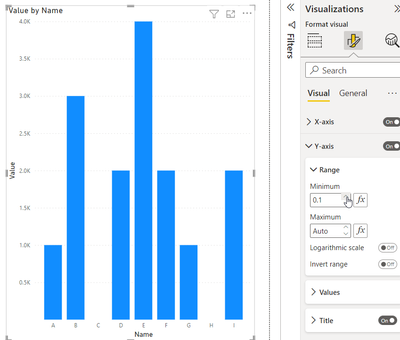
I formatted for thousands, but now zero shows as 0.0K, I would prefer a "-" for zero.
Thanks,
-w
Solved! Go to Solution.
Hi,
Not sure if there is any solution, where the Y Axis format is as a number(decimal), but the "-" is char type.
if you don't want to show the 0.0 value, then you could change the Minimum Range of the Y-Axis and start it > 0
Appreciate your Kudos and please mark it as a solution
Line/clustered column/bar charts require a numerical value for the values to be displayed. If you change 0 to "-" it will become text
Proud to be a Super User!
Paul on Linkedin.
Hi,
Not sure if there is any solution, where the Y Axis format is as a number(decimal), but the "-" is char type.
if you don't want to show the 0.0 value, then you could change the Minimum Range of the Y-Axis and start it > 0
Appreciate your Kudos and please mark it as a solution
Share feedback directly with Fabric product managers, participate in targeted research studies and influence the Fabric roadmap.
Check out the February 2026 Power BI update to learn about new features.
| User | Count |
|---|---|
| 70 | |
| 60 | |
| 47 | |
| 20 | |
| 17 |