Get certified for free when you join Fabric Data Days 2026 and dive into Fabric, Power BI, SQL, AI, and other essential data skills.
Join nowJuly 7 - July 17 | Round 2 of the Power BI Dataviz World Championships. Don't miss your chance! Learn more
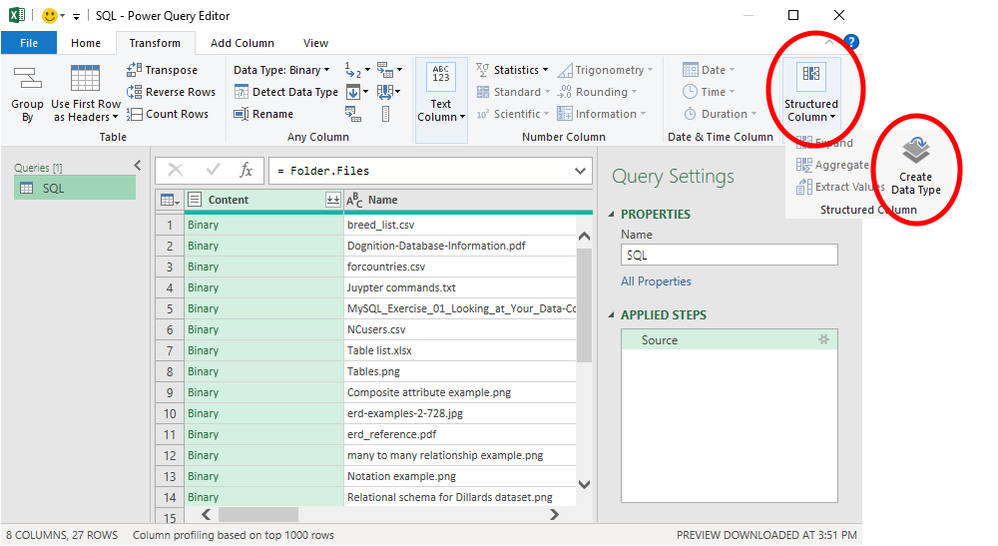
Does PowerBI offer the custom data type function available via Power Query's user interface? I can't seem to find it, even though a number of articles describe this function as having been developed originally for PowerBI.
I would hate to have to toggle back and forth between PB and PQ to build the query I need.
(See this video to see how custom data types work: https://youtu.be/5Qmp1hFjw0k)
@meagain I don't think it is possible in Power BI. I have never seen it.
✨ Follow us on LinkedIn
Check my latest blog post The Power of Using Calculation Groups with Inactive Relationships (Part 1) (perytus.com) I would ❤ Kudos if my solution helped. 👉 If you can spend time posting the question, you can also make efforts to give Kudos to whoever helped to solve your problem. It is a token of appreciation!
⚡ Visit us at https://perytus.com, your one-stop-shop for Power BI-related projects/training/consultancy.⚡
Subscribe to the @PowerBIHowTo YT channel for an upcoming video on List and Record functions in Power Query!!
Learn Power BI and Fabric - subscribe to our YT channel - Click here: @PowerBIHowTo
If my solution proved useful, I'd be delighted to receive Kudos. When you put effort into asking a question, it's equally thoughtful to acknowledge and give Kudos to the individual who helped you solve the problem. It's a small gesture that shows appreciation and encouragement! ❤
Did I answer your question? Mark my post as a solution. Proud to be a Super User! Appreciate your Kudos 🙂
Feel free to email me with any of your BI needs.
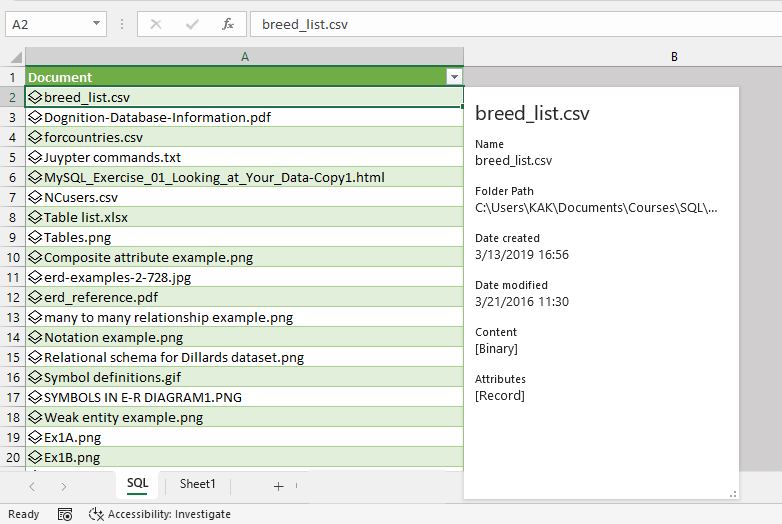
These M commands -- which I generated using the Excel (O365) UI -- work when pasted into PowerBI.
If you check out the screenshot below, the filename column is associated with all of the metadata, which appears on a separate card when you click the filename.
let
Source = Folder.Files("C:\Users\XXX\Documents\Courses\SQL"),
#"Created data type" = Table.CombineColumnsToRecord(Source, "Document", {"Name", "Folder Path", "Date created", "Date modified", "Content", "Attributes"}, [DisplayNameColumn="Name", TypeName="Excel.DataType"])
in
#"Created data type"
Join us in Barcelona for FabCon and SQLCon, the Fabric, Power BI, SQL, and AI community event. Save €200 with code FABCMTY200.
Join Fabric Data Days 2026: 60 days of free live/on-demand sessions, challenges, study groups, and certification opportunities.
| User | Count |
|---|---|
| 23 | |
| 22 | |
| 18 | |
| 17 | |
| 13 |
| User | Count |
|---|---|
| 63 | |
| 44 | |
| 42 | |
| 40 | |
| 39 |