Get Fabric or SQL Certified for Free.
Get certified for free when you join Fabric Data Days 2026 and dive into Fabric, Power BI, SQL, AI, and other essential data skills.
Join now- Power BI forums
- Get Help with Power BI
- Desktop
- Service
- Report Server
- Power Query
- Mobile Apps
- Developer
- DAX Commands and Tips
- Custom Visuals Development Discussion
- Health and Life Sciences
- Power BI Spanish forums
- Translated Spanish Desktop
- Training and Consulting
- Instructor Led Training
- Dashboard in a Day for Women, by Women
- Galleries
- Data Stories Gallery
- Themes Gallery
- Contests Gallery
- QuickViz Gallery
- Quick Measures Gallery
- Visual Calculations Gallery
- Fabric Apps Gallery
- Notebook Gallery
- Translytical Task Flow Gallery
- TMDL Gallery
- R Script Showcase
- Webinars and Video Gallery
- Ideas
- Custom Visuals Ideas (read-only)
- Issues
- Issues
- Events
- Upcoming Events
July 28 - August 9 | Final Round of the Power BI Dataviz World Championships. This is your chance. Learn more
- Power BI forums
- Forums
- Get Help with Power BI
- Desktop
- Re: Custom Data Colors using Function
- Subscribe to RSS Feed
- Mark Topic as New
- Mark Topic as Read
- Float this Topic for Current User
- Bookmark
- Subscribe
- Printer Friendly Page

- Mark as New
- Bookmark
- Subscribe
- Mute
- Subscribe to RSS Feed
- Permalink
- Report Inappropriate Content
Custom Data Colors using Function
Hello,
I am trying to set custom Data Colors for a bar graph based on their values.
I would like to visual to show something like this, i.e. all values < 25% to be green,>= 25% to be amber and > 75% to be red
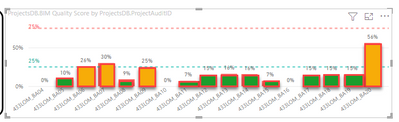
but I am getting this result instead. I feel that I am not adding the Rules correctly but I am not able to detect what am I missing.
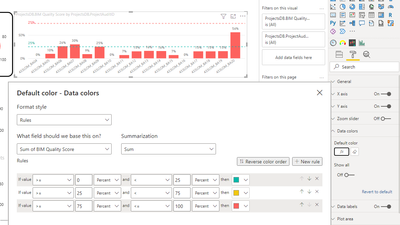
Thank you for your help.
Solved! Go to Solution.


- Mark as New
- Bookmark
- Subscribe
- Mute
- Subscribe to RSS Feed
- Permalink
- Report Inappropriate Content
@Anonymous , Try to create a measure like
Color =
Var _1 = [sum of BM Quantity] // make sure this the ratio measure
Switch( true() ,
_1< =.25, "green",
_1< =.75, "yellow",
"Red"
)
Use in conditional formatting using field value option
How to do conditional formatting by measure and apply it on pie?: https://youtu.be/RqBb5eBf_I4
If this does not help
Can you share sample data and sample output in table format? Or a sample pbix after removing sensitive data.


- Mark as New
- Bookmark
- Subscribe
- Mute
- Subscribe to RSS Feed
- Permalink
- Report Inappropriate Content
Hi, @Anonymous
Here you should use 'value' instead of 'percent'. Percent in conditional formatting refers to the percentage of all data distributions. Please refer to this document for details.

You can also refer to my sample file:


Best Regards,
Community Support Team _ Eason


- Mark as New
- Bookmark
- Subscribe
- Mute
- Subscribe to RSS Feed
- Permalink
- Report Inappropriate Content
Hi @Anonymous,
Here, is bar chart with custom colour formatting based on percentages it will you to get colour formatting on bars.

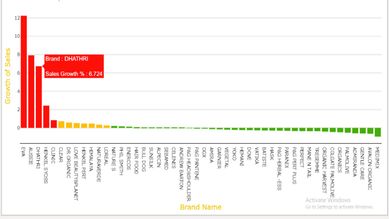
Download link for the custom visual file in this page,
https://pbivizedit.com/gallery/bar-chart-with-colour-formatting-based-on-percentage
This was made with our Custom Visual creator tool PBIVizEdit.com. With this tool,
- anyone, irrespective of technical skills, can create their own visuals
- 15 minutes to create a visual from scratch
- opens up many additional attributes to edit (for e.g. labels, tooltips, legends position, etc)
Give this a shot and let us know if you face any problem/errors.
You can use the editor to modify your visual further (some modifications cannot be done in Power BI window and have to be in editor).
Thanks,
Team PBIVizEdit
- Mark as New
- Bookmark
- Subscribe
- Mute
- Subscribe to RSS Feed
- Permalink
- Report Inappropriate Content
sample data column
| ProjectsDB.ProjectAuditID | ProjectsDB.BIM Quality Score |
| 433LOM_BA04 | 0.00% |
| 433LOM_BA05 | 9.68% |
| 433LOM_BA06 | 26.00% |
| 433LOM_BA07 | 30.00% |
| 433LOM_BA08 | 9.00% |
| 433LOM_BA09 | 25.00% |
| 433LOM_BA10 | 0.00% |
| 433LOM_BA11 | 7.00% |
| 433LOM_BA12 | 15.00% |
| 433LOM_BA13 | 16.00% |
| 433LOM_BA14 | 15.64% |
| 433LOM_BA15 | 7.00% |
| 433LOM_BA16 | 0.00% |
| 433LOM_BA17 | 15.00% |
| 433LOM_BA18 | 15.00% |
| 433LOM_BA19 | 15.40% |
| 433LOM_BA20 | 56.00% |
- Mark as New
- Bookmark
- Subscribe
- Mute
- Subscribe to RSS Feed
- Permalink
- Report Inappropriate Content
Hi, @Anonymous
Here you should use 'value' instead of 'percent'. Percent in conditional formatting refers to the percentage of all data distributions. Please refer to this document for details.
You can also refer to my sample file:
Best Regards,
Community Support Team _ Eason
- Mark as New
- Bookmark
- Subscribe
- Mute
- Subscribe to RSS Feed
- Permalink
- Report Inappropriate Content
thank you very much @v-easonf-msft for such detailed but very clear explanation. I certainly learned something new with your post.
- Mark as New
- Bookmark
- Subscribe
- Mute
- Subscribe to RSS Feed
- Permalink
- Report Inappropriate Content
@Anonymous , if you column is Ratio/percent then you should use number in the column where you have taken percent
Also usually the ratio is below 1 unless you multiple it by 100
so 25 % is .25
based on this do the changes and try
- Mark as New
- Bookmark
- Subscribe
- Mute
- Subscribe to RSS Feed
- Permalink
- Report Inappropriate Content
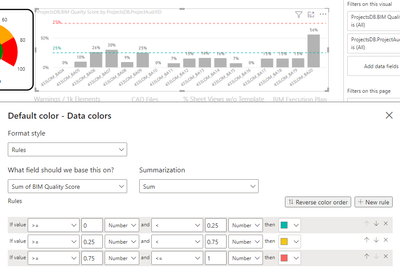
hi @amitchandak ,
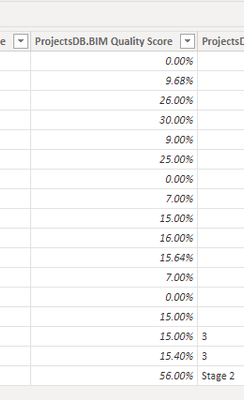
the values are formatted as percentages.
the custom colors are still not working regardless of being set as percentages or numbers.
Thank you for your help.


- Mark as New
- Bookmark
- Subscribe
- Mute
- Subscribe to RSS Feed
- Permalink
- Report Inappropriate Content
@Anonymous , Try to create a measure like
Color =
Var _1 = [sum of BM Quantity] // make sure this the ratio measure
Switch( true() ,
_1< =.25, "green",
_1< =.75, "yellow",
"Red"
)
Use in conditional formatting using field value option
How to do conditional formatting by measure and apply it on pie?: https://youtu.be/RqBb5eBf_I4
If this does not help
Can you share sample data and sample output in table format? Or a sample pbix after removing sensitive data.
- Mark as New
- Bookmark
- Subscribe
- Mute
- Subscribe to RSS Feed
- Permalink
- Report Inappropriate Content
thank you @amitchandak
This measure was key for the answer to my query.
I just needed to understand that I needed to add a "return" before the SWITCH function.
The final measure formula, for reference was thus
Color =
VAR color = MAX(CurrentProjectAudits[ProjectsDB.BIM Quality Score])*100

return
SWITCH(TRUE(),color <= 25,"green",color <= 75,"#FFA500","red")
I could not find a way, however, of "just" getting the value in a cell without using some sort of functions (I used MAX above).
Could one not just use something like:
var color = CurrentProjectAudits[ProjectsDB.BIM Quality Score]- Mark as New
- Bookmark
- Subscribe
- Mute
- Subscribe to RSS Feed
- Permalink
- Report Inappropriate Content
I am getting this error when pasting the code you sent me.

Helpful resources

FabCon & SQLCon – Barcelona 2026
Join us in Barcelona for FabCon and SQLCon, the Fabric, Power BI, SQL, and AI community event. Save €200 with code FABCMTY200.

Fabric Community Sticker Challenge - Barcelona 2026
If you love stickers, then you will definitely want to check out our community sticker challenge, Barcelona edition!

Power BI Monthly Update - July 2026
Check out the July 2026 Power BI update to learn about new features.

Power BI DataViz World Championships - June 2026
A new Power BI DataViz World Championship is coming this June! Don't miss out on submitting your entry.

| User | Count |
|---|---|
| 25 | |
| 23 | |
| 22 | |
| 17 | |
| 14 |


| User | Count |
|---|---|
| 27 | |
| 24 | |
| 20 | |
| 20 | |
| 19 |


