Join us at FabCon Atlanta from March 16 - 20, 2026, for the ultimate Fabric, Power BI, AI and SQL community-led event. Save $200 with code FABCOMM.
Register now!The Power BI Data Visualization World Championships is back! Get ahead of the game and start preparing now! Learn more
I could use some help trying to figure out how to...properly count/aggregate data from two tables.
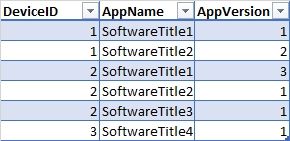
Let's say I have a table called SoftwareInstalled, similar to this:
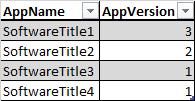
And I have a Target table like this:
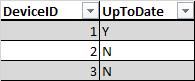
I'd like to add a calculated column or create some (aggregate?) table that gives me this:
I'm pretty new to PowerBI, and I've tried searching for some pointers/tutorial that points me in the right direction, but no luck so far. Is this doable in PowerBI?
Solved! Go to Solution.
@Anonymous ,
You may use Merge Queries (Table.NestedJoin) in Query Editor or LOOKUPVALUE Function in DAX.
@Anonymous ,
You may use Merge Queries (Table.NestedJoin) in Query Editor or LOOKUPVALUE Function in DAX.
The Power BI Data Visualization World Championships is back! Get ahead of the game and start preparing now!
Check out the November 2025 Power BI update to learn about new features.
| User | Count |
|---|---|
| 65 | |
| 44 | |
| 40 | |
| 29 | |
| 19 |
| User | Count |
|---|---|
| 200 | |
| 130 | |
| 102 | |
| 72 | |
| 55 |