Join us at FabCon Atlanta from March 16 - 20, 2026, for the ultimate Fabric, Power BI, AI and SQL community-led event. Save $200 with code FABCOMM.
Register now!The Power BI Data Visualization World Championships is back! Get ahead of the game and start preparing now! Learn more
Hi All,
I'm stuck trying to figure out a way to apply a currency conversion within the confines of PowerQuery.
I have two tables, one containing transactions (ie: a date and a value), and one containing currency conversions in the following format:
For the life of me, I cannot come up with any way to apply these conversions to my transaction table.
To make matters worse, I ideally need to do this entirely within PowerQuery, as this step will take place before some other merges, so my previous DAX solutions are out.
Anyone know a possible way to achieve this?
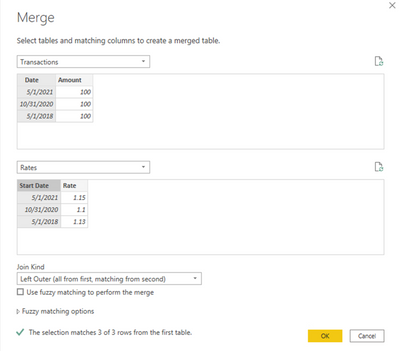
In Power Query, you can merge the tables and create a custom column.
M code:
let
Source = Table.NestedJoin(Transactions, {"Date"}, Rates, {"Start Date"}, "Rates", JoinKind.LeftOuter),
ExpandRates = Table.ExpandTableColumn(Source, "Rates", {"Rate"}, {"Rate"}),
AddColumn = Table.AddColumn(ExpandRates, "Converted Amount", each [Amount] * [Rate]),
ChangeType = Table.TransformColumnTypes(AddColumn,{{"Converted Amount", type number}})
in
ChangeType
Proud to be a Super User!
The Power BI Data Visualization World Championships is back! Get ahead of the game and start preparing now!
| User | Count |
|---|---|
| 40 | |
| 36 | |
| 34 | |
| 31 | |
| 27 |
| User | Count |
|---|---|
| 135 | |
| 103 | |
| 65 | |
| 61 | |
| 55 |