Join us at FabCon Atlanta from March 16 - 20, 2026, for the ultimate Fabric, Power BI, AI and SQL community-led event. Save $200 with code FABCOMM.
Register now!The Power BI Data Visualization World Championships is back! It's time to submit your entry. Live now!
Hi All,
I'm stuck trying to figure out a way to apply a currency conversion within the confines of PowerQuery.
I have two tables, one containing transactions (ie: a date and a value), and one containing currency conversions in the following format:
For the life of me, I cannot come up with any way to apply these conversions to my transaction table.
To make matters worse, I ideally need to do this entirely within PowerQuery, as this step will take place before some other merges, so my previous DAX solutions are out.
Anyone know a possible way to achieve this?
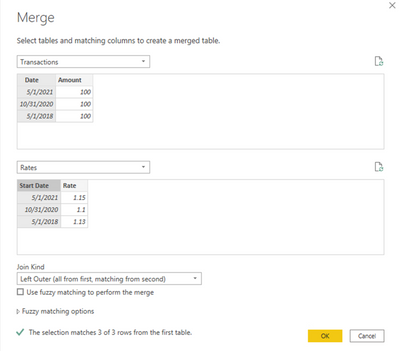
In Power Query, you can merge the tables and create a custom column.
M code:
let
Source = Table.NestedJoin(Transactions, {"Date"}, Rates, {"Start Date"}, "Rates", JoinKind.LeftOuter),
ExpandRates = Table.ExpandTableColumn(Source, "Rates", {"Rate"}, {"Rate"}),
AddColumn = Table.AddColumn(ExpandRates, "Converted Amount", each [Amount] * [Rate]),
ChangeType = Table.TransformColumnTypes(AddColumn,{{"Converted Amount", type number}})
in
ChangeType
Proud to be a Super User!
| User | Count |
|---|---|
| 50 | |
| 42 | |
| 36 | |
| 31 | |
| 28 |
| User | Count |
|---|---|
| 139 | |
| 128 | |
| 60 | |
| 59 | |
| 57 |