This time we’re going bigger than ever. Fabric, Power BI, SQL, AI and more. We're covering it all. You won't want to miss it.
Learn moreLevel up your Power BI skills this month - build one visual each week and tell better stories with data! Get started
Hi All,
I'm stuck trying to figure out a way to apply a currency conversion within the confines of PowerQuery.
I have two tables, one containing transactions (ie: a date and a value), and one containing currency conversions in the following format:
For the life of me, I cannot come up with any way to apply these conversions to my transaction table.
To make matters worse, I ideally need to do this entirely within PowerQuery, as this step will take place before some other merges, so my previous DAX solutions are out.
Anyone know a possible way to achieve this?
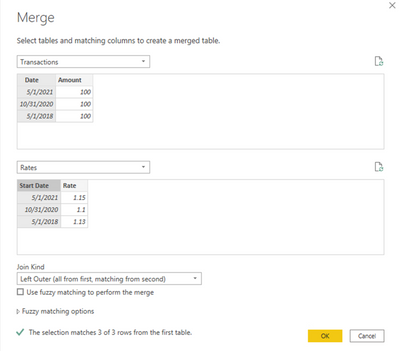
In Power Query, you can merge the tables and create a custom column.
M code:
let
Source = Table.NestedJoin(Transactions, {"Date"}, Rates, {"Start Date"}, "Rates", JoinKind.LeftOuter),
ExpandRates = Table.ExpandTableColumn(Source, "Rates", {"Rate"}, {"Rate"}),
AddColumn = Table.AddColumn(ExpandRates, "Converted Amount", each [Amount] * [Rate]),
ChangeType = Table.TransformColumnTypes(AddColumn,{{"Converted Amount", type number}})
in
ChangeType
Proud to be a Super User!
Check out the April 2026 Power BI update to learn about new features.
Sign up to receive a private message when registration opens and key events begin.
If you have recently started exploring Fabric, we'd love to hear how it's going. Your feedback can help with product improvements.
| User | Count |
|---|---|
| 30 | |
| 24 | |
| 23 | |
| 17 | |
| 15 |
| User | Count |
|---|---|
| 63 | |
| 36 | |
| 30 | |
| 23 | |
| 22 |