Join us at FabCon Atlanta from March 16 - 20, 2026, for the ultimate Fabric, Power BI, AI and SQL community-led event. Save $200 with code FABCOMM.
Register now!The Power BI Data Visualization World Championships is back! Get ahead of the game and start preparing now! Learn more
Hi,
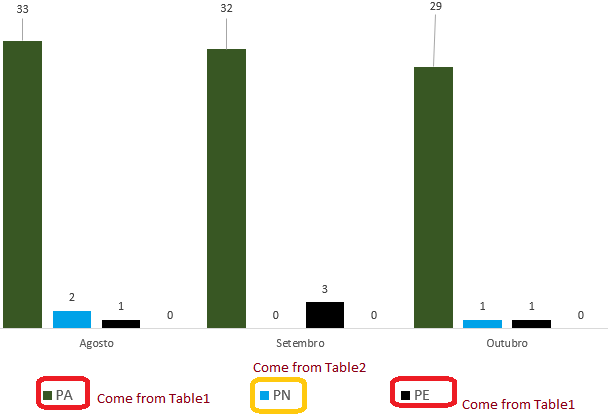
I was wondering if it's possible, since do I need do the countrows (distinct) for 02 different tables (table1 and table2), based on a slicer defined period, then put on the same graph on a page.
Is that possible?
Take a look that image.
Solved! Go to Solution.
Hi @jr3151006
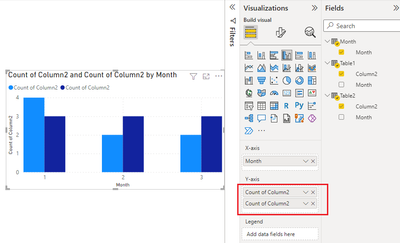
Yes, you can add multiple fields to Y-axis. You can add columns with a proper aggregation, or add measures. Ensure that the dimension date table is connected to both tables where the y-axis fields are from.
Best Regards,
Community Support Team _ Jing
If this post helps, please Accept it as Solution to help other members find it.
I think that was accomplished after put the MONTH in 'X-Axis' which coming from Calendar (dimension table) and also put two DAX coming from each table into 'Y-axis'.
Hi @jr3151006
Yes, you can add multiple fields to Y-axis. You can add columns with a proper aggregation, or add measures. Ensure that the dimension date table is connected to both tables where the y-axis fields are from.
Best Regards,
Community Support Team _ Jing
If this post helps, please Accept it as Solution to help other members find it.
The Power BI Data Visualization World Championships is back! Get ahead of the game and start preparing now!
Check out the November 2025 Power BI update to learn about new features.
| User | Count |
|---|---|
| 59 | |
| 43 | |
| 42 | |
| 23 | |
| 17 |
| User | Count |
|---|---|
| 190 | |
| 122 | |
| 96 | |
| 66 | |
| 47 |