cancel
Showing results for 
Search instead for 
Did you mean: 

The Power BI Data Visualization World Championships is back! Get ahead of the game and start preparing now! Learn more

Reply

Is there a way to set the card callout value colour by category?

I'm working on a report, that has two categories for an alarm, and on the charts one is as a light blue and the other a dark blue. I have made a donut chart with the card inside to show the total count of each, and a slicer to select which one the user wants to focus on.


The issue is on the card, as I click on the dark blue category, all charts display dark blue, which is right, but the callout card doesn't so it looks a bit off and can be confusing. I looked at the conditional formatting in the card, but there is no way for me to select the colour by category, only by value range. Is there a way I can set up the callout value colour by category? So it would change the colour accordingly to the category?

1 ACCEPTED SOLUTION
v-yadongf-msft
Community Support
Community Support

Hi @Amazing_Random ,


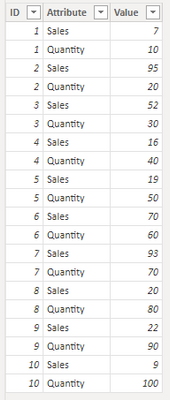
This is my test table:

vyadongfmsft_0-1670292922079.png


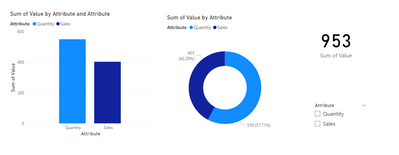
The charts I created:

vyadongfmsft_1-1670292960085.png


Please create a measure:

Measure = SWITCH(
    TRUE(),
    SELECTEDVALUE('Table'[Attribute]) = BLANK(),"black",
    SELECTEDVALUE('Table'[Attribute]) = "Sales","#12239E",
    SELECTEDVALUE('Table'[Attribute]) = "Quantity","#118dff"
    )


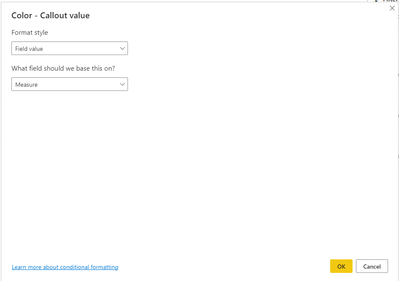
Conditional formatting for callout value:

vyadongfmsft_2-1670293102731.png

vyadongfmsft_3-1670293147176.png


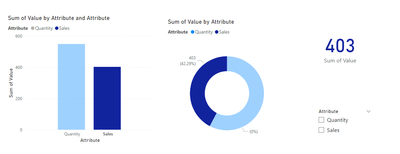
When you click on the dark blue category:

vyadongfmsft_4-1670293195348.png


When you click on the light blue category:

vyadongfmsft_5-1670293223738.png


IIf you don't click any category, the default color for callout value is black:

vyadongfmsft_6-1670293325592.png


The effect is the same if you choose a slicer.


Best regards,

Yadong Fang

If this post helps, then please consider Accept it as the solution to help the other members find it more quickly.

View solution in original post

1 REPLY 1
v-yadongf-msft
Community Support
Community Support

Hi @Amazing_Random ,


This is my test table:

vyadongfmsft_0-1670292922079.png


The charts I created:

vyadongfmsft_1-1670292960085.png


Please create a measure:

Measure = SWITCH(
    TRUE(),
    SELECTEDVALUE('Table'[Attribute]) = BLANK(),"black",
    SELECTEDVALUE('Table'[Attribute]) = "Sales","#12239E",
    SELECTEDVALUE('Table'[Attribute]) = "Quantity","#118dff"
    )


Conditional formatting for callout value:

vyadongfmsft_2-1670293102731.png

vyadongfmsft_3-1670293147176.png


When you click on the dark blue category:

vyadongfmsft_4-1670293195348.png


When you click on the light blue category:

vyadongfmsft_5-1670293223738.png


IIf you don't click any category, the default color for callout value is black:

vyadongfmsft_6-1670293325592.png


The effect is the same if you choose a slicer.


Best regards,

Yadong Fang

If this post helps, then please consider Accept it as the solution to help the other members find it more quickly.

Helpful resources

Announcements
Power BI DataViz World Championships

Power BI Dataviz World Championships

The Power BI Data Visualization World Championships is back! Get ahead of the game and start preparing now!

December 2025 Power BI Update Carousel

Power BI Monthly Update - December 2025

Check out the December 2025 Power BI Holiday Recap!

FabCon Atlanta 2026 carousel

FabCon Atlanta 2026

Join us at FabCon Atlanta, March 16-20, for the ultimate Fabric, Power BI, AI and SQL community-led event. Save $200 with code FABCOMM.