FabCon is coming to Atlanta
Join us at FabCon Atlanta from March 16 - 20, 2026, for the ultimate Fabric, Power BI, AI and SQL community-led event. Save $200 with code FABCOMM.
Register now!- Power BI forums
- Get Help with Power BI
- Desktop
- Service
- Report Server
- Power Query
- Mobile Apps
- Developer
- DAX Commands and Tips
- Custom Visuals Development Discussion
- Health and Life Sciences
- Power BI Spanish forums
- Translated Spanish Desktop
- Training and Consulting
- Instructor Led Training
- Dashboard in a Day for Women, by Women
- Galleries
- Data Stories Gallery
- Themes Gallery
- Contests Gallery
- QuickViz Gallery
- Quick Measures Gallery
- Visual Calculations Gallery
- Notebook Gallery
- Translytical Task Flow Gallery
- TMDL Gallery
- R Script Showcase
- Webinars and Video Gallery
- Ideas
- Custom Visuals Ideas (read-only)
- Issues
- Issues
- Events
- Upcoming Events
The Power BI Data Visualization World Championships is back! Get ahead of the game and start preparing now! Learn more
- Power BI forums
- Forums
- Get Help with Power BI
- Desktop
- Re: Cumulative values on period
- Subscribe to RSS Feed
- Mark Topic as New
- Mark Topic as Read
- Float this Topic for Current User
- Bookmark
- Subscribe
- Printer Friendly Page

- Mark as New
- Bookmark
- Subscribe
- Mute
- Subscribe to RSS Feed
- Permalink
- Report Inappropriate Content
Cumulative values on period
Hi everyone,
So I am triyng to get the sum of values between two dates column, this is a sample of the data :
ContractID           Start             End                ContractRevPerYear
00000034507          09/10/1972        09/10/1990         10000
00000046073          01/01/1978        01/01/2008         24000
00000047710          01/01/1978        01/01/2004         30000
00000046138          01/01/1979        01/01/1990         21000
My goal is to get the revenue per year between the start date and the end date, for example if I filter on year 1989 I would have the cumulative total from the begining of each contract to the year choosen.
I have tried many ways like using a calendar table and create a cumulative measure but it failed :
Calendar = CALENDAR(MIN('Table'[Start]);MAX('Table'[End]))
TotalRevenueGenerated =
CALCULATE (
    SUM ( 'Table'[ContractRevYear] );
    FILTER (
        ALL ( 'Calendar'[Date]);
        ('Calendar'[Date]) <= MAX ( 'Calendar'[Date] )
    )
)
Could anyone please give me any hint how to achieve this?
Kind regards,
Mohammad
Solved! Go to Solution.


- Mark as New
- Bookmark
- Subscribe
- Mute
- Subscribe to RSS Feed
- Permalink
- Report Inappropriate Content
@Anonymous
hi, please try this:
RevenueGenerated =

VAR revenue =
    IF (
        HASONEVALUE ( 'Calendar'[Year] ),
        IF (
            YEAR ( VALUES ( Table1[End] ) ) <= VALUES ( 'Calendar'[Year] ),
            YEAR ( VALUES ( Table1[End] ) ) - YEAR ( VALUES ( Table1[Start] ) );
            VALUES ( 'Calendar'[Year] ) - YEAR ( VALUES ( Table1[Start] ) )
        )
            * CALCULATE ( AVERAGE ( Table1[ContractRevPerYear] ) )
    )
RETURN
    IF ( revenue > 0, revenue, BLANK () )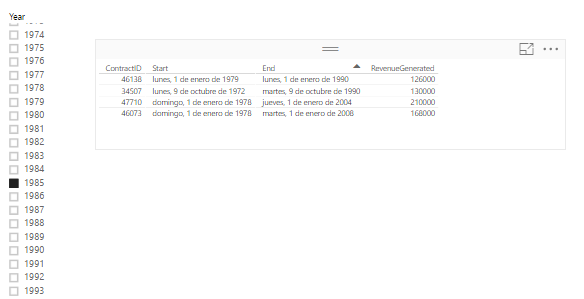
Lima - Peru
- Mark as New
- Bookmark
- Subscribe
- Mute
- Subscribe to RSS Feed
- Permalink
- Report Inappropriate Content
@Anonymous
hi, please try this:
RevenueGenerated =

VAR revenue =
    IF (
        HASONEVALUE ( 'Calendar'[Year] ),
        IF (
            YEAR ( VALUES ( Table1[End] ) ) <= VALUES ( 'Calendar'[Year] ),
            YEAR ( VALUES ( Table1[End] ) ) - YEAR ( VALUES ( Table1[Start] ) );
            VALUES ( 'Calendar'[Year] ) - YEAR ( VALUES ( Table1[Start] ) )
        )
            * CALCULATE ( AVERAGE ( Table1[ContractRevPerYear] ) )
    )
RETURN
    IF ( revenue > 0, revenue, BLANK () )
Lima - Peru
- Mark as New
- Bookmark
- Subscribe
- Mute
- Subscribe to RSS Feed
- Permalink
- Report Inappropriate Content
Hi,
Thank you for your reply. I tried it but i have a blank result.
Is your Calendar table connected to your main table ? How do you manage to create it ?
Kind Regards,
Mohammad PATEL
- Mark as New
- Bookmark
- Subscribe
- Mute
- Subscribe to RSS Feed
- Permalink
- Report Inappropriate Content
@Anonymous
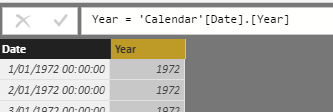
The Calendar:

A Calculated Column in Calendar:
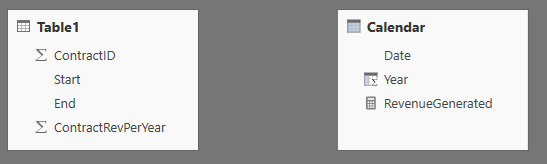
Don't related with Data Table:
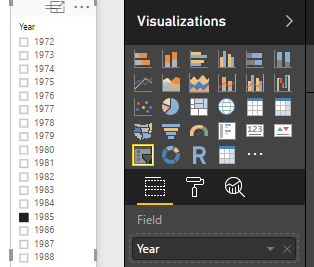
The Slicer:
Lima - Peru
- Mark as New
- Bookmark
- Subscribe
- Mute
- Subscribe to RSS Feed
- Permalink
- Report Inappropriate Content
Thanks.
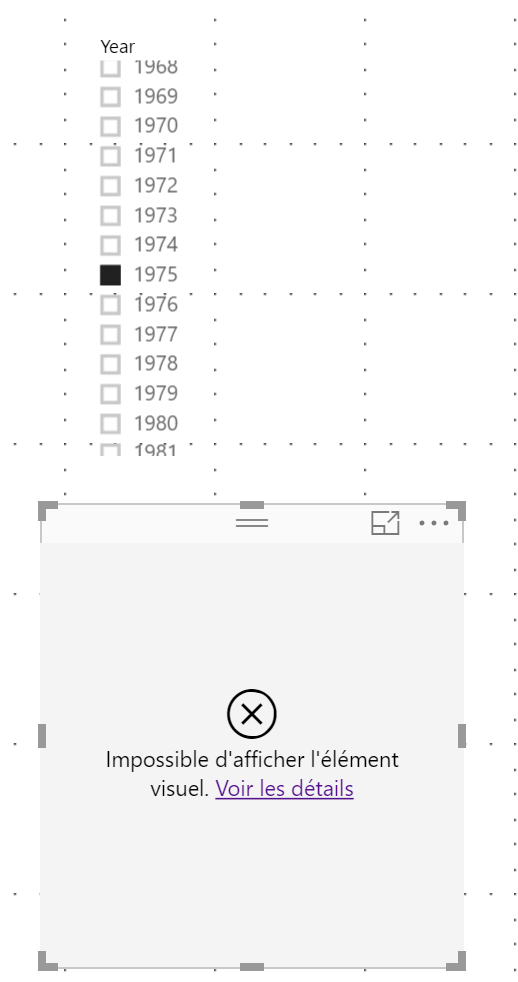
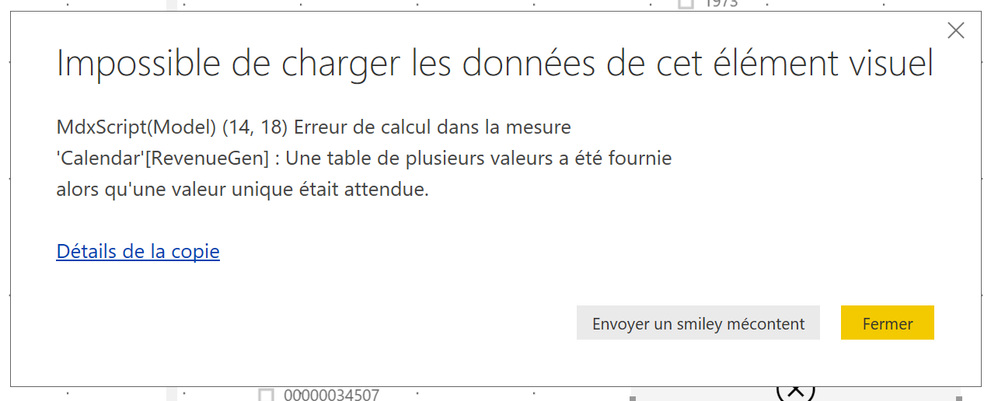
Unfortunately, i get an error when i choose a year. Well this is the error :
MdxScript(Model) (14, 18) Calculation error in measure 'Calendar'[RevenueGen]: A table with multiple values has been given while unique value is expected
- Mark as New
- Bookmark
- Subscribe
- Mute
- Subscribe to RSS Feed
- Permalink
- Report Inappropriate Content
@Anonymous
disable the total in the visual table.
Lima - Peru
- Mark as New
- Bookmark
- Subscribe
- Mute
- Subscribe to RSS Feed
- Permalink
- Report Inappropriate Content
- Mark as New
- Bookmark
- Subscribe
- Mute
- Subscribe to RSS Feed
- Permalink
- Report Inappropriate Content
@Anonymous
What type is your visual...a Table?
Lima - Peru
- Mark as New
- Bookmark
- Subscribe
- Mute
- Subscribe to RSS Feed
- Permalink
- Report Inappropriate Content
Indeed, yes it is a table.
Mohammad
- Mark as New
- Bookmark
- Subscribe
- Mute
- Subscribe to RSS Feed
- Permalink
- Report Inappropriate Content
@Anonymous
After review your measure, need litle adjustment:
Premium =

VAR revenue =
    IF (
        HASONEVALUE( 'Calendar'[Year] ),
        IF (
            YEAR(VALUES('Active Policies'[Maturity Date])) <= VALUES('Calendar'[Year]),
            YEAR(VALUES('Active Policies'[Maturity Date])) - YEAR(VALUES('Active Policies'[Policy Date])),
            VALUES ('Calendar'[Year]) - YEAR(VALUES('Active Policies'[Policy Date]))
        )
           * CALCULATE(AVERAGE('Active Policies'[Basic Premium]))
    )
RETURN
if(revenue>0,revenue;BLANK())
Lima - Peru
- Mark as New
- Bookmark
- Subscribe
- Mute
- Subscribe to RSS Feed
- Permalink
- Report Inappropriate Content
Thanks for your help.
It is still make me the same issue from the screenshot.
Kind regards,
Mohammad
- Mark as New
- Bookmark
- Subscribe
- Mute
- Subscribe to RSS Feed
- Permalink
- Report Inappropriate Content
Lima - Peru
- Mark as New
- Bookmark
- Subscribe
- Mute
- Subscribe to RSS Feed
- Permalink
- Report Inappropriate Content
Thank you for your time and your patience it works now !
Mohammad
Helpful resources

Power BI Dataviz World Championships
The Power BI Data Visualization World Championships is back! Get ahead of the game and start preparing now!

Power BI Monthly Update - November 2025
Check out the November 2025 Power BI update to learn about new features.

FabCon Atlanta 2026
Join us at FabCon Atlanta, March 16-20, for the ultimate Fabric, Power BI, AI and SQL community-led event. Save $200 with code FABCOMM.

| User | Count |
|---|---|
| 59 | |
| 43 | |
| 42 | |
| 23 | |
| 17 |


| User | Count |
|---|---|
| 190 | |
| 122 | |
| 96 | |
| 66 | |
| 47 |


