FabCon is coming to Atlanta
Join us at FabCon Atlanta from March 16 - 20, 2026, for the ultimate Fabric, Power BI, AI and SQL community-led event. Save $200 with code FABCOMM.
Register now!- Power BI forums
- Get Help with Power BI
- Desktop
- Service
- Report Server
- Power Query
- Mobile Apps
- Developer
- DAX Commands and Tips
- Custom Visuals Development Discussion
- Health and Life Sciences
- Power BI Spanish forums
- Translated Spanish Desktop
- Training and Consulting
- Instructor Led Training
- Dashboard in a Day for Women, by Women
- Galleries
- Data Stories Gallery
- Themes Gallery
- Contests Gallery
- QuickViz Gallery
- Quick Measures Gallery
- Visual Calculations Gallery
- Notebook Gallery
- Translytical Task Flow Gallery
- TMDL Gallery
- R Script Showcase
- Webinars and Video Gallery
- Ideas
- Custom Visuals Ideas (read-only)
- Issues
- Issues
- Events
- Upcoming Events
The Power BI Data Visualization World Championships is back! Get ahead of the game and start preparing now! Learn more
- Power BI forums
- Forums
- Get Help with Power BI
- Desktop
- Re: Cumulative sum group by day of month - with co...
- Subscribe to RSS Feed
- Mark Topic as New
- Mark Topic as Read
- Float this Topic for Current User
- Bookmark
- Subscribe
- Printer Friendly Page

- Mark as New
- Bookmark
- Subscribe
- Mute
- Subscribe to RSS Feed
- Permalink
- Report Inappropriate Content
Cumulative sum group by day of month - with columns of months
Hey, guys
Could you please help me (kind of a begginer here). I want to make a matrix with cumulative daily sales grouped by day of month and organized in monthly columns 🙂
I will try to explain, imagine this:
- January 1st we sold: $15
- January 2nd we sold: $20
- ...
So, at day 2 of January we would have $35 (which is day 1 plus day 2 of january).
- February 1st we sold: $8
- February 2nd we sold: $4
So, at day 2 of February we would have $12(which is day 1 plus day 2 of february).
I'm trying to make a matrix like this:

Currently the best code so far was:
Cumulative = CALCULATE (
    SUM ( 'Daily - by Índices'[Daily Revenue] ),
    FILTER (
        ALLSELECTED('Daily - by Índices'[Data]),
        'Daily - by Índices'[Data] <= MAX ('Daily - by Índices'[Data] )
    )
)
However, I was only able to create such a matrix with rows like "DATE" without hierarchy (each day appears in a single row in a endless table)
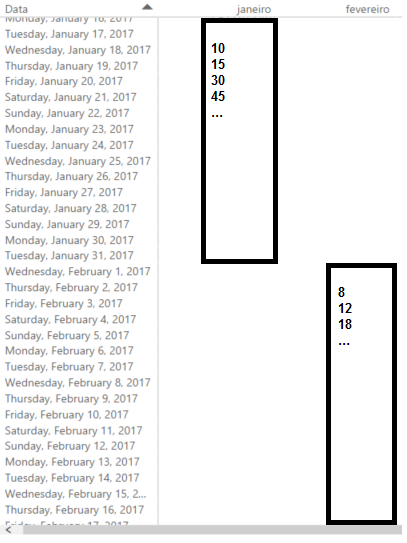
I would like to reinforce that apparently the code above WORKS, however I want to group rows by day of month (not have a single date in each row).
- When I tried to select DATE by DAY (using hierarchy) my metric (Daily Revenue) stoped to be cumulative
Any ideas?
Thanks in advance.
-Matt
Solved! Go to Solution.


- Mark as New
- Bookmark
- Subscribe
- Mute
- Subscribe to RSS Feed
- Permalink
- Report Inappropriate Content
Hey,
I created a new measure
Amount Month ToDate =
CALCULATE(
	SUM('FactWithDates'[Amount])
	,FILTER(ALL('Calendar'[Date]),'Calendar'[Date] <= MAX('Calendar'[Date])
		&& YEAR('Calendar'[Date]) = YEAR(MAX('Calendar'[Date]))
		&& MONTH('Calendar'[Date]) = MONTH(MAX('Calendar'[Date]))
		)
)
and updated the ReportPage in the file I mentioned above, redownload please.
I guess this measure creates what your are looking for:
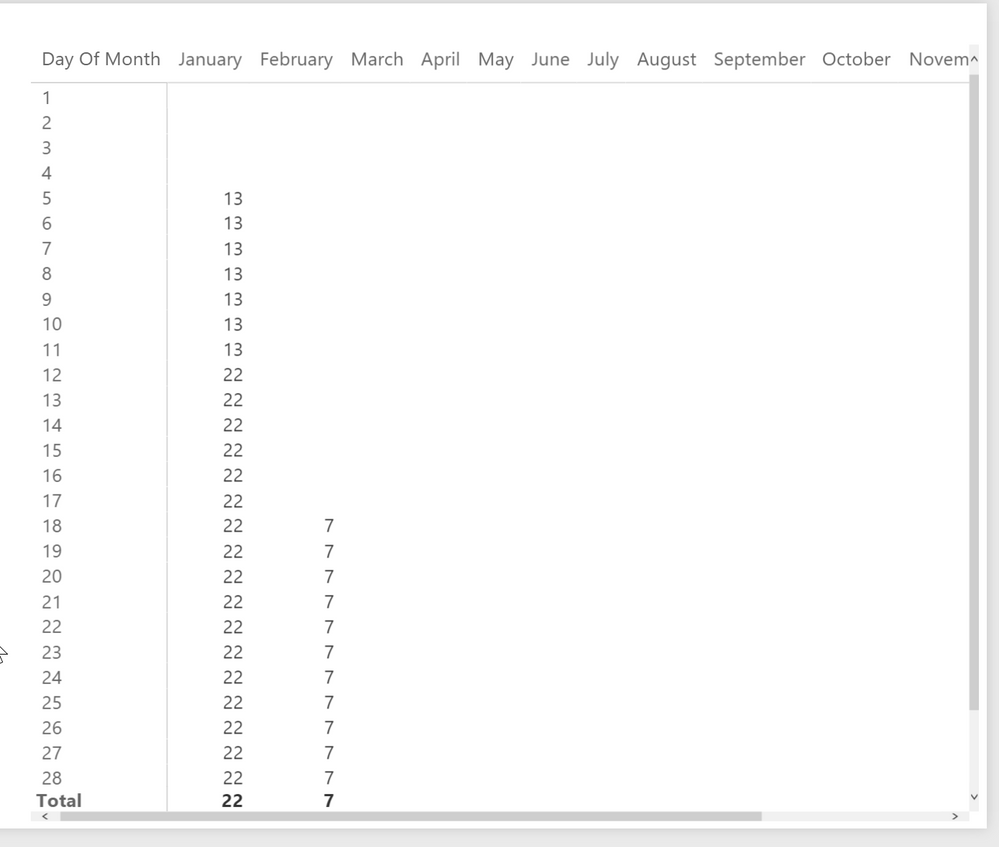
Be aware that I also checked "Show items with no data" for the columns and rows.
Regards
Did I answer your question? Mark my post as a solution, this will help others!
Proud to be a Super User!
I accept Kudos 😉
Hamburg, Germany

- Mark as New
- Bookmark
- Subscribe
- Mute
- Subscribe to RSS Feed
- Permalink
- Report Inappropriate Content
Hi @mateus_sjc,
For your requirement, you want to get month to date total, right?
If this is a case, you can create a measure to sum of sale by filter on year,month and date.
After above steps, creata a matrix visual, switch date to hierarchy mode, day part to row, month to column filed, drag above measure to value field.
Result =
var current_date=MAX('Fact'[Date])
return
SUMX(FILTER(ALLSELECTED('Fact'),[Date].[Year]=YEAR(current_date)&&[Date].[MonthNo]=MONTH(current_date)&&[Date]<=current_date),[Amount])
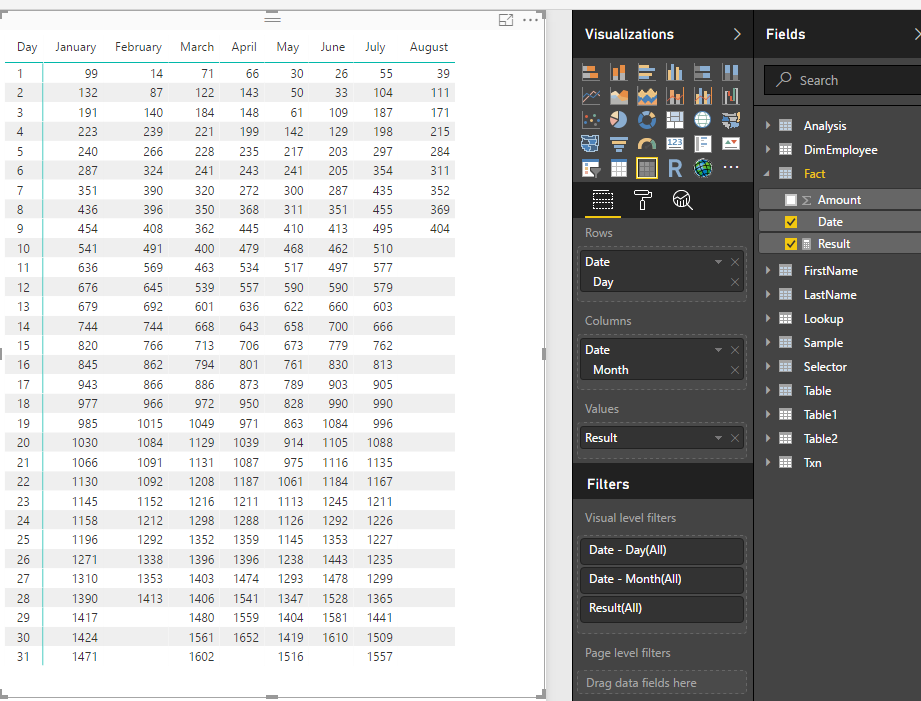
Compare:
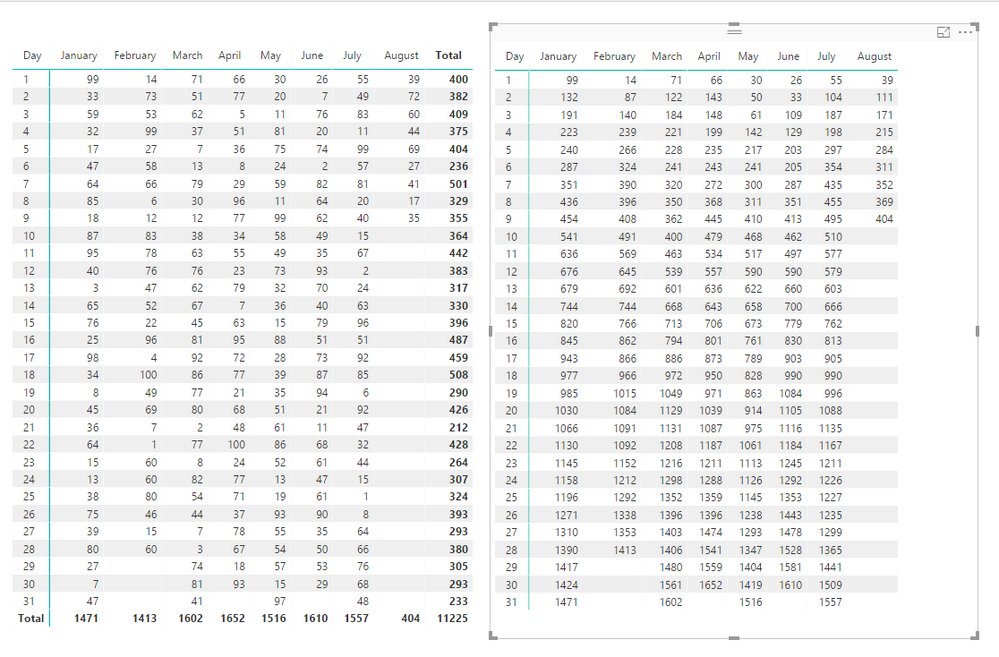
Regards,
Xiaoxin Sheng
- Mark as New
- Bookmark
- Subscribe
- Mute
- Subscribe to RSS Feed
- Permalink
- Report Inappropriate Content
Hey,
maybe this is what you are looking for, here is PBI file, have a look at the page "Matrix Visual":
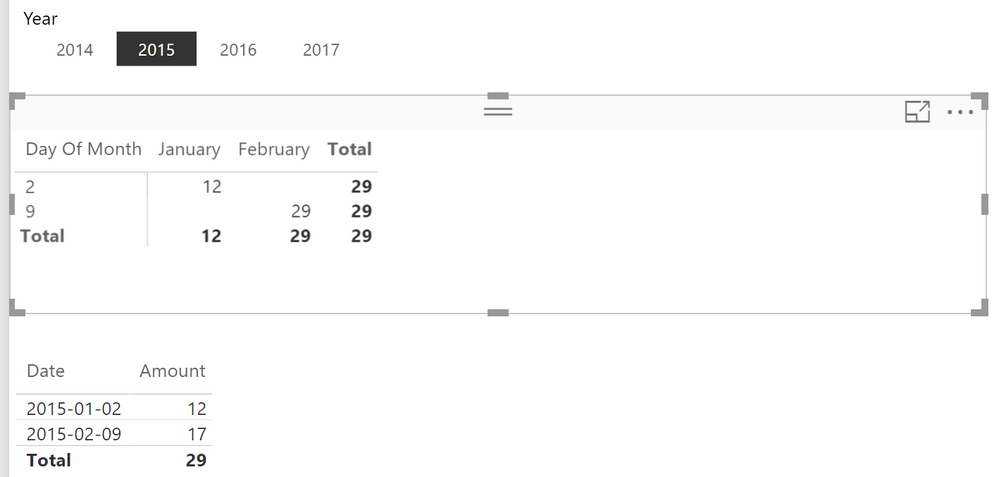
This is the Measure "Amount ToDate" I'm using in the Matrix
Amount ToDate =
IF(NOT(ISBLANK(SUM('FactWithDates'[Amount])))
,CALCULATE(
	SUM('FactWithDates'[Amount])
	,FILTER(ALL('Calendar'[Date]),'Calendar'[Date] <= MAX('Calendar'[Date])
		&& YEAR('Calendar'[Date]) = YEAR(MAX('Calendar'[Date])))
)
)
Maybe this helps
Regards
Did I answer your question? Mark my post as a solution, this will help others!
Proud to be a Super User!
I accept Kudos 😉
Hamburg, Germany
- Mark as New
- Bookmark
- Subscribe
- Mute
- Subscribe to RSS Feed
- Permalink
- Report Inappropriate Content
Hm... no, sorry
I don't wanna cross information between months. I'm trying to reproduce the exaclty same table that I posted 
Let me try this: "I wish to be able to compare results between months, so I need cumulative results from each month."
Rows with days of months and each month with your on information and cumulative.
Imagine the following results of 4 sales during the period:

What I expect from these results is exactly a matrix like this:
- EACH MONTH with their OWN specific results, they're just organized in the same row by the day of the month. However, results from February are from February and from January from January.
- Also, note that only 4 sales were made, but we have the table fulfilled once it's a cumulative result.
So:
- on January 1st one sale was made: $10
- on january 5th the last one: $18
Note that from day 1 - 4 January we only have $10, which is from that one sale.
Then, from day 5-31 we have $28 repeateadly (which is $10 from first sale + $18 from the last)
Also:
- February results have nothing to do with January
- No sale was made until February 9th, when we add $15
- Then, only on February 13th we have another $6 from a sale
- resulting in a $21 result
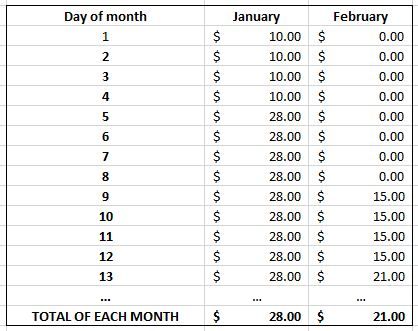
The code that I posted works, actually. However, only with DATE, not DATE HIERARCHY. So, the result is a long table with each date in a different row - which sucks badly to compare results.
I wish to be able to compare results between months, so I need cumulative results from each month.
I think now I'm better expressing myself 🙂
Regards,
- Mark as New
- Bookmark
- Subscribe
- Mute
- Subscribe to RSS Feed
- Permalink
- Report Inappropriate Content
Hey,
I created a new measure
Amount Month ToDate =
CALCULATE(
	SUM('FactWithDates'[Amount])
	,FILTER(ALL('Calendar'[Date]),'Calendar'[Date] <= MAX('Calendar'[Date])
		&& YEAR('Calendar'[Date]) = YEAR(MAX('Calendar'[Date]))
		&& MONTH('Calendar'[Date]) = MONTH(MAX('Calendar'[Date]))
		)
)
and updated the ReportPage in the file I mentioned above, redownload please.
I guess this measure creates what your are looking for:
Be aware that I also checked "Show items with no data" for the columns and rows.
Regards
Did I answer your question? Mark my post as a solution, this will help others!
Proud to be a Super User!
I accept Kudos 😉
Hamburg, Germany

- Mark as New
- Bookmark
- Subscribe
- Mute
- Subscribe to RSS Feed
- Permalink
- Report Inappropriate Content
Hello ,maybe the following code will help you :
Cumulative = CALCULATE (
    SUM ( 'Daily - by Índices'[Daily Revenue] ),
          DATESMTD( 'Daily - by Índices'[Data] )
    )
- Mark as New
- Bookmark
- Subscribe
- Mute
- Subscribe to RSS Feed
- Permalink
- Report Inappropriate Content
Hello,the following code may work:
Cumulative = CALCULATE (
    SUM ( 'Daily - by Índices'[Daily Revenue] ),
          DATESMTD( 'Daily - by Índices'[Data] )
)
Helpful resources

Power BI Monthly Update - November 2025
Check out the November 2025 Power BI update to learn about new features.

Fabric Data Days
Advance your Data & AI career with 50 days of live learning, contests, hands-on challenges, study groups & certifications and more!

FabCon Atlanta 2026
Join us at FabCon Atlanta, March 16-20, for the ultimate Fabric, Power BI, AI and SQL community-led event. Save $200 with code FABCOMM.


