cancel
Showing results for 
Search instead for 
Did you mean: 

The Power BI Data Visualization World Championships is back! Get ahead of the game and start preparing now! Learn more

Reply
Johnrobbinsjr
Regular Visitor

Cumulative rates yearly with a goal of 10% decrease

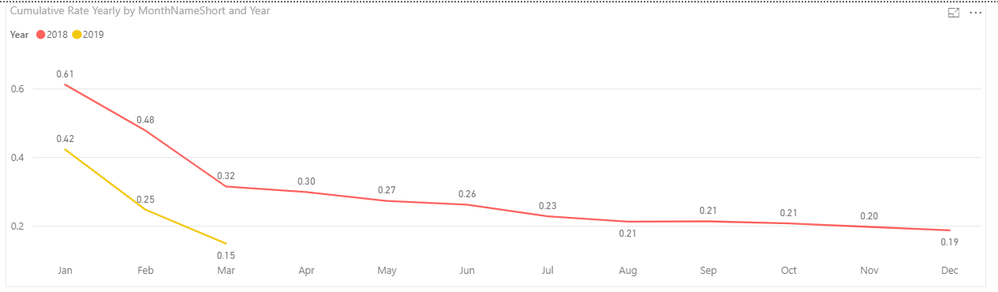
I have been working on this for 2 days now and I can not for the life of me figgure out how to show 2 cumulative rate lines one for 2018 and one for 2019 YTD allong with a third rate line that would be a 10% from 2018. This is what I have for the 2018 and 2019 YTD rates compared, but I can't figure out how to put that goal line.Capture.PNG

Cumulative Rate Yearly = CALCULATE(
COUNT('Incidents'[Incident Classification(s)]),
FILTER(
ALLSELECTED('Incidents'),
'Incidents'[Date] <= MAX('Calendar Work Hours'[Date])),VALUES('Calendar Work Hours'[Year]
)
)
*200000/
CALCULATE(
SUM('Work Hours'[Hours]),
FILTER(
ALLSELECTED('Work Hours'),
'Work Hours'[Date] <= MAX('Calendar Work Hours'[Date])),VALUES('Calendar Work Hours'[Year]
)
)+0
 
This is the Measure I'm using. All I need to do now is calculate 10% less of the 2018 line and get it to show on the same graph. Can anyone help?
1 ACCEPTED SOLUTION
v-lili6-msft
Community Support
Community Support

HI, @Johnrobbinsjr 

Based on my research, you could try this way:

Step1:

Add a dim year legend table

For example:
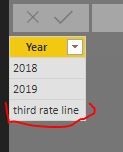
4.JPG

Then create the relationship with 'Calendar Work Hours'[Year]

Step2:

Create a new measure like this:

New measure = IF(SELECTEDVALUE('Dim year legend'[Year])="third rate line",[your 10% from 2018 measure] , [Cumulative Rate Yearly] )

Step3:

Drag the new measure into value and year field from dim year legend table into line chart visual.

Result:

simple example:
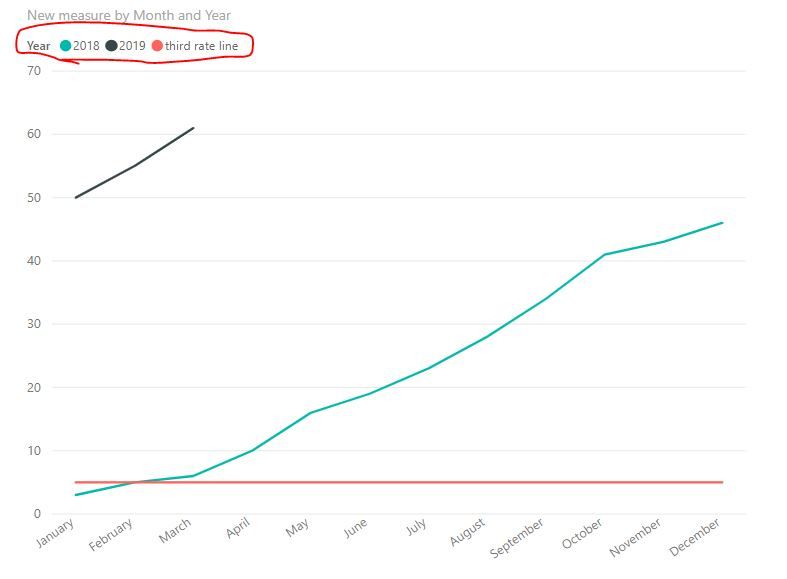
5.JPG

Best Regards,

Lin

Community Support Team _ Lin
If this post helps, then please consider Accept it as the solution to help the other members find it more quickly.

View solution in original post

1 REPLY 1
v-lili6-msft
Community Support
Community Support

HI, @Johnrobbinsjr 

Based on my research, you could try this way:

Step1:

Add a dim year legend table

For example:

4.JPG

Then create the relationship with 'Calendar Work Hours'[Year]

Step2:

Create a new measure like this:

New measure = IF(SELECTEDVALUE('Dim year legend'[Year])="third rate line",[your 10% from 2018 measure] , [Cumulative Rate Yearly] )

Step3:

Drag the new measure into value and year field from dim year legend table into line chart visual.

Result:

simple example:

5.JPG

Best Regards,

Lin

Community Support Team _ Lin
If this post helps, then please consider Accept it as the solution to help the other members find it more quickly.

Helpful resources

Announcements
Power BI DataViz World Championships

Power BI Dataviz World Championships

The Power BI Data Visualization World Championships is back! Get ahead of the game and start preparing now!

December 2025 Power BI Update Carousel

Power BI Monthly Update - December 2025

Check out the December 2025 Power BI Holiday Recap!

FabCon Atlanta 2026 carousel

FabCon Atlanta 2026

Join us at FabCon Atlanta, March 16-20, for the ultimate Fabric, Power BI, AI and SQL community-led event. Save $200 with code FABCOMM.