Join us at FabCon Atlanta from March 16 - 20, 2026, for the ultimate Fabric, Power BI, AI and SQL community-led event. Save $200 with code FABCOMM.
Register now!The Power BI Data Visualization World Championships is back! Get ahead of the game and start preparing now! Learn more
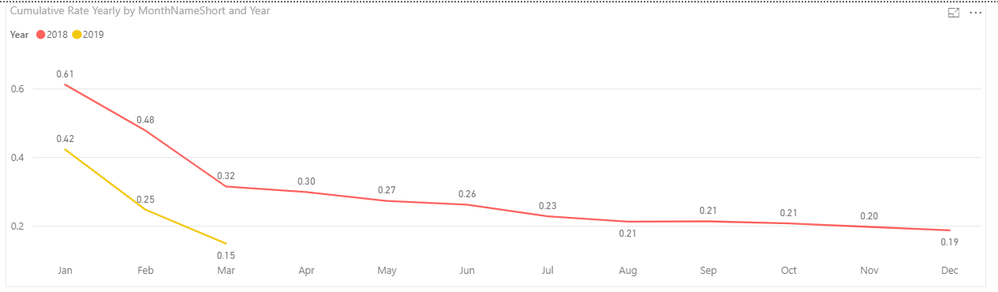
I have been working on this for 2 days now and I can not for the life of me figgure out how to show 2 cumulative rate lines one for 2018 and one for 2019 YTD allong with a third rate line that would be a 10% from 2018. This is what I have for the 2018 and 2019 YTD rates compared, but I can't figure out how to put that goal line.
Solved! Go to Solution.
HI, @Johnrobbinsjr
Based on my research, you could try this way:
Step1:
Add a dim year legend table
For example:
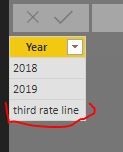
Then create the relationship with 'Calendar Work Hours'[Year]
Step2:
Create a new measure like this:
New measure = IF(SELECTEDVALUE('Dim year legend'[Year])="third rate line",[your 10% from 2018 measure] , [Cumulative Rate Yearly] )
Step3:
Drag the new measure into value and year field from dim year legend table into line chart visual.
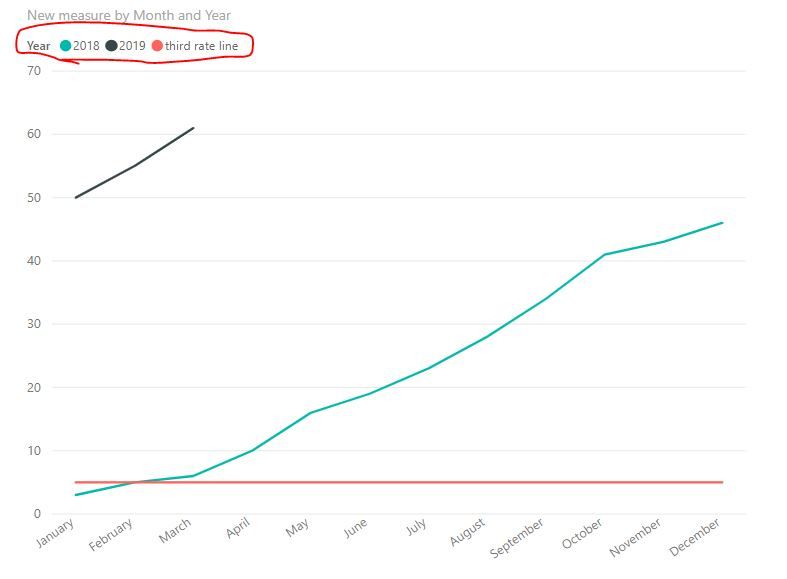
Result:
simple example:
Best Regards,
Lin
HI, @Johnrobbinsjr
Based on my research, you could try this way:
Step1:
Add a dim year legend table
For example:
Then create the relationship with 'Calendar Work Hours'[Year]
Step2:
Create a new measure like this:
New measure = IF(SELECTEDVALUE('Dim year legend'[Year])="third rate line",[your 10% from 2018 measure] , [Cumulative Rate Yearly] )
Step3:
Drag the new measure into value and year field from dim year legend table into line chart visual.
Result:
simple example:
Best Regards,
Lin
The Power BI Data Visualization World Championships is back! Get ahead of the game and start preparing now!
| User | Count |
|---|---|
| 40 | |
| 35 | |
| 34 | |
| 31 | |
| 27 |
| User | Count |
|---|---|
| 135 | |
| 102 | |
| 67 | |
| 65 | |
| 56 |