Learn from the best! Meet the four finalists headed to the FINALS of the Power BI Dataviz World Championships! Register now
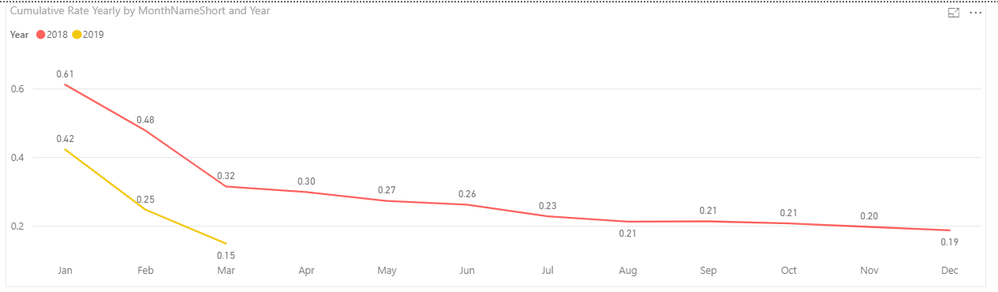
I have been working on this for 2 days now and I can not for the life of me figgure out how to show 2 cumulative rate lines one for 2018 and one for 2019 YTD allong with a third rate line that would be a 10% from 2018. This is what I have for the 2018 and 2019 YTD rates compared, but I can't figure out how to put that goal line.
Solved! Go to Solution.
HI, @Johnrobbinsjr
Based on my research, you could try this way:
Step1:
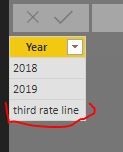
Add a dim year legend table
For example:
Then create the relationship with 'Calendar Work Hours'[Year]
Step2:
Create a new measure like this:
New measure = IF(SELECTEDVALUE('Dim year legend'[Year])="third rate line",[your 10% from 2018 measure] , [Cumulative Rate Yearly] )
Step3:
Drag the new measure into value and year field from dim year legend table into line chart visual.
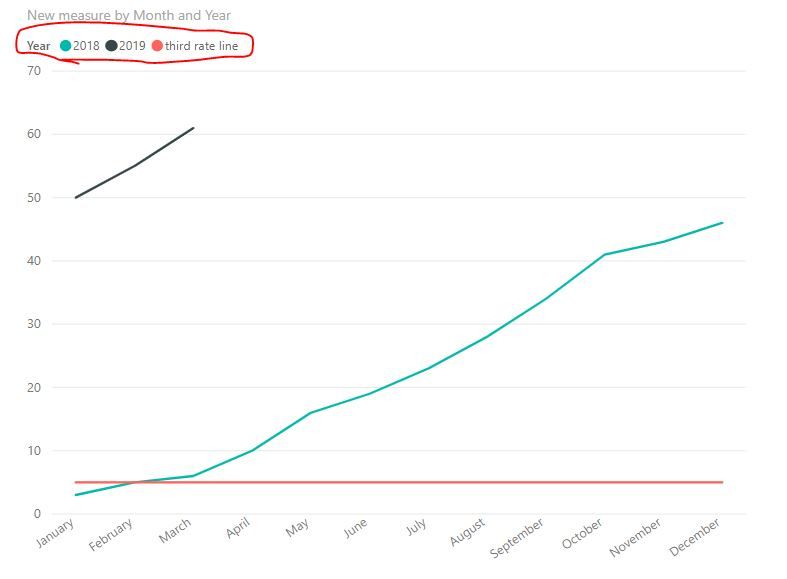
Result:
simple example:
Best Regards,
Lin
HI, @Johnrobbinsjr
Based on my research, you could try this way:
Step1:
Add a dim year legend table
For example:
Then create the relationship with 'Calendar Work Hours'[Year]
Step2:
Create a new measure like this:
New measure = IF(SELECTEDVALUE('Dim year legend'[Year])="third rate line",[your 10% from 2018 measure] , [Cumulative Rate Yearly] )
Step3:
Drag the new measure into value and year field from dim year legend table into line chart visual.
Result:
simple example:
Best Regards,
Lin
A new Power BI DataViz World Championship is coming this June! Don't miss out on submitting your entry.
Share feedback directly with Fabric product managers, participate in targeted research studies and influence the Fabric roadmap.
| User | Count |
|---|---|
| 47 | |
| 35 | |
| 28 | |
| 17 | |
| 16 |
| User | Count |
|---|---|
| 59 | |
| 58 | |
| 40 | |
| 22 | |
| 20 |