Get certified for free when you join Fabric Data Days 2026 and dive into Fabric, Power BI, SQL, AI, and other essential data skills.
Join nowData Days is here! Join us now for 60+ days of learning, challenges, and connection. Learn more
Hello!
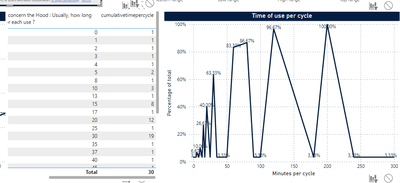
I have some cumulative plots in my dashboard but when I try to filter it does not work.
Every time when there is no data to be added the measure place the minimum value intead of the cumulative value.
This is the measure that I've used:
Solved! Go to Solution.
Hi @Anonymous ,
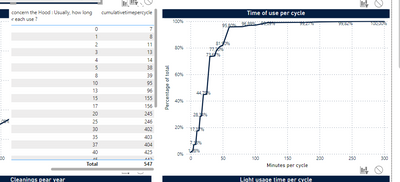
If I understand correctly, it seems that the culmulative values not display correctly when apply the filter. Am I right? Please update the formula of measure [cumulativetimepercycle] as below and check if it can return your expected result...
cumulativetimepercycle =
CALCULATE (
COUNT ( Hood[Time of usage] ),
FILTER (
ALLSELECTED ( 'Hood' ),
Hood[Time of usage] <= SELECTEDVALUE ( Hood[Time of usage] )
)
)
If the above one didn't help you, please provide some raw data in your table 'Hood' with Text format, the filter settings and your expected result with backend logic and special examples. It would be helpful to find out the solution. You can refer the following link to share the required info:
How to provide sample data in the Power BI Forum
And It is better if you can share a simplified pbix file. You can refer the following link to upload the file to the community. Thank you.
How to upload PBI in Community
Best Regards
Hi @Anonymous ,
If I understand correctly, it seems that the culmulative values not display correctly when apply the filter. Am I right? Please update the formula of measure [cumulativetimepercycle] as below and check if it can return your expected result...
cumulativetimepercycle =
CALCULATE (
COUNT ( Hood[Time of usage] ),
FILTER (
ALLSELECTED ( 'Hood' ),
Hood[Time of usage] <= SELECTEDVALUE ( Hood[Time of usage] )
)
)
If the above one didn't help you, please provide some raw data in your table 'Hood' with Text format, the filter settings and your expected result with backend logic and special examples. It would be helpful to find out the solution. You can refer the following link to share the required info:
How to provide sample data in the Power BI Forum
And It is better if you can share a simplified pbix file. You can refer the following link to upload the file to the community. Thank you.
How to upload PBI in Community
Best Regards
Don't miss out on Data Days, June 15 through August 7. Learn Fabric, Power BI, SQL, AI and more.
Check out the May 2026 Power BI update to learn about new features.
| User | Count |
|---|---|
| 23 | |
| 23 | |
| 21 | |
| 20 | |
| 15 |
| User | Count |
|---|---|
| 58 | |
| 53 | |
| 42 | |
| 30 | |
| 24 |