Get certified for free when you join Fabric Data Days 2026 and dive into Fabric, Power BI, SQL, AI, and other essential data skills.
Join nowTry your skills in the Power BI Dataviz World Championship! Round one ends June 26. Join now
Hi,
I have this data
| Type | PoR | Amount | Month |
| A | Real | 5 | 1 |
| A | Real | 4 | 2 |
| A | Real | 5 | 3 |
| A | Real | 8 | 4 |
| A | Real | 9 | 5 |
| A | Plan | 2 | 1 |
| A | Plan | 3 | 2 |
| A | Plan | 6 | 3 |
| A | Plan | 3 | 4 |
| A | Plan | 7 | 5 |
| B | Real | 6 | 1 |
| B | Real | 7 | 2 |
| B | Real | 7 | 3 |
| B | Real | 7 | 4 |
| B | Real | 10 | 5 |
| B | Plan | 5 | 1 |
| B | Plan | 5 | 2 |
| B | Plan | 7 | 3 |
| B | Plan | 8 | 4 |
| B | Plan | 8 | 5 |
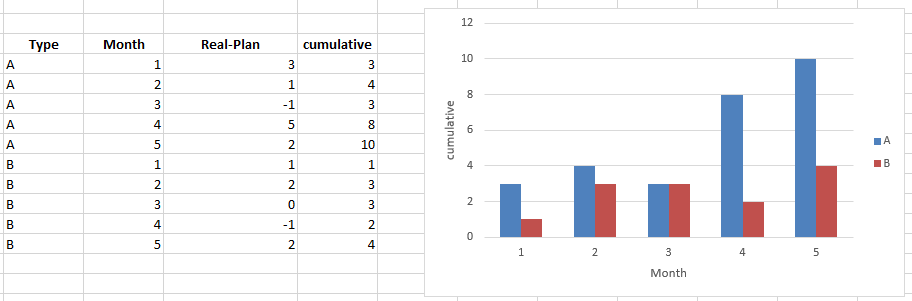
and im trying to create the following graph, that is a cumulative graph for type A and B (real-plan) for each month
Thanks
Solved! Go to Solution.
Hi @rfernandez,
You can achieve this by creating the following measures:
Real-Plan =
CALCULATE ( SUM ( Plan[Amount] ); Plan[PoR] = "Real" )
- CALCULATE ( SUM ( Plan[Amount] ); Plan[PoR] = "Plan" )
Cumulative =
CALCULATE (
SUMX ( Plan; [Real-Plan] );
FILTER ( ALLSELECTED ( Plan[Month] ); Plan[Month] <= MAX ( Plan[Month] ) )
)
Then just use your cumulative measure on your charts.
Although the ansewer by @AnkitBI is good, a good practice is to create a measure instead of calculated columns since they add size to your model and complexity.
This option works both for PBI and for Excel PowerPivot see attach both files with the solutions.
Regards,
MFelix
Regards
Miguel Félix
Proud to be a Super User!
Check out my blog: Power BI em PortuguêsHi,
You may download my PBI file from here.
Hope this helps.
Hi @rfernandez,
You can achieve this by creating the following measures:
Real-Plan =
CALCULATE ( SUM ( Plan[Amount] ); Plan[PoR] = "Real" )
- CALCULATE ( SUM ( Plan[Amount] ); Plan[PoR] = "Plan" )
Cumulative =
CALCULATE (
SUMX ( Plan; [Real-Plan] );
FILTER ( ALLSELECTED ( Plan[Month] ); Plan[Month] <= MAX ( Plan[Month] ) )
)
Then just use your cumulative measure on your charts.
Although the ansewer by @AnkitBI is good, a good practice is to create a measure instead of calculated columns since they add size to your model and complexity.
This option works both for PBI and for Excel PowerPivot see attach both files with the solutions.
Regards,
MFelix
Regards
Miguel Félix
Proud to be a Super User!
Check out my blog: Power BI em PortuguêsPlease find the PBIX PBIX. Hope this Helps. I am using Power Query to get first 3 Output columns and a Calculated Column to get comulative value.
| User | Count |
|---|---|
| 22 | |
| 20 | |
| 19 | |
| 19 | |
| 11 |
| User | Count |
|---|---|
| 61 | |
| 54 | |
| 46 | |
| 44 | |
| 34 |