This time we’re going bigger than ever. Fabric, Power BI, SQL, AI and more. We're covering it all. You won't want to miss it.
Learn moreLevel up your Power BI skills this month - build one visual each week and tell better stories with data! Get started
Hi,
I have this data
| Type | PoR | Amount | Month |
| A | Real | 5 | 1 |
| A | Real | 4 | 2 |
| A | Real | 5 | 3 |
| A | Real | 8 | 4 |
| A | Real | 9 | 5 |
| A | Plan | 2 | 1 |
| A | Plan | 3 | 2 |
| A | Plan | 6 | 3 |
| A | Plan | 3 | 4 |
| A | Plan | 7 | 5 |
| B | Real | 6 | 1 |
| B | Real | 7 | 2 |
| B | Real | 7 | 3 |
| B | Real | 7 | 4 |
| B | Real | 10 | 5 |
| B | Plan | 5 | 1 |
| B | Plan | 5 | 2 |
| B | Plan | 7 | 3 |
| B | Plan | 8 | 4 |
| B | Plan | 8 | 5 |
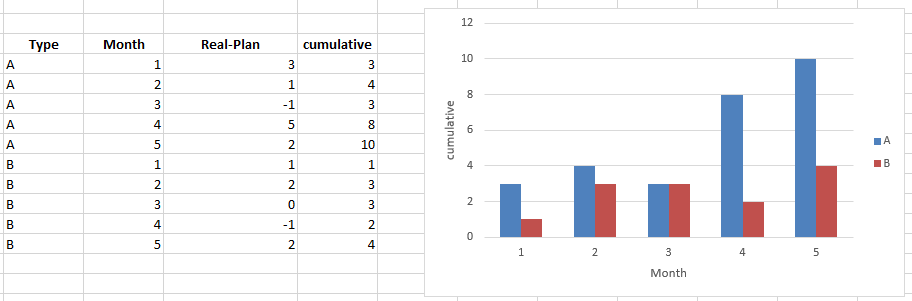
and im trying to create the following graph, that is a cumulative graph for type A and B (real-plan) for each month
Thanks
Solved! Go to Solution.
Hi @rfernandez,
You can achieve this by creating the following measures:
Real-Plan =
CALCULATE ( SUM ( Plan[Amount] ); Plan[PoR] = "Real" )
- CALCULATE ( SUM ( Plan[Amount] ); Plan[PoR] = "Plan" )
Cumulative =
CALCULATE (
SUMX ( Plan; [Real-Plan] );
FILTER ( ALLSELECTED ( Plan[Month] ); Plan[Month] <= MAX ( Plan[Month] ) )
)
Then just use your cumulative measure on your charts.
Although the ansewer by @AnkitBI is good, a good practice is to create a measure instead of calculated columns since they add size to your model and complexity.
This option works both for PBI and for Excel PowerPivot see attach both files with the solutions.
Regards,
MFelix
Regards
Miguel Félix
Proud to be a Super User!
Check out my blog: Power BI em PortuguêsHi,
You may download my PBI file from here.
Hope this helps.
Hi @rfernandez,
You can achieve this by creating the following measures:
Real-Plan =
CALCULATE ( SUM ( Plan[Amount] ); Plan[PoR] = "Real" )
- CALCULATE ( SUM ( Plan[Amount] ); Plan[PoR] = "Plan" )
Cumulative =
CALCULATE (
SUMX ( Plan; [Real-Plan] );
FILTER ( ALLSELECTED ( Plan[Month] ); Plan[Month] <= MAX ( Plan[Month] ) )
)
Then just use your cumulative measure on your charts.
Although the ansewer by @AnkitBI is good, a good practice is to create a measure instead of calculated columns since they add size to your model and complexity.
This option works both for PBI and for Excel PowerPivot see attach both files with the solutions.
Regards,
MFelix
Regards
Miguel Félix
Proud to be a Super User!
Check out my blog: Power BI em PortuguêsPlease find the PBIX PBIX. Hope this Helps. I am using Power Query to get first 3 Output columns and a Calculated Column to get comulative value.
Check out the April 2026 Power BI update to learn about new features.
Sign up to receive a private message when registration opens and key events begin.
If you have recently started exploring Fabric, we'd love to hear how it's going. Your feedback can help with product improvements.
| User | Count |
|---|---|
| 36 | |
| 33 | |
| 31 | |
| 24 | |
| 18 |
| User | Count |
|---|---|
| 66 | |
| 50 | |
| 33 | |
| 24 | |
| 24 |