cancel
Showing results for 
Search instead for 
Did you mean: 

The Power BI Data Visualization World Championships is back! Get ahead of the game and start preparing now! Learn more

Reply
Anonymous
Not applicable

Cumulative completed projects per month/year Line Chart

Hi all,


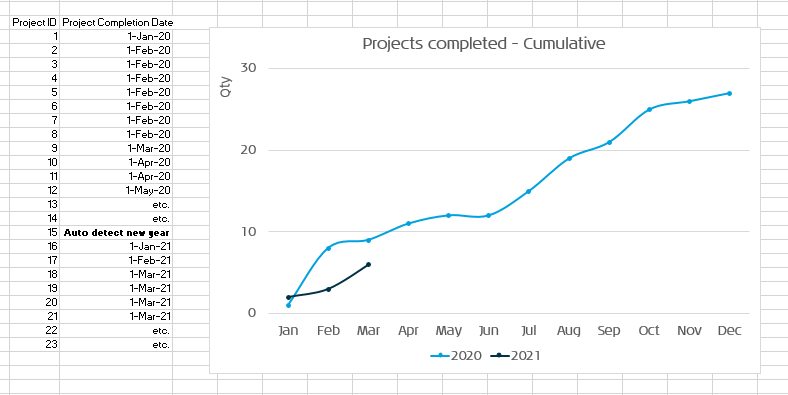
I am relativily new to Power BI and have been trying to reproduce something I made in Excel, see image below:


result.PNG

I saw a similar post (https://community.powerbi.com/t5/Desktop/Compare-cumulative-data-between-years/td-p/112480) that has a solution but I still can't manage to do it and would really appriciate some step by step help here.


Thank you in advance!


Regards, Stefan

4 REPLIES 4
Gabriel_Walkman
Continued Contributor

Hi!


What does your source table look like? What did you try and how did it fail?

Anonymous
Not applicable

Hi Gabriel,


Appreciate your reply, I uploaded my source table and how it fails in my other comment.

amitchandak
Super User
Super User

@Anonymous , Create a date table with Year and Month and month sort.

and use a formula like this

YTD Sales = CALCULATE(SUM(Sales[Sales Amount]),DATESYTD('Date'[Date],"12/31"))


Month on axis , year as legend


column in date table

Month= FORMAT([Date],"mmm")
Month sort = month([Date])


To get the best of the time intelligence function. Make sure you have a date calendar and it has been marked as the date in model view. Also, join it with the date column of your fact/s. Refer :radacad sqlbi My Video Series Appreciate your Kudos.


Share with Power BI Enthusiasts: Full Power BI Video (20 Hours) YouTube
Microsoft Fabric Series 60+ Videos YouTube
Microsoft Fabric Hindi End to End YouTube
Anonymous
Not applicable

@amitchandak Thank you for your quick reply, I did some of the steps you mentioned and still don't get the desired result, probably because I'm still doing something wrong.


Here is what I did:


My raw input test date for this forum

Project ID	Project Completion Date
1	1-Jan-20
2	1-Feb-20
3	1-Feb-20
4	1-Feb-20
5	1-Feb-20
6	1-Feb-20
7	1-Feb-20
8	1-Feb-20
9	1-Mar-20
10	1-Apr-20
11	1-Apr-20
12	1-May-20
13	2-May-20
14	3-May-20
15	4-May-20
16	1-Jun-20
17	1-Jun-20
18	1-Jul-20
19	1-Aug-20
20	1-Sep-20
21	1-Oct-20
22	1-Oct-20
23	1-Oct-20
23	2-Oct-20
25	3-Oct-20
26	4-Oct-20
27	1-Nov-20
28	1-Dec-20
29	1-Jan-21
30	2-Jan-21
31	3-Jan-21
32	4-Jan-21
33	1-Feb-21
34	1-Mar-21
35	1-Apr-21
36	1-May-21
37	2-May-21
38	3-May-21
39	4-May-21
40	1-Jun-21
41	2-Jun-21
42	3-Jun-21
43	4-Jun-21
44	1-Jul-21
45	2-Jul-21
46	3-Jul-21
47	4-Jul-21
48	1-Aug-21
49	1-Aug-21
50	1-Sep-21
51	1-Oct-21
52	1-Nov-21
53	1-Dec-21
54	1-Dec-21
55	1-Jan-22


Then I created a data calendar like in the sqlbi post you shared (thanks!):


1.PNG


As I don't have a 'Sales Amount' that I want to SUM but a (distinct) Count of the completed projects, this is the Measure that I came up with:


YTDprojects = CALCULATE(DISTINCTCOUNT(Sheet1[Project ID]),DATESYTD('Date'[Date],"12/31"))


I think that part is where it goes wrong giving me the following result:
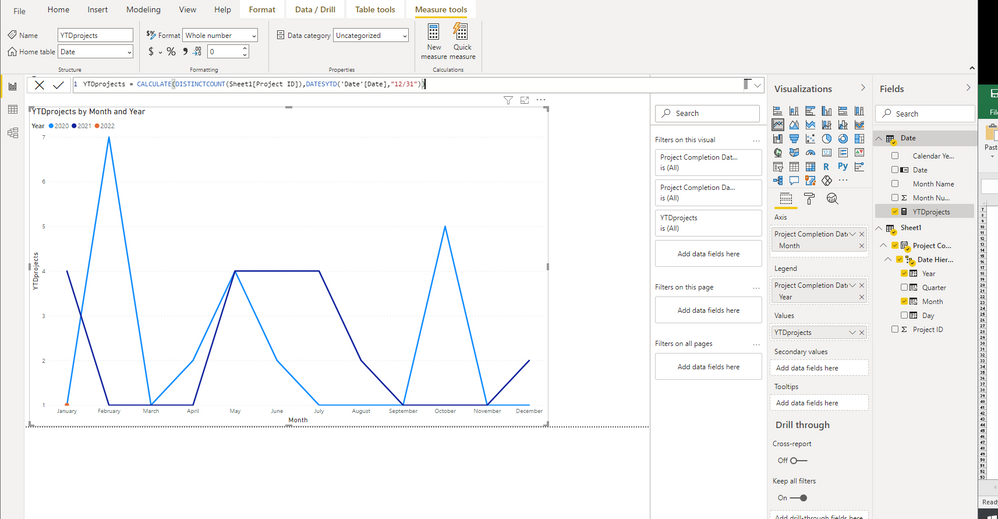
 

2.PNG


Thanks again for your help and please let me know what I'm doing wrong!


Helpful resources

Announcements
Power BI DataViz World Championships

Power BI Dataviz World Championships

The Power BI Data Visualization World Championships is back! Get ahead of the game and start preparing now!

December 2025 Power BI Update Carousel

Power BI Monthly Update - December 2025

Check out the December 2025 Power BI Holiday Recap!

FabCon Atlanta 2026 carousel

FabCon Atlanta 2026

Join us at FabCon Atlanta, March 16-20, for the ultimate Fabric, Power BI, AI and SQL community-led event. Save $200 with code FABCOMM.