Join us in Barcelona for FabCon and SQLCon, September 28 - October 1, 2026.
This is best Fabric, Power BI, SQL and AI community event. How do we know? The last event sold out! Save €200 with code FABCMTY200.
Register now- Power BI forums
- Get Help with Power BI
- Desktop
- Service
- Report Server
- Power Query
- Mobile Apps
- Developer
- DAX Commands and Tips
- Custom Visuals Development Discussion
- Health and Life Sciences
- Power BI Spanish forums
- Translated Spanish Desktop
- Training and Consulting
- Instructor Led Training
- Dashboard in a Day for Women, by Women
- Galleries
- Data Stories Gallery
- Themes Gallery
- Contests Gallery
- QuickViz Gallery
- Quick Measures Gallery
- Visual Calculations Gallery
- Fabric Apps Gallery
- Notebook Gallery
- Translytical Task Flow Gallery
- TMDL Gallery
- R Script Showcase
- Webinars and Video Gallery
- Ideas
- Custom Visuals Ideas (read-only)
- Issues
- Issues
- Events
- Upcoming Events
The Fabric community is upgrading! Read all of the details including the timeline and what you can expect. Learn more
- Power BI forums
- Forums
- Get Help with Power BI
- Desktop
- Re: Cumulative Using Summarized Table
- Subscribe to RSS Feed
- Mark Topic as New
- Mark Topic as Read
- Float this Topic for Current User
- Bookmark
- Subscribe
- Printer Friendly Page


- Mark as New
- Bookmark
- Subscribe
- Mute
- Subscribe to RSS Feed
- Permalink
- Report Inappropriate Content
Cumulative Using Summarized Table
Hello everyone,
First of all, I'll explain what I'm trying to do.
1. Create a Summarized Table with the following columns "Calendar", "Created Tickets", "Closed Tickets", "Daily Open Tickets" (Is the difference between "Created Tickets" - "Closed Tickets") and finnaly "Open Tickets" (Cumulative of Daily Open Tickets).
2. Then to create cumulative, I'm using the before summarized table to do that, but is only returning the same value "39".
There's an example:
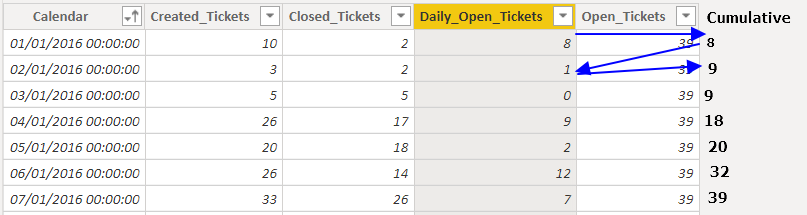
The DAX that I'm using:
Solved! Go to Solution.


- Mark as New
- Bookmark
- Subscribe
- Mute
- Subscribe to RSS Feed
- Permalink
- Report Inappropriate Content
Hi, @HugoJesus
Try to modify the formula as below:
...
.....
VAR LastDay =
    MAX ( Date_Link[Calendar] )
VAR TempTable2 =
    ADDCOLUMNS (
        TempTable,
        "Open_Tickets",
        var _date = [Calendar]
        return
            SUMX(
                FILTER(
                    TempTable,
                    [Calendar]<=_date
                ),
                [Daily_Open_Tickets]
            )
    )
RETURN
    TempTable2
The result will show as below:
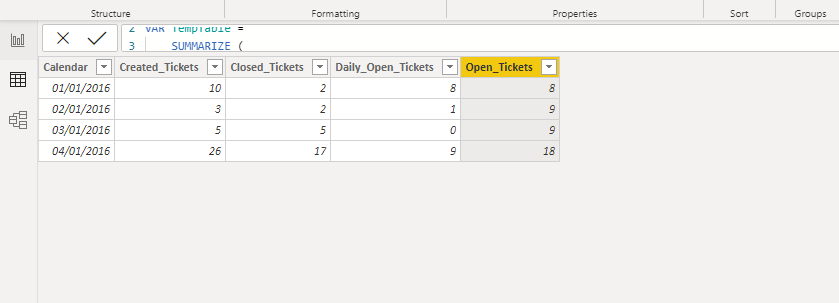
Please check the attached pbix file for more details.
Best Regards,
Community Support Team _ Eason
If this post helps, then please consider Accept it as the solution to help the other members find it more quickly.


- Mark as New
- Bookmark
- Subscribe
- Mute
- Subscribe to RSS Feed
- Permalink
- Report Inappropriate Content
@HugoJesus , In your script of addcolumns .
"Open_Tickets",
CALCULATE
(
SUMX(Filter(TempTable,Date_Link[Calendar] <= earlier(Date_Link[Calendar])),[Daily_Open_Tickets])
)
new column =SUMX(Filter(Total_Open_Tickets ,[Calendar] <= earlier([Calendar])),[Daily_Open_Tickets])
- Mark as New
- Bookmark
- Subscribe
- Mute
- Subscribe to RSS Feed
- Permalink
- Report Inappropriate Content
Sorry, is not working. Give to me the follow error.

- Mark as New
- Bookmark
- Subscribe
- Mute
- Subscribe to RSS Feed
- Permalink
- Report Inappropriate Content
Hi, @HugoJesus
Try to modify the formula as below:
...
.....
VAR LastDay =
    MAX ( Date_Link[Calendar] )
VAR TempTable2 =
    ADDCOLUMNS (
        TempTable,
        "Open_Tickets",
        var _date = [Calendar]
        return
            SUMX(
                FILTER(
                    TempTable,
                    [Calendar]<=_date
                ),
                [Daily_Open_Tickets]
            )
    )
RETURN
    TempTable2
The result will show as below:
Please check the attached pbix file for more details.
Best Regards,
Community Support Team _ Eason
If this post helps, then please consider Accept it as the solution to help the other members find it more quickly.
- Mark as New
- Bookmark
- Subscribe
- Mute
- Subscribe to RSS Feed
- Permalink
- Report Inappropriate Content
Hi @v-easonf-msft,
It is possible to create a Variable, with this code and create x-axis visualizations by date?
Regard's
Hugo Jesus
- Mark as New
- Bookmark
- Subscribe
- Mute
- Subscribe to RSS Feed
- Permalink
- Report Inappropriate Content
Sorry the correct term is "Measure" instead of "Variable".
- Mark as New
- Bookmark
- Subscribe
- Mute
- Subscribe to RSS Feed
- Permalink
- Report Inappropriate Content
Hi @v-easonf-msft ,
This is a different level and my idea is to have the "Open_Tickets" in Area Chart by date.
The code that I'm using is the same that you have sent before, but a little different at the end.
Create a Measure:
At below, as you can see the "Open_Tickets" is the correct value and "Total_Open_Tickets" is the Measure that I've asked for help before, both are different.
The "Total_Open_Tickets" is showing the "Daily_Open_Tickets" instead of cumulative.
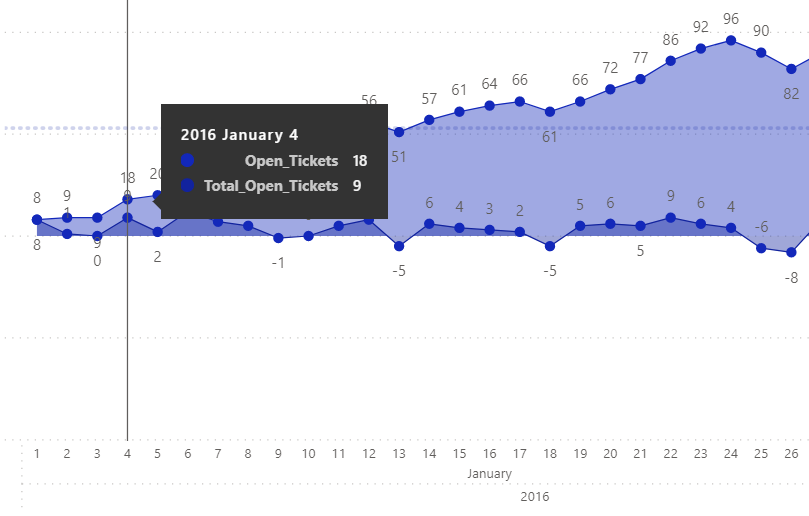
Any idea how to solve this.
Regard's
Hugo Jesus
- Mark as New
- Bookmark
- Subscribe
- Mute
- Subscribe to RSS Feed
- Permalink
- Report Inappropriate Content
Anyone have an idea about this?
Help ...
Regards
Hugo Jesus
- Mark as New
- Bookmark
- Subscribe
- Mute
- Subscribe to RSS Feed
- Permalink
- Report Inappropriate Content
Hi @v-easonf-msft ,
That's a miracle, I searched in many sites, but no one have mentioned something like this.
It works perfectly, this is why I love to share my doubts here in this forum.
Thanks a lot.
Regard's
Hugo Jesus


- Mark as New
- Bookmark
- Subscribe
- Mute
- Subscribe to RSS Feed
- Permalink
- Report Inappropriate Content
Hi @HugoJesus
Please take a look at the following thread: https://community.powerbi.com/t5/Desktop/Cumulative-Total/td-p/43115
- Mark as New
- Bookmark
- Subscribe
- Mute
- Subscribe to RSS Feed
- Permalink
- Report Inappropriate Content
Hi Darentengmfs,
I've already saw that, but is not the same example, because I'm using SUMMARIZE instead of the primary table.
Regards
Hugo Jesus

Helpful resources

FabCon & SQLCon – Barcelona 2026
Join us in Barcelona for FabCon and SQLCon, the Fabric, Power BI, SQL, and AI community event. Save €200 with code FABCMTY200.

Power BI DataViz World Championships - June 2026
A new Power BI DataViz World Championship is coming this June! Don't miss out on submitting your entry.

| User | Count |
|---|---|
| 24 | |
| 22 | |
| 20 | |
| 18 | |
| 14 |


| User | Count |
|---|---|
| 32 | |
| 26 | |
| 23 | |
| 20 | |
| 20 |


