Don't miss your chance to take the Fabric Data Engineer (DP-600) exam for FREE! Find out how by watching the DP-600 session on-demand now through April 28th.
Learn moreJoin the FabCon + SQLCon recap series. Up next: Power BI, Real-Time Intelligence, IQ and AI, and Data Factory take center stage. All sessions are available on-demand after the live show. Register now
Hy,
I had an issue with a latest project for my company. The task was to show the liquidity ratio per month (filtered by the chart of account Id). A formula for calculating the cumulative total was used. I used many variations of the cumulative totals formula which are mentioned even here on the PowerBI community pages. One of them is this one for example:
Cumulative = IF(COUNTROWS(GeneralLedger) > 0, CALCULATE([LiquidityRatio],FILTER(ALL(GeneralLedger[Date]), GeneralLedger[Date]<= MAX(GeneralLedger[Date]))),BLANK())
The filtering of the chart account id was done in the Filters option.
The issue appears when I present the results with a line chart or a area chart. When I use a waterfall chart, the results are suming up as they should, but the line and area chart do not present the data in the desired way. Here is what happens:
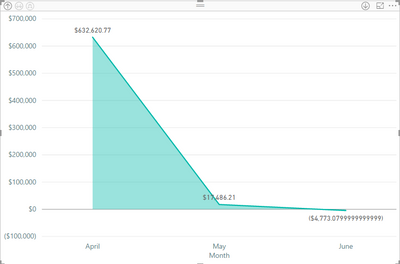
This is an example with a modified data set where just three months are used, April with a liquidity ratio of $632K, May with $17K and june with a negative of -$4.733. As you can see the values are not sumed up (the line is not rising) they are just presented as an apsolute value per month.
Any ideas why is this happening that way?
Solved! Go to Solution.
Hi @Chorri21,
I found your measure worked for me. But I was only working with a very small dataset.
Maybe check your GeneralLedger[Date] column is a date time. Make sure you have the latest version of Power BI.
If that doesn't work, perhaps look to use a date/calendar table to build your measure over.
In any case here is the super simple version using your code.
Thank you @Phil_Seamark for your replay. Well the issue was in the date format which was imported from the server. There was that option GeneralLedger[Date].[Date] which I had to specify in the code and it has worked well.
Greetings
Hi @Chorri21,
I found your measure worked for me. But I was only working with a very small dataset.
Maybe check your GeneralLedger[Date] column is a date time. Make sure you have the latest version of Power BI.
If that doesn't work, perhaps look to use a date/calendar table to build your measure over.
In any case here is the super simple version using your code.
Thank you @Phil_Seamark for your replay. Well the issue was in the date format which was imported from the server. There was that option GeneralLedger[Date].[Date] which I had to specify in the code and it has worked well.
Greetings
Nice work! Well done.
Check out the April 2026 Power BI update to learn about new features.
If you have recently started exploring Fabric, we'd love to hear how it's going. Your feedback can help with product improvements.
A new Power BI DataViz World Championship is coming this June! Don't miss out on submitting your entry.
| User | Count |
|---|---|
| 42 | |
| 37 | |
| 34 | |
| 21 | |
| 16 |
| User | Count |
|---|---|
| 65 | |
| 62 | |
| 31 | |
| 26 | |
| 25 |