- Power BI forums
- Get Help with Power BI
- Desktop
- Service
- Report Server
- Power Query
- Mobile Apps
- Developer
- DAX Commands and Tips
- Custom Visuals Development Discussion
- Health and Life Sciences
- Power BI Spanish forums
- Translated Spanish Desktop
- Training and Consulting
- Instructor Led Training
- Dashboard in a Day for Women, by Women
- Galleries
- Data Stories Gallery
- Themes Gallery
- Contests Gallery
- QuickViz Gallery
- Quick Measures Gallery
- Visual Calculations Gallery
- Notebook Gallery
- Translytical Task Flow Gallery
- TMDL Gallery
- R Script Showcase
- Webinars and Video Gallery
- Ideas
- Custom Visuals Ideas (read-only)
- Issues
- Issues
- Events
- Upcoming Events
Learn from the best! Meet the four finalists headed to the FINALS of the Power BI Dataviz World Championships! Register now
- Power BI forums
- Forums
- Get Help with Power BI
- Desktop
- Re: Cumulative Counts
- Subscribe to RSS Feed
- Mark Topic as New
- Mark Topic as Read
- Float this Topic for Current User
- Bookmark
- Subscribe
- Printer Friendly Page

- Mark as New
- Bookmark
- Subscribe
- Mute
- Subscribe to RSS Feed
- Permalink
- Report Inappropriate Content
Cumulative Counts
Hello,
I am dealing with a dataset for a hotel and I am trying to create a graph that shows the ramp up of reservations made for a certain date (usually a holiday).
I have created a measure (Cumulative_Count) that is supposed to count the number of cumulative reservations prior to a set date. For example, as of 6/30/19, how many reservations do I have for 7/04/19. As of now I can not get the measure to "ramp" up to the total count, it is just showing me the grand total of reservations for the target date and resulting in a flat line. I have read many threads on this topic but can not get it to work.
I have created a sample pbix file with the measure as well as a example excel document to show the expected result. They can be downloaded at this link: https://www.dropbox.com/sh/y0lvjyzcnq7iygz/AABedKjIVopWFsaHLhW9r9a4a?dl=0
Any help is much appreciated.
Solved! Go to Solution.


- Mark as New
- Bookmark
- Subscribe
- Mute
- Subscribe to RSS Feed
- Permalink
- Report Inappropriate Content
HI @Anonymous ,
You can download my proposed solution from here.
Here is the DAX formula I propose for it:
Cumulative_Count 2 =
var currentDate = MAX('Reservations'[res_created_at_date])

return CALCULATE(COUNTROWS(FILTER('Reservations','Reservations'[res_created_at_date]<=currentDate)), ALL('Reservations'[res_created_at_date].[Month], 'Reservations'[res_created_at_date].[MonthNo], 'Reservations'[res_created_at_date].[Day]))
Let me know if that works for you.
LC
Interested in Power BI and DAX templates? Check out my blog at www.finance-bi.com
- Mark as New
- Bookmark
- Subscribe
- Mute
- Subscribe to RSS Feed
- Permalink
- Report Inappropriate Content
HI @Anonymous ,
You can download my proposed solution from here.
Here is the DAX formula I propose for it:
Cumulative_Count 2 =
var currentDate = MAX('Reservations'[res_created_at_date])

return CALCULATE(COUNTROWS(FILTER('Reservations','Reservations'[res_created_at_date]<=currentDate)), ALL('Reservations'[res_created_at_date].[Month], 'Reservations'[res_created_at_date].[MonthNo], 'Reservations'[res_created_at_date].[Day]))
Let me know if that works for you.
LC
Interested in Power BI and DAX templates? Check out my blog at www.finance-bi.com
- Mark as New
- Bookmark
- Subscribe
- Mute
- Subscribe to RSS Feed
- Permalink
- Report Inappropriate Content
Thank you @lc_finance,
Yes, that formula does appear to work. Can you expand on why you used the [.Month], [.Day] tags after the columns name. Normally I only need to name the column and do not need to specify those items. Could this be why my graph does not act like other I have used? Normally I can see everyday when I move my mouse over a graph and click on the specific day to drill down. The chart in your example appears to only be able to do months.
Thank you for the continued help.
- Mark as New
- Bookmark
- Subscribe
- Mute
- Subscribe to RSS Feed
- Permalink
- Report Inappropriate Content
Hi @Anonymous ,
The need for specifying [.Month], [.Day] is because Power BI 'derives' multiple columns from a Date column.
These 'derived' columns are Month, Day, Year, Quarter, etc. These additional columns allow you to filter by days, month, quarter, etc when you have a Date column.
Now back to your request: as you want to show all reservations made prior to a certain date, I had to remove the filter on Dates.
If I did not remove the filter on Dates, you would see on June 15 only reservation made on June 15, on June 16 only reservation made on the 16, etc. I removed them using ALL, and I had to apply ALL to the different 'derived' columns as above.
Does this help you?
LC
Interested in Power BI and DAX templates? Check out my blog at www.finance-bi.com
- Mark as New
- Bookmark
- Subscribe
- Mute
- Subscribe to RSS Feed
- Permalink
- Report Inappropriate Content
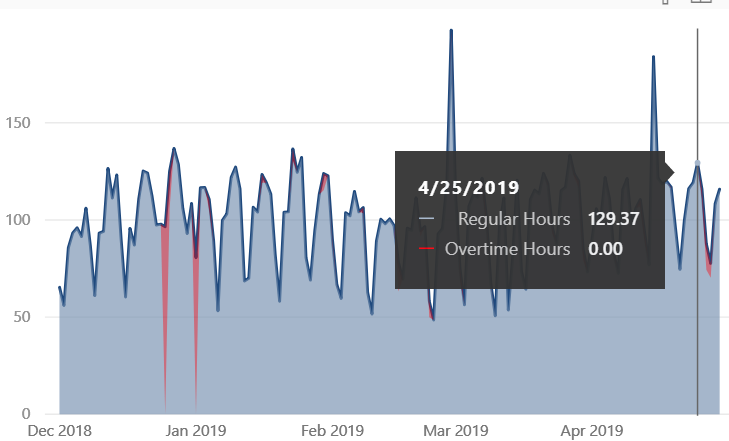
Thanks @lc_finance. Yes that helps. I did not know that about the column treatment for dates. So how would go about having a graph like the below which allows me to mouse over specific calender days to see the metrics. The x-axis still shows months and years, but I can also mouse over specific days. My current graph works different. I can only have month, quarters, days, but not all at once, which causes the graph to not be very flexible.
Thank you again for your help.
- Mark as New
- Bookmark
- Subscribe
- Mute
- Subscribe to RSS Feed
- Permalink
- Report Inappropriate Content
Hi @Anonymous ,
Sorry for the late reply, and I am glad that it helped you.
The chart in your screenshot is from Power BI? If yes, can you share a sample of it?
I will be happy to look into that for you,
LC
Helpful resources

Join our Fabric User Panel
Share feedback directly with Fabric product managers, participate in targeted research studies and influence the Fabric roadmap.

Power BI Monthly Update - February 2026
Check out the February 2026 Power BI update to learn about new features.

| User | Count |
|---|---|
| 55 | |
| 43 | |
| 32 | |
| 16 | |
| 13 |


| User | Count |
|---|---|
| 84 | |
| 72 | |
| 37 | |
| 27 | |
| 24 |


