cancel
Showing results for 
Search instead for 
Did you mean: 

The Power BI Data Visualization World Championships is back! Get ahead of the game and start preparing now! Learn more

Reply
Anonymous
Not applicable

Cumulate difference between each months

Trying to write a measure to calculate the cumulative difference between months.


For example, I'm working with the data below.

Yearmonth     Sales

2020/01/01    10

2020/02/01    15

2020/03/01    14

2020/04/01    11

Total               50


Then each month difference is 5, -1, -3 and cumulative total difference is 1 (5+ -1 + -2).


Can you please help me to figure out how to get the total (i.e. 1)?


Thanks!

1 ACCEPTED SOLUTION
Anonymous
Not applicable

Hi @Anonymous ,

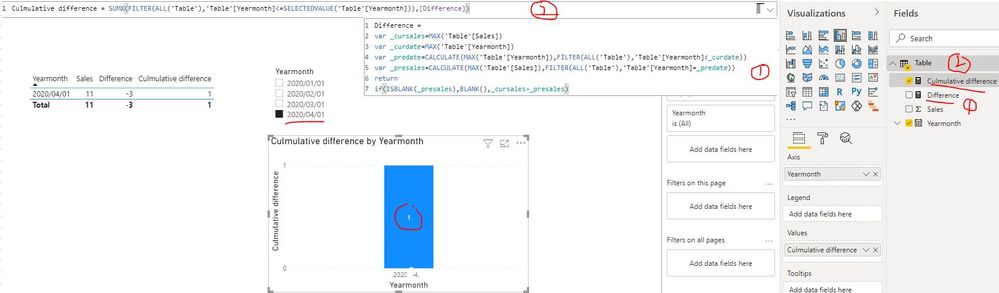
I created a sample pbix file for you(see attachment) base on your requirement, please check whether that is what you want.

Difference = 
var _cursales=MAX('Table'[Sales])
var _curdate=MAX('Table'[Yearmonth])
var _predate=CALCULATE(MAX('Table'[Yearmonth]),FILTER(ALL('Table'),'Table'[Yearmonth]<_curdate))
var _presales=CALCULATE(MAX('Table'[Sales]),FILTER(ALL('Table'),'Table'[Yearmonth]=_predate))
return 
if(ISBLANK(_presales),BLANK(),_cursales-_presales)
Culmulative difference = SUMX(FILTER(ALL('Table'),'Table'[Yearmonth]<=SELECTEDVALUE('Table'[Yearmonth])),[Difference])

Cumulate difference between each months.JPG

Best Regards
Rena
Community Support Team _ Rena Ruan
If this post helps, then please consider Accept it as the solution to help the other members find it more.

View solution in original post

3 REPLIES 3
Anonymous
Not applicable

Hi @Anonymous 


You can try some thing similar to below:

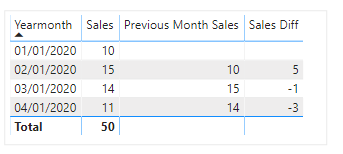
Previous Month Sales = CALCULATE(sum('Table'[Sales]),ALL('Table'),PREVIOUSMONTH('Table'[Yearmonth ]))
Sales Diff = IF(ISBLANK([Previous Month Sales]),BLANK(),sum('Table'[Sales]) - [Previous Month Sales]) 


Capture.PNG


Thanks

Manoj

Anonymous
Not applicable

Thank you for the help! I created two measures and it gives me a difference for each month. However, I can't seem to add the difference to get total 1.

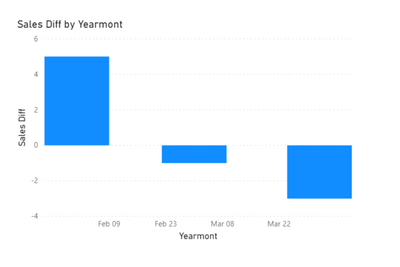
Below is a bar chart using the measure.

kbae_0-1603835117637.png

I would like a cumulated difference bar chart. For example, if I select 04/01/2020, I would like the bar chart to show 1. But it's showing -3, just a difference between March and April.

kbae_1-1603835268670.png


Can you please help?


Anonymous
Not applicable

Hi @Anonymous ,

I created a sample pbix file for you(see attachment) base on your requirement, please check whether that is what you want.

Difference = 
var _cursales=MAX('Table'[Sales])
var _curdate=MAX('Table'[Yearmonth])
var _predate=CALCULATE(MAX('Table'[Yearmonth]),FILTER(ALL('Table'),'Table'[Yearmonth]<_curdate))
var _presales=CALCULATE(MAX('Table'[Sales]),FILTER(ALL('Table'),'Table'[Yearmonth]=_predate))
return 
if(ISBLANK(_presales),BLANK(),_cursales-_presales)
Culmulative difference = SUMX(FILTER(ALL('Table'),'Table'[Yearmonth]<=SELECTEDVALUE('Table'[Yearmonth])),[Difference])

Cumulate difference between each months.JPG

Best Regards
Rena
Community Support Team _ Rena Ruan
If this post helps, then please consider Accept it as the solution to help the other members find it more.

Helpful resources

Announcements
Power BI DataViz World Championships

Power BI Dataviz World Championships

The Power BI Data Visualization World Championships is back! Get ahead of the game and start preparing now!

December 2025 Power BI Update Carousel

Power BI Monthly Update - December 2025

Check out the December 2025 Power BI Holiday Recap!

FabCon Atlanta 2026 carousel

FabCon Atlanta 2026

Join us at FabCon Atlanta, March 16-20, for the ultimate Fabric, Power BI, AI and SQL community-led event. Save $200 with code FABCOMM.