
Join us at FabCon Atlanta from March 16 - 20, 2026, for the ultimate Fabric, Power BI, AI and SQL community-led event. Save $200 with code FABCOMM.
Register now!The Power BI Data Visualization World Championships is back! Get ahead of the game and start preparing now! Learn more
Hi,
My Power BI is connected to a database containing information on movies as per below.
My request is simple: how can I display in a single pie chart the proportion of movies by genre, cumulating the Genre1 and Genre2 ?
Thank you for your help,
Alexandre.
Solved! Go to Solution.
Hi @AlCado
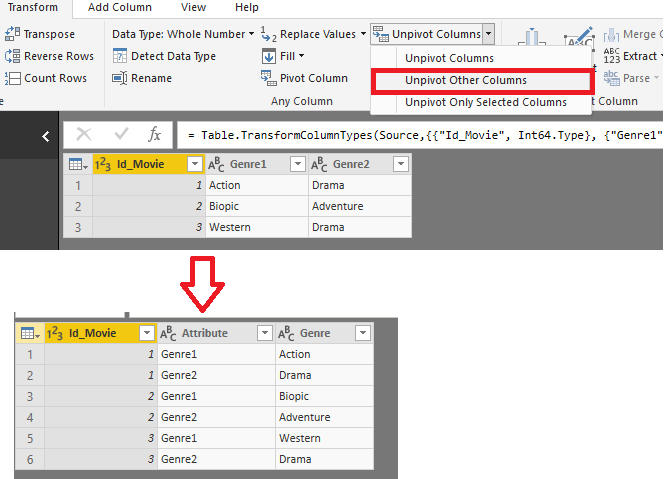
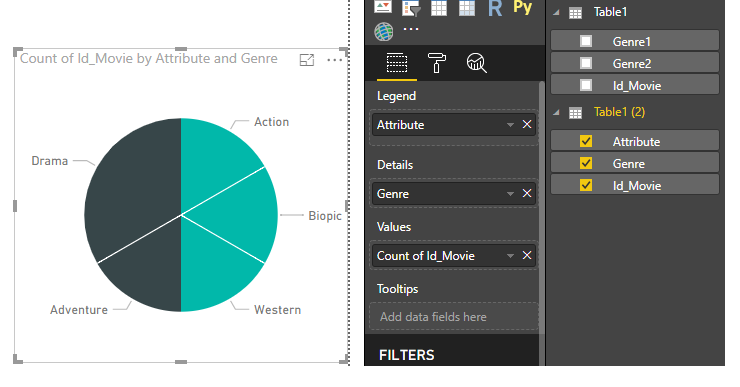
You may use 'Unpivot other column' in Query Editor first. Then you may get the pie chart as below.
Regards,
Cherie
Hi @AlCado
You may use 'Unpivot other column' in Query Editor first. Then you may get the pie chart as below.
Regards,
Cherie
Thank you both very much it's exactly what I needed !
You need to create a new column
CumulativeGenre = CONCATENATE ( Movies[Genre1] & ", ", Movies[Genre2] )
Now use the Pie Chart as usual.
The Power BI Data Visualization World Championships is back! Get ahead of the game and start preparing now!
| User | Count |
|---|---|
| 41 | |
| 38 | |
| 36 | |
| 31 | |
| 28 |
| User | Count |
|---|---|
| 129 | |
| 88 | |
| 79 | |
| 68 | |
| 63 |