
Join us at FabCon Atlanta from March 16 - 20, 2026, for the ultimate Fabric, Power BI, AI and SQL community-led event. Save $200 with code FABCOMM.
Register now!Get Fabric Certified for FREE during Fabric Data Days. Don't miss your chance! Request now
Hi,
My Power BI is connected to a database containing information on movies as per below.
My request is simple: how can I display in a single pie chart the proportion of movies by genre, cumulating the Genre1 and Genre2 ?
Thank you for your help,
Alexandre.
Solved! Go to Solution.
Hi @AlCado
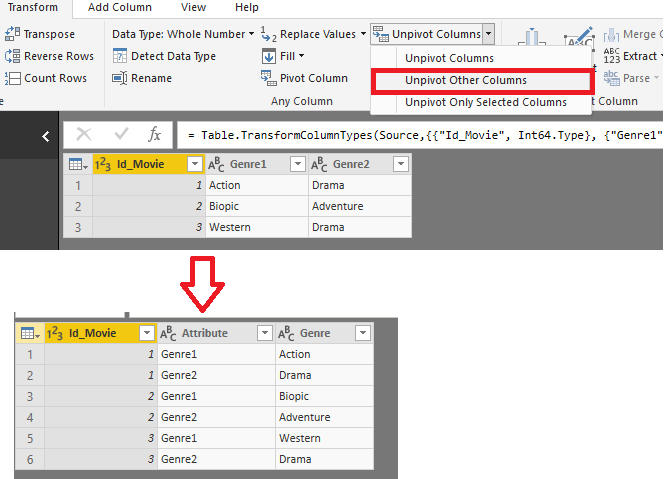
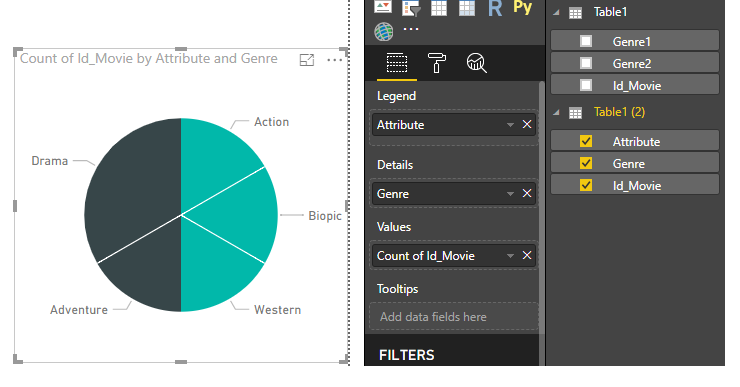
You may use 'Unpivot other column' in Query Editor first. Then you may get the pie chart as below.
Regards,
Cherie
Hi @AlCado
You may use 'Unpivot other column' in Query Editor first. Then you may get the pie chart as below.
Regards,
Cherie
Thank you both very much it's exactly what I needed !
You need to create a new column
CumulativeGenre = CONCATENATE ( Movies[Genre1] & ", ", Movies[Genre2] )
Now use the Pie Chart as usual.
Check out the November 2025 Power BI update to learn about new features.
Advance your Data & AI career with 50 days of live learning, contests, hands-on challenges, study groups & certifications and more!