cancel
Showing results for 
Search instead for 
Did you mean: 

The FabCon + SQLCon recap series starts April 14th at 8am Pacific. If you’re tracking where AI is going inside Fabric, this first session is a can't miss. Register now

Reply
patoduck
Helper III
Helper III

Creating lists / tables for AB testing

Imagine you are working for a company that have, let's say  it has 10 branches. Your task is to create lists for A/B testing, so you need to prepare a new colum classifies customers in category A or B.  (Group by Bank)


So you can have a table like this.

In an Ideal world you will have even number of customer, so for eks 80 can be divided in 40 A and 40 B, but in reallity odd figures will appear so for eks 81, then it will be 40 A and 41 B.


BankKundeAB Test
A1A
A2B
A3A
A4B
A5A
A6B
A7A
A8B
A9A
A10B
A11A
A12B
A13A
A14B
A15A
A16B
B1A
B2B
B3A
B4B
B5A
B6B
B7A
B8B
B9A
B10B
B11A
B12B
B13A


1 ACCEPTED SOLUTION
Mariusz
Community Champion
Community Champion

Hi @patoduck 


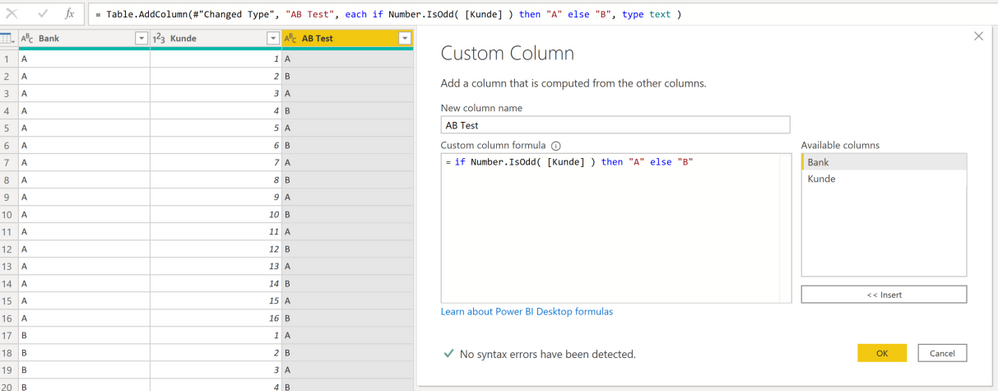
Sorry but I'm not sure if I understand your requirement, are you looking to create a column that alternates between a and b?
If so please consider the below solution.

=if Number.IsOdd( [Kunde] ) then "A" else "B"


image.png

Best Regards,
Mariusz

If this post helps, then please consider Accepting it as the solution.

Please feel free to connect with me.
LinkedIn


View solution in original post

2 REPLIES 2
Mariusz
Community Champion
Community Champion

Hi @patoduck 


Sorry but I'm not sure if I understand your requirement, are you looking to create a column that alternates between a and b?
If so please consider the below solution.

=if Number.IsOdd( [Kunde] ) then "A" else "B"


image.png

Best Regards,
Mariusz

If this post helps, then please consider Accepting it as the solution.

Please feel free to connect with me.
LinkedIn


At the end i did it on SQL rank () over (partition by Banknr order by CustomerNr ) as ranking and then use a  CASE with (ranking % 2) <> 0 to find odd and even numbers.


In Power BI you can do it by creating an index Group By  and then as suggested by Marius use 

Number.IsOdd  =if Number.IsOdd( [Kunde] ) then "A" else "B"


Helpful resources

Announcements
New to Fabric survey Carousel

New to Fabric Survey

If you have recently started exploring Fabric, we'd love to hear how it's going. Your feedback can help with product improvements.

Power BI DataViz World Championships carousel

Power BI DataViz World Championships - June 2026

A new Power BI DataViz World Championship is coming this June! Don't miss out on submitting your entry.

Join our Fabric User Panel

Join our Fabric User Panel

Share feedback directly with Fabric product managers, participate in targeted research studies and influence the Fabric roadmap.

March Power BI Update Carousel

Power BI Community Update - March 2026

Check out the March 2026 Power BI update to learn about new features.