cancel
Showing results for 
Search instead for 
Did you mean: 

The Power BI Data Visualization World Championships is back! Get ahead of the game and start preparing now! Learn more

Reply
Viola
Frequent Visitor

waffle chart with survey responses

Hello everyone, 

I am currently trying to display my survey results using waffle chart. My responses are in text format therefore i need to add a new coulmn that will calculate the values of each response, what is the formula for that? I have tried several and nothing works, i am able to calculate one value at the time, when adding new measure to the same column i get an error? Anyone know how to solve that issue ? 

I would higly appreaciate as i am stuck with it 2nd day already:( 

1 ACCEPTED SOLUTION
v-haibl-msft
Microsoft Employee
Microsoft Employee

@Viola


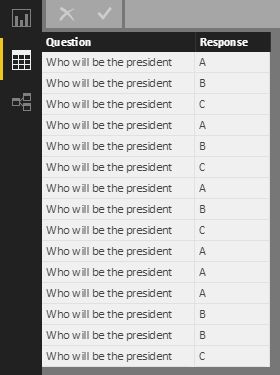
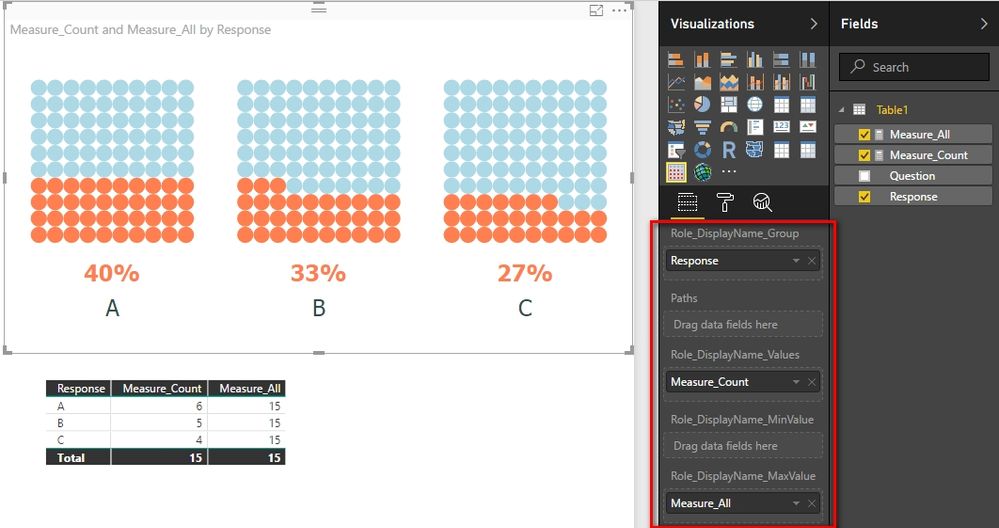
I do not know about your data table, so I create a test table like below. In such scenario, we can create two measures to calcuate the responses for each type and all types.


Measure_Count = 
CALCULATE ( COUNTROWS ( Table1 ), ALLEXCEPT ( Table1, Table1[Response] ) )
Measure_All = 
CALCULATE ( COUNTROWS ( Table1 ), ALL ( Table1 ) )


waffle chart with survey responses_1.jpg


waffle chart with survey responses_2.jpg


Best Regards,
Herbert

View solution in original post

4 REPLIES 4
v-haibl-msft
Microsoft Employee
Microsoft Employee

@Viola


I do not know about your data table, so I create a test table like below. In such scenario, we can create two measures to calcuate the responses for each type and all types.


Measure_Count = 
CALCULATE ( COUNTROWS ( Table1 ), ALLEXCEPT ( Table1, Table1[Response] ) )
Measure_All = 
CALCULATE ( COUNTROWS ( Table1 ), ALL ( Table1 ) )


waffle chart with survey responses_1.jpg


waffle chart with survey responses_2.jpg


Best Regards,
Herbert

Anonymous
Not applicable

@v-haibl-msft 

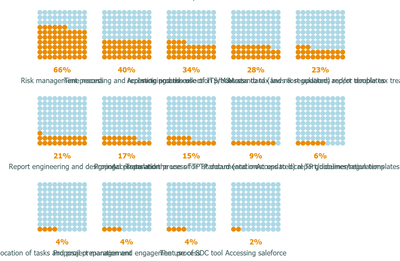
The text under each waffle chart is overlapping, please see the below image. Are there any solutions to this please?Waffle chart.PNG

Excellent! Thank you so much! That is exactly what i was looking for.

@Viola


You can mark the right answer as solution so that others who have the same problem can find the correct solution quickly.


Best Regards,
Herbert

Helpful resources

Announcements
Power BI DataViz World Championships

Power BI Dataviz World Championships

The Power BI Data Visualization World Championships is back! Get ahead of the game and start preparing now!

December 2025 Power BI Update Carousel

Power BI Monthly Update - December 2025

Check out the December 2025 Power BI Holiday Recap!

FabCon Atlanta 2026 carousel

FabCon Atlanta 2026

Join us at FabCon Atlanta, March 16-20, for the ultimate Fabric, Power BI, AI and SQL community-led event. Save $200 with code FABCOMM.