Join us at FabCon Atlanta from March 16 - 20, 2026, for the ultimate Fabric, Power BI, AI and SQL community-led event. Save $200 with code FABCOMM.
Register now!The Power BI Data Visualization World Championships is back! Get ahead of the game and start preparing now! Learn more
Hi, this should be fairly easy, but I am a beginner!
My data has hire month for employees,
Example
| Employee | Hire date | Other filter |
| Worker 1 | 01/02/2022 | Filled |
| Worker 2 | 01/02/2022 | Accepted |
| Worker 3 | 02/11/2022 | Filled |
| Worker 4 | 03/22/2022 | Filled |
| Worker 5 | 03/25/2022 | Filled |
What I need is to show is Total Head Count measure.. for Jan = 102, Feb = 103, Mar = 105 (so it adding number of hires from previous months)
I have a DateDim table... (if that's useful?)
Also, what if I want to calculate only the ones that are (Filled)?
Thank you in advance!
@amitchandak thank you for your quick response..
I do not have termination date, and I tried your calculation like this:
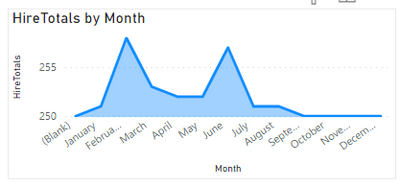
HireTotals = CALCULATE(Count('Table'[Hire date]),filter(DimDate,DimDate[Date] <=maxx(DimDate,DimDate[Date]))) + [initial Emp]
And I got this (total by month) not the (total year to date) = adding totals per month
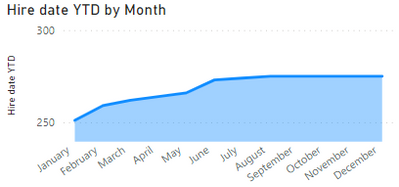
I tried to use the quick measure function to measure YTD and it came up with this expression
Any thoughts?
Thank you!
@NovWor , if we have hire and termination date both then we use, log like the one here
else we use logic like
[Intial Emp] + CALCULATE(Count(Hire[EmpID]),filter(date,date[date] <=maxx(date,date[date]))) - CALCULATE(SUM(leaver[leaver]),filter(date,date[date] <=maxx(date,date[date])))
Check out the November 2025 Power BI update to learn about new features.
Advance your Data & AI career with 50 days of live learning, contests, hands-on challenges, study groups & certifications and more!
| User | Count |
|---|---|
| 58 | |
| 45 | |
| 40 | |
| 21 | |
| 18 |