Join us at FabCon Atlanta from March 16 - 20, 2026, for the ultimate Fabric, Power BI, AI and SQL community-led event. Save $200 with code FABCOMM.
Register now!The Power BI Data Visualization World Championships is back! Get ahead of the game and start preparing now! Learn more
Hello,
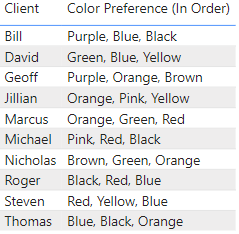
I am having an issue creating a filter that will let me filter items with mulitple values in a column separated by commas. Here is an example of the table I am using:
I want this filter to be able to show names based on a color, with that color being in any of the three positions. For instance, If I were to click Blue I would want it to filter to Bill, David, Roger, Steven and Thomas as they all have blue somewhere in their color preference.
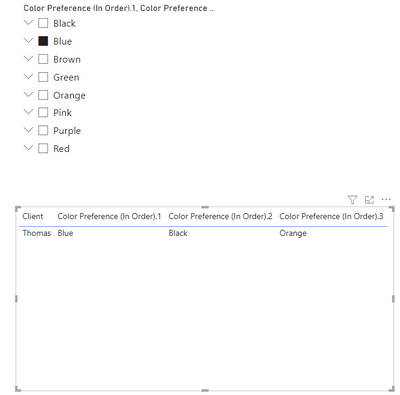
I have tried approaching this a few different ways. I have tried splitting the columns by delimeter into separate columns. The problem when I do that is the filter will only recognize the first entry so if I were to click Blue only Thomas would show up. Also I still only want one column for Color Preference and this splits Color Preference into 3 columns:
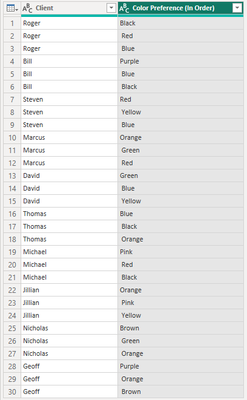
I have also tried using the delimeter to split them into multiple rows but then the issue becomes I have multiple rows repeating the same persons name:
Is there anyway to create the filter I need?
Solved! Go to Solution.
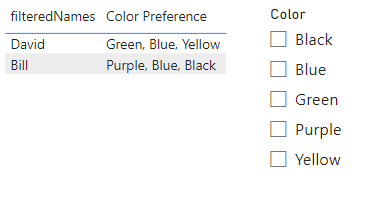
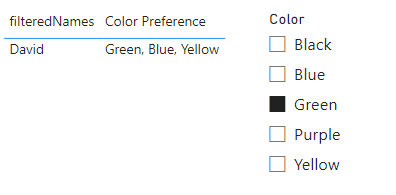
One way to approach it would be to create a second table with your colors, but do not relate it to the original table. Use this table as the filter.
Create a measure that looks for the selected value in the color table and and then looks in the color preference column for that value.
filteredNames =
var _selectedColor =
IF(
HASONEVALUE(colors[Color]),
SELECTEDVALUE(colors[Color])
)
var _nameCalc =
CALCULATE(
MIN('Table'[Name]),
FILTER('Table', CONTAINSSTRING('Table'[Color Preference], _selectedColor))
)
Return
_nameCalc
As long as you keep the color preference column in your table you will get the result you are looking for.
Proud to be a Super User! | |
One way to approach it would be to create a second table with your colors, but do not relate it to the original table. Use this table as the filter.
Create a measure that looks for the selected value in the color table and and then looks in the color preference column for that value.
filteredNames =
var _selectedColor =
IF(
HASONEVALUE(colors[Color]),
SELECTEDVALUE(colors[Color])
)
var _nameCalc =
CALCULATE(
MIN('Table'[Name]),
FILTER('Table', CONTAINSSTRING('Table'[Color Preference], _selectedColor))
)
Return
_nameCalc
As long as you keep the color preference column in your table you will get the result you are looking for.
Proud to be a Super User! | |
The Power BI Data Visualization World Championships is back! Get ahead of the game and start preparing now!
Check out the November 2025 Power BI update to learn about new features.
| User | Count |
|---|---|
| 66 | |
| 46 | |
| 42 | |
| 26 | |
| 19 |
| User | Count |
|---|---|
| 193 | |
| 124 | |
| 101 | |
| 67 | |
| 49 |