cancel
Showing results for 
Search instead for 
Did you mean: 

July 7 - July 17 | Round 2 of the Power BI Dataviz World Championships. Don't miss your chance! Learn more

Reply
KellyLen
Helper III
Helper III

Creating durations

Hello,


I am having difficulties with creating durations. I have different date columns and I would like to calculate durations between them. 

For example three columns, which are in date/time format:

image.png


I would like to get durations, how much there has been time between scanning date and basic data changed time, basic data changed time and posting data changed time etc. 

I have tried to do this in Query Editor with simple formula basic data changed - scanning date, but this does not allow me to get data type duration and it cannot be used for making conclusions - averages, totals etc. I would like to get conclusions in days, hours and minutes. 


Kindly waiting for your help,

Kelly 

6 REPLIES 6
v-xjiin-msft
Solution Sage
Solution Sage

Hi @KellyLen,


To achieve your requirement, you can try Power Query functions. Please refer:


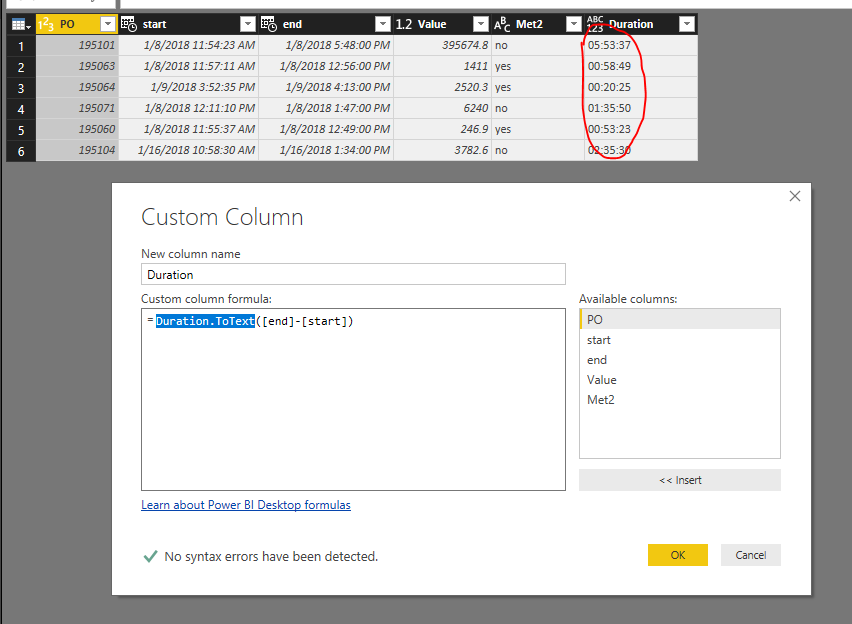
1. Duration.ToText() function:


1.PNG


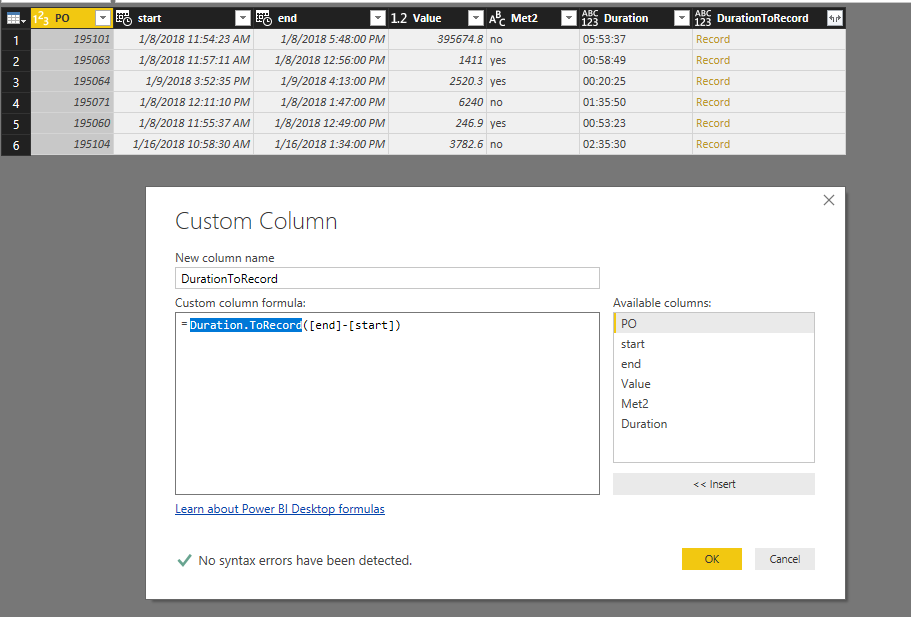
2. Duration.ToRecord() function. And expand columns.


2.PNG


Thanks,
Xi Jin.


Hello,


Duration.ToText does not allow me to make conclusions afterwards in visuals. E.g. there is not possible to take average time or make sums based on some other column's values. 

Duration.ToRecord gives me too many separate columns, which are not even taking into consideration the previous columns- for example, if I choose to show only hours, then it does not convert the days or minutes into it. And if I have like 10 different durations, then I would have 10 different days columns, 10 different hours columns..


This seems so messy, is not there any better solution? 😕


Thanks,

Kelly 

Hi @KellyLen,


With Duration.ToText, you can use following DAX expression to calculate the Average or Sum in measures:


SumDuration =
VAR TotalSeconds =
    SUMX (
        'Table4',
        HOUR ( 'Table4'[Duration] ) * 3600
            + MINUTE ( 'Table4'[Duration] ) * 60
            + SECOND ( 'Table4'[Duration] )
    )
VAR Days =
    TRUNC ( TotalSeconds / 3600 / 24 )
VAR Hors =
    TRUNC ( ( TotalSeconds - Days * 3600 * 24 ) / 3600 )
VAR Mins =
    TRUNC ( MOD ( TotalSeconds, 3600 ) / 60 )
VAR Secs =
    MOD ( TotalSeconds, 60 )
RETURN
    IF ( DAYS = 0, "", IF ( DAYS > 1, DAYS & "days ", Days & "day" ) )
        & IF ( Hors < 10, "0" & Hors, Hors )
        & ":"
        & IF ( Mins < 10, "0" & Mins, Mins )
        & ":"
        & IF ( Secs < 10, "0" & Secs, Secs )
AvgDuration =
VAR TotalSeconds =
    AVERAGEX (
        'Table4',
        HOUR ( 'Table4'[Duration] ) * 3600
            + MINUTE ( 'Table4'[Duration] ) * 60
            + SECOND ( 'Table4'[Duration] )
    )
VAR Days =
    TRUNC ( TotalSeconds / 3600 / 24 )
VAR Hors =
    TRUNC ( ( TotalSeconds - Days * 3600 * 24 ) / 3600 )
VAR Mins =
    TRUNC ( MOD ( TotalSeconds, 3600 ) / 60 )
VAR Secs =
    MOD ( TotalSeconds, 60 )
RETURN
    IF ( DAYS = 0, "", IF ( DAYS > 1, DAYS & "days ", Days & "day" ) )
        & IF ( Hors < 10, "0" & Hors, Hors )
        & ":"
        & IF ( Mins < 10, "0" & Mins, Mins )
        & ":"
        & IF ( Secs < 10, "0" & Secs, Secs )

With Duration.ToRecord, you can combine those columns to make them display in one column like:


Detail Duration =
Table4[DurationToRecord.Days] & " days "
    & Table4[DurationToRecord.Hours]
    & " hours "
    & Table4[DurationToRecord.Minutes]
    & " minutes "
    & Table4[DurationToRecord.Seconds]
    & " seconds "
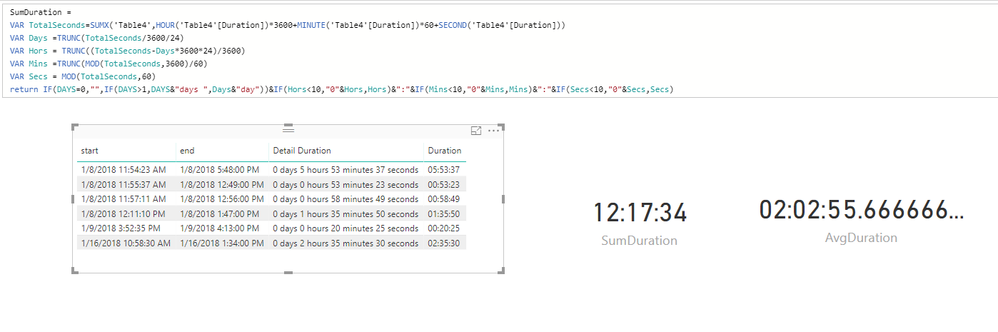
1.PNG


Thanks,
Xi Jin.

Zubair_Muhammad
Community Champion
Community Champion

Hi,


This basically works, but allows me to present only one value in one column - the days or hours or minutes or etc. But if I would like to present days and hours and minutes ? 


Best regards,

Kelly 

Hi,


Now turned out that the DATEDIFF is not working for me as well. I have different dates in columns and some of the start date column values are after end dates, so the function is not working.. 😞 


Please help. 🙂 

Helpful resources

Announcements
FabCon and SQLCon Barcelona 2026

FabCon & SQLCon – Barcelona 2026

Join us in Barcelona for FabCon and SQLCon, the Fabric, Power BI, SQL, and AI community event. Save €200 with code FABCMTY200.

60 days of Data Days Carousel

Data Days 2026

Join Fabric Data Days 2026: 60 days of free live/on-demand sessions, challenges, study groups, and certification opportunities.

Power BI DataViz World Championships carousel

Power BI DataViz World Championships - June 2026

A new Power BI DataViz World Championship is coming this June! Don't miss out on submitting your entry.

Top Solution Authors