
Join us at FabCon Atlanta from March 16 - 20, 2026, for the ultimate Fabric, Power BI, AI and SQL community-led event. Save $200 with code FABCOMM.
Register now!Vote for your favorite vizzies from the Power BI Dataviz World Championship submissions. Vote now!
Hello all,
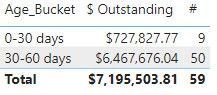
I am new to PowerBI and am looking to create an AR Aging bucket. I have pulled all the relevant information from our SQL server, but cannot figure out how to create calculate columns based on the net_due_date field.
We are looking to create 30, 60, 90, and over 90 day aging buckets for reporting that would pull the amount_remaining field to the appropriate buckets based on age.
What would the formulas look like to create these buckets?
Below are the current fields that I have for the table.
Solved! Go to Solution.
@Anonymous what is your definition for "age"? If it is net_due_date - invoice_date, then a calculated columns something like below might work:
Age_Bucket =
VAR _Age = DATEDIFF('Table'[invoice_date],'Table'[net_due_Date], DAY)
VAR _Result =
SWITCH(
TRUE(),
_Age < 30, "0-30 days",
_Age >= 30 && _Age < 60, "30-60 days",
_Age >= 60 && _Age < 90, "60-90 days",
_Age >= 90, "90+ days"
)
Return
_Result
ebeery, Thanks so much for the Age_Bucket code. It works great!
Hi,
We can use the CALCULATE() and FILTER() functions in a calculated column formula to get your desired result. I can offer more help if you share the link from where i can download your PBI file.
@Anonymous what is your definition for "age"? If it is net_due_date - invoice_date, then a calculated columns something like below might work:
Age_Bucket =
VAR _Age = DATEDIFF('Table'[invoice_date],'Table'[net_due_Date], DAY)
VAR _Result =
SWITCH(
TRUE(),
_Age < 30, "0-30 days",
_Age >= 30 && _Age < 60, "30-60 days",
_Age >= 60 && _Age < 90, "60-90 days",
_Age >= 90, "90+ days"
)
Return
_Result
Vote for your favorite vizzies from the Power BI World Championship submissions!
If you love stickers, then you will definitely want to check out our Community Sticker Challenge!
Check out the January 2026 Power BI update to learn about new features.
| User | Count |
|---|---|
| 58 | |
| 53 | |
| 43 | |
| 17 | |
| 16 |
| User | Count |
|---|---|
| 123 | |
| 108 | |
| 44 | |
| 32 | |
| 24 |