This is best Fabric, Power BI, SQL and AI community event. How do we know? The last event sold out! Save €200 with code FABCMTY200.
Register nowA new Data Days event is coming soon! This time we’re going bigger than ever. Fabric, Power BI, SQL, AI and more. Don't miss out.
Hello, everyone.
I need your kind help to create a crazy table in PowerQuery M.
What I need to do is create a table with dynamic dates range and replicate these dates for each windturbine tag.
So I have 151 windturbine tags and for each tag I need to have the dates from 01/01/2021 to today.
The dates will come from another table that has the min and max date;
In example it will be more clarified+
The table I need has to come out like this:
| Winturbine | Date |
| A0201 | 01/01/2021 |
| A0201 | 01/02/2021 |
| ... | ... |
| A0201 | 06/16/2021 |
| A0202 | 01/01/2021 |
| ... | ... |
| A0202 | 06/16/2021 |
So I already have a table with each windturbine tag
All I need to do is add the rows for the dates and fill down with the turbines tags.
Please help!!!
Solved! Go to Solution.
Hi @nlgenin
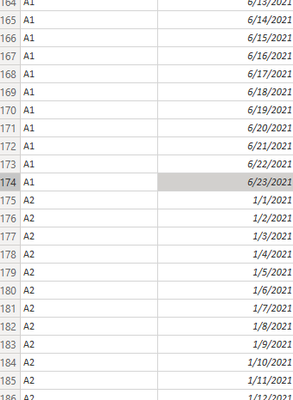
do you mean you want to create the table like bellow with M code?
| Name | Date |
| A1 | 2021/1/1 |
| A1 | 2021/1/2 |
| A1 | 2021/1/3 |
| A1 | 2021/1/4 |
| A1 | 2021/1/5 |
| A1 | . |
| A1 | . |
| A1 | . |
| A1 | . |
| A1 | 2021/6/23 |
| A2 | 2021/1/1 |
| A2 | 2021/1/2 |
| A2 | 2021/1/3 |
| A2 | 2021/1/4 |
| A2 | 2021/1/5 |
| A2 | . |
| A2 | . |
| A2 | . |
| A2 | . |
| A2 | 2021/6/23 |
-
here are my operations,
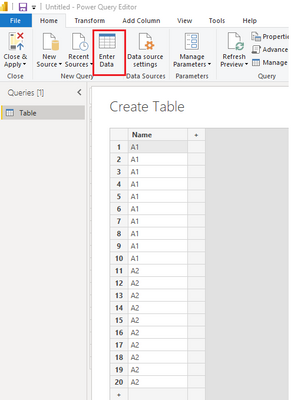
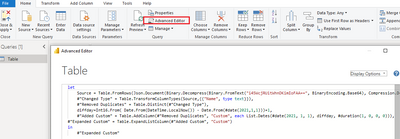
Then open the Advanced Editor, and paste the M code bellow into it
let
Source = Table.FromRows(Json.Document(Binary.Decompress(Binary.FromText("i45WcjRUitWhnDKimIoFAA==", BinaryEncoding.Base64), Compression.Deflate)), let _t = ((type nullable text) meta [Serialized.Text = true]) in type table [Name = _t]),
#"Changed Type" = Table.TransformColumnTypes(Source,{{"Name", type text}}),
#"Removed Duplicates" = Table.Distinct(#"Changed Type"),
diffday=Int16.From( Date.From(DateTime.LocalNow()) - Date.From(#date(2021,1,1)))+1,
#"Added Custom" = Table.AddColumn(#"Removed Duplicates", "Custom", each List.Dates(#date(2021, 1, 1), diffday, #duration(1, 0, 0, 0))),
#"Expanded Custom" = Table.ExpandListColumn(#"Added Custom", "Custom")
in
#"Expanded Custom"
result:
See sample file attached bellow.
Best Regards,
Community Support Team _ Tang
If this post helps, please consider Accept it as the solution✔️ to help the other members find it more quickly.
Hi @nlgenin
do you mean you want to create the table like bellow with M code?
| Name | Date |
| A1 | 2021/1/1 |
| A1 | 2021/1/2 |
| A1 | 2021/1/3 |
| A1 | 2021/1/4 |
| A1 | 2021/1/5 |
| A1 | . |
| A1 | . |
| A1 | . |
| A1 | . |
| A1 | 2021/6/23 |
| A2 | 2021/1/1 |
| A2 | 2021/1/2 |
| A2 | 2021/1/3 |
| A2 | 2021/1/4 |
| A2 | 2021/1/5 |
| A2 | . |
| A2 | . |
| A2 | . |
| A2 | . |
| A2 | 2021/6/23 |
-
here are my operations,
Then open the Advanced Editor, and paste the M code bellow into it
let
Source = Table.FromRows(Json.Document(Binary.Decompress(Binary.FromText("i45WcjRUitWhnDKimIoFAA==", BinaryEncoding.Base64), Compression.Deflate)), let _t = ((type nullable text) meta [Serialized.Text = true]) in type table [Name = _t]),
#"Changed Type" = Table.TransformColumnTypes(Source,{{"Name", type text}}),
#"Removed Duplicates" = Table.Distinct(#"Changed Type"),
diffday=Int16.From( Date.From(DateTime.LocalNow()) - Date.From(#date(2021,1,1)))+1,
#"Added Custom" = Table.AddColumn(#"Removed Duplicates", "Custom", each List.Dates(#date(2021, 1, 1), diffday, #duration(1, 0, 0, 0))),
#"Expanded Custom" = Table.ExpandListColumn(#"Added Custom", "Custom")
in
#"Expanded Custom"
result:
See sample file attached bellow.
Best Regards,
Community Support Team _ Tang
If this post helps, please consider Accept it as the solution✔️ to help the other members find it more quickly.
@nlgenin you can add a new column in PQ like this
{ [Min Date]..[Max Date] }
it will create a list and expand the list, you will get the all the dates for each tag.
Check my latest blog post Comparing Selected Client With Other Top N Clients | PeryTUS I would ❤ Kudos if my solution helped. 👉 If you can spend time posting the question, you can also make efforts to give Kudos to whoever helped to solve your problem. It is a token of appreciation!
⚡Visit us at https://perytus.com, your one-stop-shop for Power BI-related projects/training/consultancy.⚡
Subscribe to the @PowerBIHowTo YT channel for an upcoming video on List and Record functions in Power Query!!
Learn Power BI and Fabric - subscribe to our YT channel - Click here: @PowerBIHowTo
If my solution proved useful, I'd be delighted to receive Kudos. When you put effort into asking a question, it's equally thoughtful to acknowledge and give Kudos to the individual who helped you solve the problem. It's a small gesture that shows appreciation and encouragement! ❤
Did I answer your question? Mark my post as a solution. Proud to be a Super User! Appreciate your Kudos 🙂
Feel free to email me with any of your BI needs.
Sign up to receive a private message when registration opens and key events begin.
If you have recently started exploring Fabric, we'd love to hear how it's going. Your feedback can help with product improvements.
| User | Count |
|---|---|
| 33 | |
| 25 | |
| 23 | |
| 20 | |
| 15 |
| User | Count |
|---|---|
| 64 | |
| 41 | |
| 27 | |
| 22 | |
| 22 |