cancel
Showing results for 
Search instead for 
Did you mean: 

The Power BI Data Visualization World Championships is back! Get ahead of the game and start preparing now! Learn more

Reply
andyparkerson
Advocate II
Advocate II

Creating a table visualization with dimensions on left & top and data in the fields

I want to display a measure for items according to their configuration dimension and color dimension. For example, I want to show the measure for a Freestanding Green, or a Built-in Stainless, or a Tabletop Blue.


I think a table is my best bet, with the configuration dimension on the left axis and the color dimension on the top axis.


However, I can't figure out how to get the table visualization to do this.

1 ACCEPTED SOLUTION
avisingh
Advocate III
Advocate III

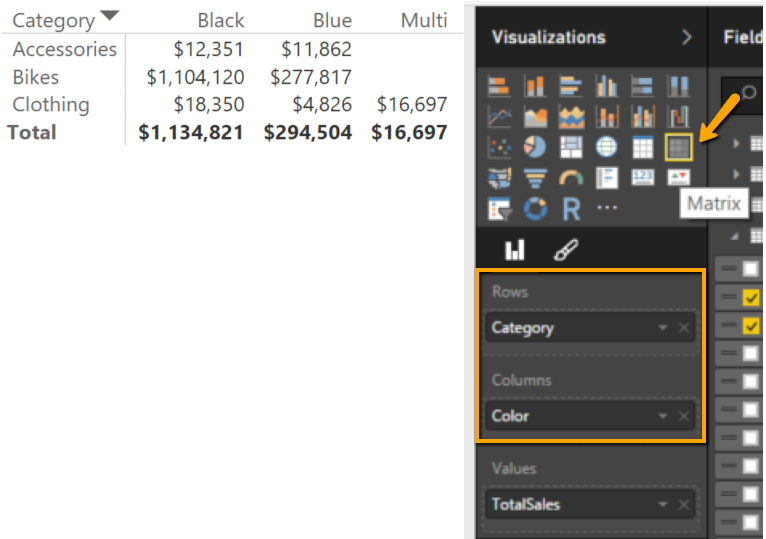
I think what you are looking for is the Matrix (not the Table) visualization. See image below. Try that.
Matrix.png

View solution in original post

1 REPLY 1
avisingh
Advocate III
Advocate III

I think what you are looking for is the Matrix (not the Table) visualization. See image below. Try that.
Matrix.png

Helpful resources

Announcements
Power BI DataViz World Championships

Power BI Dataviz World Championships

The Power BI Data Visualization World Championships is back! Get ahead of the game and start preparing now!

December 2025 Power BI Update Carousel

Power BI Monthly Update - December 2025

Check out the December 2025 Power BI Holiday Recap!

FabCon Atlanta 2026 carousel

FabCon Atlanta 2026

Join us at FabCon Atlanta, March 16-20, for the ultimate Fabric, Power BI, AI and SQL community-led event. Save $200 with code FABCOMM.