FabCon is coming to Atlanta
Join us at FabCon Atlanta from March 16 - 20, 2026, for the ultimate Fabric, Power BI, AI and SQL community-led event. Save $200 with code FABCOMM.
Register now!- Power BI forums
- Get Help with Power BI
- Desktop
- Service
- Report Server
- Power Query
- Mobile Apps
- Developer
- DAX Commands and Tips
- Custom Visuals Development Discussion
- Health and Life Sciences
- Power BI Spanish forums
- Translated Spanish Desktop
- Training and Consulting
- Instructor Led Training
- Dashboard in a Day for Women, by Women
- Galleries
- Data Stories Gallery
- Themes Gallery
- Contests Gallery
- QuickViz Gallery
- Quick Measures Gallery
- Visual Calculations Gallery
- Notebook Gallery
- Translytical Task Flow Gallery
- TMDL Gallery
- R Script Showcase
- Webinars and Video Gallery
- Ideas
- Custom Visuals Ideas (read-only)
- Issues
- Issues
- Events
- Upcoming Events
The Power BI Data Visualization World Championships is back! Get ahead of the game and start preparing now! Learn more
- Power BI forums
- Forums
- Get Help with Power BI
- Desktop
- Re: Creating a table of custom measures and their ...
- Subscribe to RSS Feed
- Mark Topic as New
- Mark Topic as Read
- Float this Topic for Current User
- Bookmark
- Subscribe
- Printer Friendly Page


- Mark as New
- Bookmark
- Subscribe
- Mute
- Subscribe to RSS Feed
- Permalink
- Report Inappropriate Content
Creating a table of custom measures and their difference
I am trying to recreate a table of performance values for a mutual fund for different periods.

Data table is formatted as below.
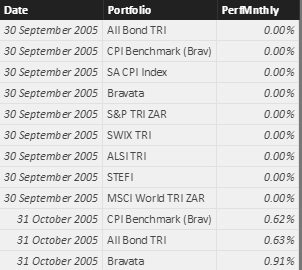
I've created measures for each period with the below an example of 1yr performance.
Perf1yrRoll =
VAR EndDate =
	CALCULATE(MinX(AllPerfMnthly,AllPerfMnthly[Date]),ALLSELECTED ( 'Calendar'[Date] ) )
VAR BeginDate =
    CALCULATE ( EOMONTH(EDATE(EndDate,-12),0) , ALLSELECTED ( 'Calendar'[Date] ) )
RETURN
        CALCULATE (
            PRODUCTX ( 'AllPerfMnthly', ( 1 + 'AllPerfMnthly'[PerfMnthly] ) )
                ,
            FILTER (
                ALLEXCEPT ( 'AllPerfMnthly', AllPerfMnthly[Portfolio] ),
                'AllPerfMnthly'[Date] > BeginDate
                    && 'AllPerfMnthly'[Date] <= EndDate )
            )
		- SUMX(AllPerfMnthly,1)
I now have this table which shows each measure in a separate column.

Instead of showing a total, I want to show a difference of Top - Bottom. How can I do this?
Would it be better to use a matrix somehow?


- Mark as New
- Bookmark
- Subscribe
- Mute
- Subscribe to RSS Feed
- Permalink
- Report Inappropriate Content
Hi,
So instead of showing -97.7% for 3M, you want to show 1.82%-0.4%=1.4%. The same should happen for other time periods as well. Am i correct?
Regards,
Ashish Mathur
http://www.ashishmathur.com
https://www.linkedin.com/in/excelenthusiasts/
- Mark as New
- Bookmark
- Subscribe
- Mute
- Subscribe to RSS Feed
- Permalink
- Report Inappropriate Content
Hi, it needs to be the other way around. The Top minus the bottom. So 0.4% - 1.82% = -1.42%. And it should happen for all periods.
- Mark as New
- Bookmark
- Subscribe
- Mute
- Subscribe to RSS Feed
- Permalink
- Report Inappropriate Content
Hi,
This sounds doable. Share the download link of your PBIX file.
Regards,
Ashish Mathur
http://www.ashishmathur.com
https://www.linkedin.com/in/excelenthusiasts/
- Mark as New
- Bookmark
- Subscribe
- Mute
- Subscribe to RSS Feed
- Permalink
- Report Inappropriate Content
- Mark as New
- Bookmark
- Subscribe
- Mute
- Subscribe to RSS Feed
- Permalink
- Report Inappropriate Content
Hi,
That site asks me for my e-mail address. Sorry, cannot share that.
Regards,
Ashish Mathur
http://www.ashishmathur.com
https://www.linkedin.com/in/excelenthusiasts/
- Mark as New
- Bookmark
- Subscribe
- Mute
- Subscribe to RSS Feed
- Permalink
- Report Inappropriate Content
- Mark as New
- Bookmark
- Subscribe
- Mute
- Subscribe to RSS Feed
- Permalink
- Report Inappropriate Content
Hi,
That link did not work. Here's the message i got
We're sorry, but my_email can't be found in the aylett-my.sharepoint.com directory. Please try again later, while we try to automatically fix this for you.
Regards,
Ashish Mathur
http://www.ashishmathur.com
https://www.linkedin.com/in/excelenthusiasts/
- Mark as New
- Bookmark
- Subscribe
- Mute
- Subscribe to RSS Feed
- Permalink
- Report Inappropriate Content
- Mark as New
- Bookmark
- Subscribe
- Mute
- Subscribe to RSS Feed
- Permalink
- Report Inappropriate Content
Hi,
I am not sure of what your formula does, bu here is how i modified your formula for 3m
==
if(HASONEVALUE(AllPerfMnthly[Portfolio]),VAR EndDate =
	CALCULATE(MinX(AllPerfMnthly,AllPerfMnthly[Date]),ALLSELECTED ( 'Calendar'[Date] ) )
VAR BeginDate =
    CALCULATE ( EOMONTH(EDATE(EndDate,-3),0) , ALLSELECTED ( 'Calendar'[Date] ) )
RETURN
        CALCULATE (
            PRODUCTX ( 'AllPerfMnthly', ( 1 + 'AllPerfMnthly'[PerfMnthly] ) )
                ,
            FILTER (
                ALLEXCEPT ( 'AllPerfMnthly', AllPerfMnthly[Portfolio] ),
                'AllPerfMnthly'[Date] > BeginDate
                    && 'AllPerfMnthly'[Date] <= EndDate )
            )
		- SUMX(AllPerfMnthly,1),MAXX(ALLSELECTED(AllPerfMnthly[Portfolio]),VAR EndDate =
	CALCULATE(MinX(AllPerfMnthly,AllPerfMnthly[Date]),ALLSELECTED ( 'Calendar'[Date] ) )
VAR BeginDate =
    CALCULATE ( EOMONTH(EDATE(EndDate,-3),0) , ALLSELECTED ( 'Calendar'[Date] ) )
RETURN
        CALCULATE (
            PRODUCTX ( 'AllPerfMnthly', ( 1 + 'AllPerfMnthly'[PerfMnthly] ) )
                ,
            FILTER (
                ALLEXCEPT ( 'AllPerfMnthly', AllPerfMnthly[Portfolio] ),
                'AllPerfMnthly'[Date] > BeginDate
                    && 'AllPerfMnthly'[Date] <= EndDate )
            )-1
		)-(MINX(ALLSELECTED(AllPerfMnthly[Portfolio]),VAR EndDate =
	CALCULATE(MinX(AllPerfMnthly,AllPerfMnthly[Date]),ALLSELECTED ( 'Calendar'[Date] ) )
VAR BeginDate =
    CALCULATE ( EOMONTH(EDATE(EndDate,-3),0) , ALLSELECTED ( 'Calendar'[Date] ) )
RETURN
        CALCULATE (
            PRODUCTX ( 'AllPerfMnthly', ( 1 + 'AllPerfMnthly'[PerfMnthly] ) )
                ,
            FILTER (
                ALLEXCEPT ( 'AllPerfMnthly', AllPerfMnthly[Portfolio] ),
                'AllPerfMnthly'[Date] > BeginDate
                    && 'AllPerfMnthly'[Date] <= EndDate )
            )-1
		))
)
Please not that i changed the SUMX(AllPerfMnthly,1) portion of your fomrula to -1 in my MINX and MAXX. Here's my file.

Regards,
Ashish Mathur
http://www.ashishmathur.com
https://www.linkedin.com/in/excelenthusiasts/


- Mark as New
- Bookmark
- Subscribe
- Mute
- Subscribe to RSS Feed
- Permalink
- Report Inappropriate Content
Instead of showing a total, I want to show a difference of Top - Bottom. How can I do this?
Currently, we have the options that may be available for aggregating a field:
- Do Not Summarize
- Sum
- Average
- Minimum
- Maximum
- Count
- Standard deviation
- Variance
- Median
The total row will show corresponding value based on our selection. As you can see, there is no difference aggregate function currently. In your scenario, there are only two rows, if we have a difference aggregate fucntion with multiple rows, which rows difference should it calculated? So I am afraid there is such an option to allow us to show difference. What we can do is that calculated difference between two columns.
Regards,
Charlie Liao
- Mark as New
- Bookmark
- Subscribe
- Mute
- Subscribe to RSS Feed
- Permalink
- Report Inappropriate Content
Alright, I see that would be problematic.
Is there a way I could get it to work with the Portfolios as columns and the different periods as rows. With a third column for the difference?

Helpful resources

Power BI Dataviz World Championships
The Power BI Data Visualization World Championships is back! Get ahead of the game and start preparing now!

Power BI Monthly Update - November 2025
Check out the November 2025 Power BI update to learn about new features.

FabCon Atlanta 2026
Join us at FabCon Atlanta, March 16-20, for the ultimate Fabric, Power BI, AI and SQL community-led event. Save $200 with code FABCOMM.

| User | Count |
|---|---|
| 59 | |
| 43 | |
| 42 | |
| 23 | |
| 17 |


| User | Count |
|---|---|
| 190 | |
| 122 | |
| 96 | |
| 66 | |
| 47 |


