Join us at FabCon Atlanta from March 16 - 20, 2026, for the ultimate Fabric, Power BI, AI and SQL community-led event. Save $200 with code FABCOMM.
Register now!Get Fabric certified for FREE! Don't miss your chance! Learn more
Hi,
I have two tables: PREVIOUS and CURRENT
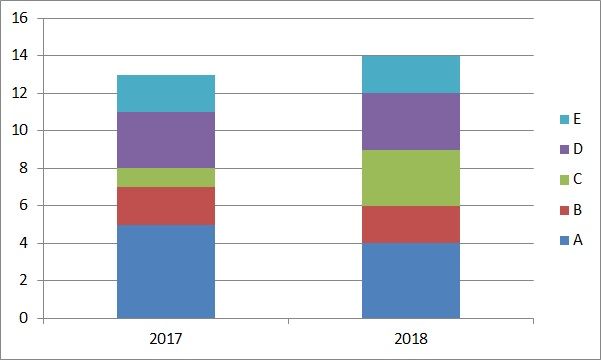
I need to make this visualisation:
How do I put those two tables PREVIOUS and CURRENT together (if necessary) and how do I make this visualisation?
Thanks,
R.W.
Solved! Go to Solution.
Thanks Dobregon for your reply.
The two tables are imported from two Excel files
I solved the problem in the end using a DAX expression
COMPARE = UNION(CURRENT;PREVIOUS)
R.W.
Hi,
I have 2 options to you.
SELECT ID, CODE, YEAR FROM PREVIOUS UNION SELECT ID, CODE, YEAR FROM CURRENTThen you will have everthing in the same "table". Then you need to take a visual of columns
Hope this help you
Thanks Dobregon for your reply.
The two tables are imported from two Excel files
I solved the problem in the end using a DAX expression
COMPARE = UNION(CURRENT;PREVIOUS)
R.W.
Share feedback directly with Fabric product managers, participate in targeted research studies and influence the Fabric roadmap.
Check out the January 2026 Power BI update to learn about new features.
| User | Count |
|---|---|
| 68 | |
| 59 | |
| 48 | |
| 20 | |
| 16 |
| User | Count |
|---|---|
| 107 | |
| 104 | |
| 39 | |
| 27 | |
| 27 |