Get certified for free when you join Fabric Data Days 2026 and dive into Fabric, Power BI, SQL, AI, and other essential data skills.
Join nowJuly 7 - July 17 | Round 2 of the Power BI Dataviz World Championships. Don't miss your chance! Learn more
Hello!
I'm very new to PowerBi, I'm running throught the tutorial videos but I couldn't see anything to help me with the below.
I'm trying to represent some survey feedback as a visual:
- There are 5 questions in the survey
- Each question has a different number of possible responses
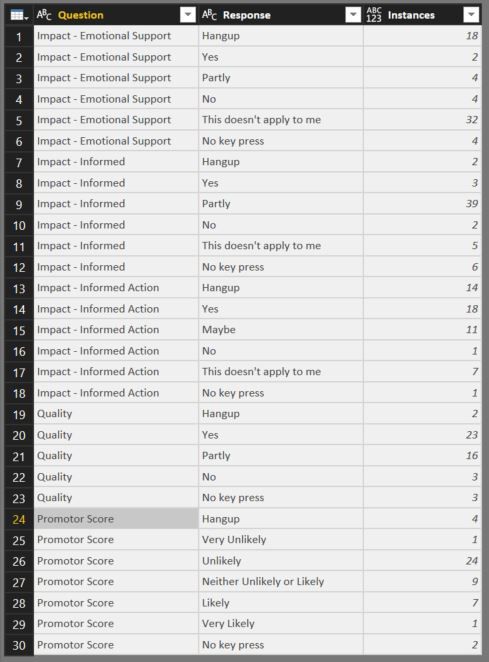
- Instances is the number of times a person selected a response to a specific question.
How do I represent this information as a nice visual - possilby a stacked column chart
The data is below:
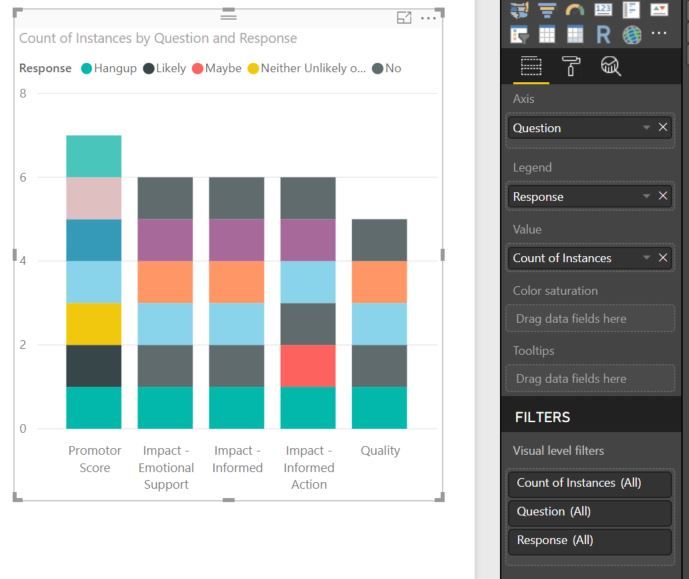
I've tried to create a stacked column chart, as below, but it's not working correctly. I had planned:
- Questions on the x axis
- Instances on the y axis
- Colour of the column segments denotes response.
- Size of the coloured column segments shows number of instances for that response.
How would I create this?
My failed attempt below 😞
Thanks for your help! 🙂
Solved! Go to Solution.
Hi @JWorthy,
Based on the image and the data you show you need to place:
Axis - Question
Value - Instances
Legend - Response
Should work as you want.
Regards,
MFelix
Regards
Miguel Félix
Proud to be a Super User!
Check out my blog: Power BI em PortuguêsI've realised what the problem was.
The data type was ABC 123. When I changed it to just number it stoped making the values a 'Count'
Thanks for your help.
Hi @JWorthy,
Based on the image and the data you show you need to place:
Axis - Question
Value - Instances
Legend - Response
Should work as you want.
Regards,
MFelix
Regards
Miguel Félix
Proud to be a Super User!
Check out my blog: Power BI em PortuguêsHi @MFelix,
Thanks for your help.
When i set the axis, legend and values as you suggest I get each of the coloured segments as 1 unit large each, why is this happening? Is it something to do with 'Instances' being 'count of instances' when I place it under values? If so, how do I change this?
This is what happened:
I've realised what the problem was.
The data type was ABC 123. When I changed it to just number it stoped making the values a 'Count'
Thanks for your help.
Join us in Barcelona for FabCon and SQLCon, the Fabric, Power BI, SQL, and AI community event. Save €200 with code FABCMTY200.
Join Fabric Data Days 2026: 60 days of free live/on-demand sessions, challenges, study groups, and certification opportunities.
| User | Count |
|---|---|
| 22 | |
| 22 | |
| 18 | |
| 17 | |
| 13 |
| User | Count |
|---|---|
| 63 | |
| 50 | |
| 46 | |
| 41 | |
| 39 |